Friday, 23 January 2015

WebSphere Application Server - What the heck is nulldllsdir ?

Not a problem per se, but I noticed references to nulldllsdir in my WAS SystemOut.log file during the startup of an IBM BPM Advanced 8.5.5 environment (running on WAS ND 8.5.5.4 )

This is what I see: -

user.install.root = /opt/IBM/WebSphere/AppServer/profiles/AppSrv01
Java Home = /opt/IBM/WebSphere/AppServer/java/jre
ws.ext.dirs = /opt/IBM/WebSphere/AppServer/java/lib:/opt/IBM/WebSphere/AppServer/profiles/AppSrv01/classes:/opt/IBM/WebSphere/AppS
erver/classes:/opt/IBM/WebSphere/AppServer/lib:/opt/IBM/WebSphere/AppServer/installedChannels:/opt/IBM/WebSphere/AppServer/lib/ext
:/opt/IBM/WebSphere/AppServer/web/help:/opt/IBM/WebSphere/AppServer/deploytool/itp/plugins/com.ibm.etools.ejbdeploy/runtime
Classpath = /opt/IBM/WebSphere/AppServer/profiles/AppSrv01/properties:/opt/IBM/WebSphere/AppServer/properties:/opt/IBM/WebSphere/A
ppServer/lib/startup.jar:/opt/IBM/WebSphere/AppServer/lib/bootstrap.jar:/opt/IBM/WebSphere/AppServer/lib/jsf-nls.jar:/opt/IBM/WebS
phere/AppServer/lib/lmproxy.jar:/opt/IBM/WebSphere/AppServer/lib/urlprotocols.jar:/opt/IBM/WebSphere/AppServer/deploytool/itp/batc
hboot.jar:/opt/IBM/WebSphere/AppServer/deploytool/itp/batch2.jar:/opt/IBM/WebSphere/AppServer/java/lib/tools.jar
Java Library path = /opt/IBM/WebSphere/AppServer/lib/native/linux/x86_64/:/opt/IBM/WebSphere/AppServer/java/jre/lib/amd64/compress
edrefs:/opt/IBM/WebSphere/AppServer/java/jre/lib/amd64:/opt/IBM/WebSphere/AppServer/bin:/opt/IBM/WebSphere/AppServer/nulldllsdir:/
usr/lib:
Orb Version = IBM Java ORB build orb626ifx-20140912.00 (IX90155)

Quelle surprise, but this directory doesn't exist.

Looking around, I can see that it's being set within the profile template(s) that are used to set up the cell e.g.

cat /opt/IBM/WebSphere/AppServer/profileTemplates/managed/documents/bin/setupCmdLine.sh |grep -i null
      LIBPATH="$WAS_HOME"/nulldllsdir
      LD_LIBRARY_PATH="$WAS_HOME"/nulldllsdir
      LD_LIBRARY_PATH="$WAS_HOME"/nulldllsdir
      SHLIB_PATH="$WAS_HOME"/nulldllsdir

This is what I have: -

/opt/IBM/InstallationManager/eclipse/tools/imcl listInstalledPackages
com.ibm.cic.agent_1.8.1000.20141126_2002
com.ibm.bpm.ADV.v85_8.5.5000.20140604_1130
com.ibm.websphere.ND.v85_8.5.5004.20141119_1746
com.ibm.websphere.IHS.v85_8.5.5004.20141119_1746
com.ibm.websphere.PLG.v85_8.5.5004.20141119_1746

I'll do a clean install of WAS 8.5.5.4 and see whether I get the same .....

IBM Installation Manager - Installing across the 'web'

Typically, when one installs IBM software such as WebSphere Application Server, IBM HTTP Server, IBM Business Process Manager etc., it is common to create a "local" software library from which to install.

This software library, either hosted on the target server's local disk or, more logically, on a shared file server ( NFS etc. ), is then used by IBM Installation Manager (IIM) as the target repository.

This is a common pattern, and allows one to run IIM commands against the repository, as per the following example: -

/mnt/hgfs/SoftwareLibrary/IIM181/tools/imcl listAvailablePackages -repositories /mnt/hgfs/SoftwareLibrary/BPM855/Product/repository/repos_64bit/,/mnt/hgfs/SoftwareLibrary/WAS85/Fixes/Base/

com.ibm.bpm.ADV.v85_8.5.5000.20140604_1130
com.ibm.websphere.ND.v85_8.5.5002.20140408_1947
com.ibm.ws.DB2EXP.linuxia64_10.1.1.20140530_0055
com.ibm.websphere.BASE.v85_8.5.5004.20141119_1746
com.ibm.websphere.BASETRIAL.v85_8.5.5004.20141119_1746
com.ibm.websphere.DEVELOPERS.v85_8.5.5004.20141119_1746
com.ibm.websphere.DEVELOPERSILAN.v85_8.5.5004.20141119_1746
com.ibm.websphere.EXPRESS.v85_8.5.5004.20141119_1746
com.ibm.websphere.EXPRESSTRIAL.v85_8.5.5004.20141119_1746
com.ibm.websphere.ND.v85_8.5.5004.20141119_1746
com.ibm.websphere.NDDMZ.v85_8.5.5004.20141119_1746
com.ibm.websphere.NDDMZTRIAL.v85_8.5.5004.20141119_1746
com.ibm.websphere.NDTRIAL.v85_8.5.5004.20141119_1746

In this example, the imcl command is being sourced from the repository, which is hosted on one OS and mounted on the target OS.

( For the record, /mnt/hgfs refers to the way that VMware Fusion on Mac OS X presents a shared folder )

Whilst this is the most common method, IIM also supports connectivity to repositories via other mechanisms, including FTP and HTTP.

To demonstrate this, I have set up a web server ( Apache 2.4 ) to serve up a software library, via HTTP.

Again, for the record, the Apache server is running on Mac OS X, but this approach should work with any common web server, including IBM HTTP Server.

These are the relevant parts of the Apache configuration: -

Create a symbolic link to the actual physical location of the software repository

cd /Library/WebServer/Documents/
sudo ln -s ~/SoftwareLibrary/ .

ls -al

total 88
drwxr-xr-x  7 root  wheel    238 23 Jan 10:28 .
drwxr-xr-x  5 root  wheel    170  9 Sep 23:11 ..
-rw-r--r--  1 root  wheel   3726  9 Sep 23:11 PoweredByMacOSX.gif
-rw-r--r--  1 root  wheel  31958  9 Sep 23:11 PoweredByMacOSXLarge.gif
lrwxr-xr-x  1 root  wheel     28 23 Jan 10:28 SoftwareLibrary -> /Users/hayd/SoftwareLibrary/
-rw-r--r--  1 root  wheel     45 11 Jun  2007 index.html.en


Update Apache configuration to serve up the repository

sudo vi /private/etc/apache2/httpd.conf 

adding: -

Alias /SoftwareLibrary "/Library/WebServer/Documents/SoftwareLibrary"
<Directory "/Library/WebServer/Documents/SoftwareLibrary">
    Options All
    AllowOverride None
    Order allow,deny
    Allow from all
</Directory>


Restart Apache

sudo apachectl restart

Test Apache via a browser


This is, as is apparent, the IBM BPM Advanced 8.5.5 installation media.

This being done, we can now query the repository using IBM Installation Manager: -

/opt/IBM/InstallationManager/eclipse/tools/imcl listAvailablePackages -repositories http://macserver/SoftwareLibrary/BPM855/Product/repository/repos_64bit/

com.ibm.bpm.ADV.v85_8.5.5000.20140604_1130
com.ibm.websphere.ND.v85_8.5.5002.20140408_1947
com.ibm.ws.DB2EXP.linuxia64_10.1.1.20140530_0055

This allows us to install BPM ( plus WAS and the 8.5.5.4 fix pack ) using a response file, onto a clean target server which does not have the repository available, either locally or via NFS.

The benefits of this approach include situations where the software media cannot be physically hosted on the target server ( perhaps for security reasons ) and where shared storage such as NFS and GPFS are not available.

This is the relevant excerpt from the response file: -

....
<server>
<repository location='/tmp/Repo/IIM181/'/>
<repository location='http://macserver/SoftwareLibrary/BPM855/Product/repository/repos_64bit/'/>
<repository location='http://macserver/SoftwareLibrary/WAS85/Fixes/Base/'/>
</server>

...

Note that the path for IBM Installation Manager is an absolute path, as IIM needs to be available locally, in order to start and run IIM. However, IIM is relatively easy to distribute, as it's ~150 MB in size.

Having staged the installation media for IIM in /tmp/Repo/IIM, we can validate the connectivity to the HTTP-hosted library as follows: -


com.ibm.bpm.ADV.v85_8.5.5000.20140604_1130
com.ibm.websphere.ND.v85_8.5.5002.20140408_1947
com.ibm.ws.DB2EXP.linuxia64_10.1.1.20140530_0055
com.ibm.websphere.BASE.v85_8.5.5004.20141119_1746
com.ibm.websphere.BASETRIAL.v85_8.5.5004.20141119_1746
com.ibm.websphere.DEVELOPERS.v85_8.5.5004.20141119_1746
com.ibm.websphere.DEVELOPERSILAN.v85_8.5.5004.20141119_1746
com.ibm.websphere.EXPRESS.v85_8.5.5004.20141119_1746
com.ibm.websphere.EXPRESSTRIAL.v85_8.5.5004.20141119_1746
com.ibm.websphere.ND.v85_8.5.5004.20141119_1746
com.ibm.websphere.NDDMZ.v85_8.5.5004.20141119_1746
com.ibm.websphere.NDDMZTRIAL.v85_8.5.5004.20141119_1746
com.ibm.websphere.NDTRIAL.v85_8.5.5004.20141119_1746


and then perform the installation: -

/tmp/Repo/IIM181/tools/imcl -input installBPM855.rsp -acceptLicense

Installed com.ibm.cic.agent_1.8.1000.20141126_2002 to the /opt/IBM/InstallationManager/eclipse directory.
Installed com.ibm.websphere.ND.v85_8.5.5004.20141119_1746 to the /opt/IBM/WebSphere/AppServer directory.
Installed com.ibm.bpm.ADV.v85_8.5.5000.20140604_1130 to the /opt/IBM/WebSphere/AppServer directory.

validated as follows: -

/opt/IBM/InstallationManager/eclipse/tools/imcl listInstalledPackages

com.ibm.cic.agent_1.8.1000.20141126_2002
com.ibm.bpm.ADV.v85_8.5.5000.20140604_1130
com.ibm.websphere.ND.v85_8.5.5004.20141119_1746

So, in conclusion, this demonstrates how a software library ( repository ) can be hosted on a HTTP server, allowing installations to be performed across the LAN, when shared file systems such as NFS are not available.

IBM Notes 9 - Why-oh-why does my Contacts DB keep appearing when I start the client ?

This has bugged me, a bit, for the past week or so. Whenever I start the IBM Notes 9.0.1 client ( I'm running it on Mac OS X 10.10 ), I found that my Contacts ( address book aka names.nsf ) would always appear as an open tab: -


I tried ( almost ) everything to resolve this, including multiple restarts of the client, checking/unchecking this: -


I even jumped into Notes Basic ( via /Applications/IBM\ Notes.app/Contents/MacOS/Notes -basic ) but to no avail.

Eventually, I found this: -


and a Google search led me to this: -


in relation to this: -


Once I removed the entry for Contacts: -

all was well.

What am I reading right now ?

Faster disaster recovery in IBM Business Process Manager

This article describes an infrastructure topology for IBM® Business Process Manager that includes elements that reside in distinct data centers that may be geographically separated from each other. Such a topology can be useful in achieving disaster recovery objectives in certain circumstances, especially when recovery times faster those offered by traditional approaches are desired. Additionally, the strategy described in this paper uses Oracle®'s Data Base File System (DBFS) to enable the database manager to control replication of the WebSphere® transaction and compensation logs, as well as traditional IBM BPM database content. This content is part of the IBM Business Process Management Journal.


Because business process management plays a very important role in an enterprise architecture, it's critical to make sure that BPM is an integral part of any enterprise disaster recovery plan. This article introduces a disaster recovery strategy for customers who are using Oracle® Data Guard for disaster recovery on existing systems and want to extend it to include IBM® Business Process Manager.


This article describes an environment that is based on using a disk replication system in asynchronous mode. You can include this environment in a disaster recovery plan that includes a secondary data center using IBM WebSphere Process Server or WebSphere Enterprise Service Bus.


Few things are more stressful and frustrating than an unplanned outage. This is especially true when the unplanned outage is the deployment manager of a large Network Deployment cell. This article walks through examples of some features available in IBM® WebSphere® Application Server Network Deployment to help you prepare for an easy recovery from such an outage.


IBM® WebSphere® Application Server Network Deployment provides for failover and recovery of application workload, but how do you provide for failover of the management workload in a Network Deployment cell? The WebSphere Contrarian explains the steps you need to take to achieve this, whether you're using WebSphere Application Server V6.x or V7.0. This content is part of the IBM WebSphere Developer Technical Journal.


WebSphere Process Server or IBM Business Process Manager does not start (completely) due to Transaction- and Partnerlog recovery issues. How do you resolve the issues and get the server up and running again?


Learn how to leverage the latest WebSphere® Application Server feature by configuring an IBM® Business Process Manager transaction and compensation logs into a relational database for high availability and disaster recovery purposes. This content is part of the IBM Business Process Management Journal.


This article explains an important task in WebSphere® Process Server administration - restoring the deployment manager after a non-recoverable crash.


This is an aside from my normal BPM/WAS HA reading, but something with which I'm playing - on the side :-)

Wednesday, 21 January 2015

WebSphere Application Server - Some basic 101

Some notes from my own environment today, for future reading and re-use.

Note that this merely provides a basic IHS > Plugin > WAS setup, and makes no use of the WAS ND concepts, such as Deployment Manager, Managed Nodes etc.

In addition, the resulting infrastructure is NOT secure, specifically in terms of the default browser > IHS configuration being over HTTP ( port 8080 ) rather than HTTPS ( SSL/TLS ).

See What We Have Available

/opt/IBM/InstallationManager/eclipse/tools/imcl listAvailablePackages -repositories /tmp/Repo/WAS85/Base/Product,/tmp/Repo/WAS85/Base/Fixes,/tmp/Repo/WAS85/Supplements/Product/,/tmp/Repo/WAS85/Supplements/Fixes

com.ibm.websphere.ND.v85_8.5.0.20120501_1108
com.ibm.websphere.BASE.v85_8.5.5004.20141119_1746
com.ibm.websphere.BASETRIAL.v85_8.5.5004.20141119_1746
com.ibm.websphere.DEVELOPERS.v85_8.5.5004.20141119_1746
com.ibm.websphere.DEVELOPERSILAN.v85_8.5.5004.20141119_1746
com.ibm.websphere.EXPRESS.v85_8.5.5004.20141119_1746
com.ibm.websphere.EXPRESSTRIAL.v85_8.5.5004.20141119_1746
com.ibm.websphere.ND.v85_8.5.5004.20141119_1746
com.ibm.websphere.NDDMZ.v85_8.5.5004.20141119_1746
com.ibm.websphere.NDDMZTRIAL.v85_8.5.5004.20141119_1746
com.ibm.websphere.NDTRIAL.v85_8.5.5004.20141119_1746
com.ibm.websphere.APPCLIENT.v85_8.5.0.20120501_1108
com.ibm.websphere.IHS.v85_8.5.0.20120501_1108
com.ibm.websphere.PLG.v85_8.5.0.20120501_1108
com.ibm.websphere.PLUGCLIENT.v85_8.5.0.20120501_1108
com.ibm.websphere.WCT.v85_8.5.0.20120501_1108
com.ibm.websphere.APPCLIENT.v85_8.5.5004.20141119_1746
com.ibm.websphere.APPCLIENTILAN.v85_8.5.5004.20141119_1746
com.ibm.websphere.IHS.v85_8.5.5004.20141119_1746
com.ibm.websphere.IHSILAN.v85_8.5.5004.20141119_1746
com.ibm.websphere.PLG.v85_8.5.5004.20141119_1746
com.ibm.websphere.PLGILAN.v85_8.5.5004.20141119_1746
com.ibm.websphere.PLUGCLIENT.v85_8.5.5004.20141119_1746
com.ibm.websphere.PLUGCLIENTILAN.v85_8.5.5004.20141119_1746

Install WAS ND 8.5.5.4

installWAS8554.rsp

<?xml version="1.0" encoding="UTF-8"?>
<!--The "acceptLicense" attribute has been deprecated. Use "-acceptLicense" command line option to accept license agreements.-->
<agent-input acceptLicense='true'>
<server>
<repository location='/tmp/Repo/WAS85/Base/Product/'/>
<repository location='/tmp/Repo/WAS85/Base/Fixes/'/>
</server>

<profile id='IBM WebSphere Application Server V8.5' installLocation='/opt/IBM/WebSphere/AppServer'>
<data key='eclipseLocation' value='/opt/IBM/WebSphere/AppServer'/>
<data key='user.import.profile' value='false'/>
<data key='cic.selector.os' value='linux'/>
<data key='cic.selector.arch' value='x86'/>
<data key='cic.selector.ws' value='gtk'/>
<data key='cic.selector.nl' value='en'/>
</profile>

<install modify='false'> 
<offering id='com.ibm.websphere.ND.v85' version='8.5.5004.20141119_1746' profile='IBM WebSphere Application Server V8.5' features='core.feature,ejbdeploy,thinclient,embeddablecontainer,com.ibm.sdk.6_64bit' installFixes='none'/>
</install>

<preference name='com.ibm.cic.common.core.preferences.eclipseCache' value='/opt/IBM/IMShared'/>
<preference name='com.ibm.cic.common.core.preferences.connectTimeout' value='30'/>
<preference name='com.ibm.cic.common.core.preferences.readTimeout' value='45'/>
<preference name='com.ibm.cic.common.core.preferences.downloadAutoRetryCount' value='0'/>
<preference name='offering.service.repositories.areUsed' value='true'/>
<preference name='com.ibm.cic.common.core.preferences.ssl.nonsecureMode' value='false'/>
<preference name='com.ibm.cic.common.core.preferences.http.disablePreemptiveAuthentication' value='false'/>
<preference name='http.ntlm.auth.kind' value='NTLM'/>
<preference name='http.ntlm.auth.enableIntegrated.win32' value='true'/>
<preference name='com.ibm.cic.common.core.preferences.preserveDownloadedArtifacts' value='true'/>
<preference name='com.ibm.cic.common.core.preferences.keepFetchedFiles' value='false'/>
<preference name='PassportAdvantageIsEnabled' value='false'/>
<preference name='com.ibm.cic.common.core.preferences.searchForUpdates' value='false'/>
<preference name='com.ibm.cic.agent.ui.displayInternalVersion' value='false'/>
<preference name='com.ibm.cic.common.sharedUI.showErrorLog' value='true'/>
<preference name='com.ibm.cic.common.sharedUI.showWarningLog' value='true'/>
<preference name='com.ibm.cic.common.sharedUI.showNoteLog' value='true'/>
</agent-input>


/opt/IBM/InstallationManager/eclipse/tools/imcl -input installWAS8554.rsp -acceptLicense

Installed com.ibm.websphere.ND.v85_8.5.5004.20141119_1746 to the /opt/IBM/WebSphere/AppServer directory.

Install IHS / Plugin 8.5.5.4

installIHS8554.rsp

<?xml version="1.0" encoding="UTF-8"?> 
<agent-input>
<server> 
<repository location='/tmp/Repo/WAS85/Supplements/Product/'/>
<repository location='/tmp/Repo/WAS85/Supplements/Fixes/'/>
</server>
<profile id='IBM HTTP Server V8.5' installLocation='/opt/IBM/HTTPServer'> 
<data key='eclipseLocation' value='/opt/IBM/HTTPServer'/> 
<data key='user.import.profile' value='false'/> 
<data key='cic.selector.os' value='linux'/> 
<data key='cic.selector.ws' value='gtk'/> 
<data key='cic.selector.arch' value='x86'/> 
<data key='user.ihs.allowNonRootSilentInstall' value='true'/> 
<data key='user.ihs.http.server.service.name' value='none'/> 
<data key='user.ihs.httpPort' value='8080'/> 
<data key='user.ihs.installHttpService' value='false'/> 
<data key='cic.selector.nl' value='en'/> 
</profile> 
<profile id='Web Server Plug-ins for IBM WebSphere Application Server V8.5' installLocation='/opt/IBM/WebSphere/Plugins'> 
<data key='eclipseLocation' value='/opt/IBM/WebSphere/Plugins'/> 
<data key='user.import.profile' value='false'/> 
<data key='cic.selector.os' value='linux'/> 
<data key='cic.selector.ws' value='gtk'/> 
<data key='cic.selector.arch' value='x86'/> 
<data key='cic.selector.nl' value='en'/> 
</profile> 
<install modify='false'> 
<offering id='com.ibm.websphere.IHS.v85' version='8.5.5004.20141119_1746' profile='IBM HTTP Server V8.5' features='core.feature,arch.64bit' installFixes='none'/> 
<offering id='com.ibm.websphere.PLG.v85' version='8.5.5004.20141119_1746' profile='Web Server Plug-ins for IBM WebSphere Application Server V8.5' features='core.feature,com.ibm.jre.6_64bit' installFixes='none'/> 
</install> 
<preference name='com.ibm.cic.common.core.preferences.eclipseCache' value='/opt/IBM/IMShared'/> 
<preference name='com.ibm.cic.common.core.preferences.connectTimeout' value='30'/> 
<preference name='com.ibm.cic.common.core.preferences.readTimeout' value='45'/> 
<preference name='com.ibm.cic.common.core.preferences.downloadAutoRetryCount' value='0'/> 
<preference name='offering.service.repositories.areUsed' value='true'/> 
<preference name='com.ibm.cic.common.core.preferences.ssl.nonsecureMode' value='false'/> 
<preference name='com.ibm.cic.common.core.preferences.http.disablePreemptiveAuthentication' value='false'/> 
<preference name='http.ntlm.auth.kind' value='NTLM'/> 
<preference name='http.ntlm.auth.enableIntegrated.win32' value='true'/> 
<preference name='com.ibm.cic.common.core.preferences.preserveDownloadedArtifacts' value='true'/> 
<preference name='com.ibm.cic.common.core.preferences.keepFetchedFiles' value='false'/> 
<preference name='PassportAdvantageIsEnabled' value='false'/> 
<preference name='com.ibm.cic.common.core.preferences.searchForUpdates' value='false'/> 
<preference name='com.ibm.cic.agent.ui.displayInternalVersion' value='false'/> 
<preference name='com.ibm.cic.common.sharedUI.showErrorLog' value='true'/> 
<preference name='com.ibm.cic.common.sharedUI.showWarningLog' value='true'/> 
<preference name='com.ibm.cic.common.sharedUI.showNoteLog' value='true'/> 
</agent-input>

/opt/IBM/InstallationManager/eclipse/tools/imcl -input installIHS8554.rsp -acceptLicense

Installed com.ibm.websphere.IHS.v85_8.5.5004.20141119_1746 to the /opt/IBM/HTTPServer directory.
Installed com.ibm.websphere.PLG.v85_8.5.5004.20141119_1746 to the /opt/IBM/WebSphere/Plugins directory.

Create WAS Profile

 /opt/IBM/WebSphere/AppServer/bin/manageprofiles.sh -create -hostName ucd61.uk.ibm.com -applyPerfTuningSetting standard -profileName AppSrv01 -adminUserName wasadmin -adminPassword passw0rd -enableAdminSecurity true -nodeName ucd61 -cellName wastest -serverName server1 -profilePath /opt/IBM/WebSphere/AppServer/profiles/AppSrv01 -templatePath /opt/IBM/WebSphere/AppServer/profileTemplates/default

INSTCONFSUCCESS: Success: Profile AppSrv01 now exists. Please consult /opt/IBM/WebSphere/AppServer/profiles/AppSrv01/logs/AboutThisProfile.txt for more information about this profile.

Start Server

/opt/IBM/WebSphere/AppServer/profiles/AppSrv01/bin/startServer.sh server1

ADMU0116I: Tool information is being logged in file
           /opt/IBM/WebSphere/AppServer/profiles/AppSrv01/logs/server1/startServer.log
ADMU0128I: Starting tool with the AppSrv01 profile
ADMU3100I: Reading configuration for server: server1
ADMU3200I: Server launched. Waiting for initialization status.
ADMU3000I: Server server1 open for e-business; process id is 31328

Federate IHS

federateIHS.sh

export profilePath=/opt/IBM/WebSphere/AppServer/profiles
export dmgrProf=AppSrv01
export dmgrHost=`hostname`
export dmgrSoapPort=8880
export wasUser=wasadmin
export wasPass=passw0rd
export wasInstallDir=/opt/IBM/WebSphere/AppServer 
export webServerName=webserver1 
export ihsInstallDir=/opt/IBM/HTTPServer 
export httpsPort=8443
export plgInstallDir=/opt/IBM/WebSphere/Plugins 
export nodeName=ihsNode1
export hostName=`hostname` 

${profilePath}/${dmgrProf}/bin/wsadmin.sh -lang jacl -host $dmgrHost -port $dmgrSoapPort  -user ${wasUser} -password ${wasPass} -f ${wasInstallDir}/bin/configureWebserverDefinition.jacl ${webServerName} IHS ${ihsInstallDir} ${ihsInstallDir}/conf/httpd.conf ${httpsPort} MAP_ALL ${plgInstallDir} unmanaged ${nodeName} ${hostName} linux 8083 ${wasUser} ${wasPass} 


./federateIHS.sh

WASX7209I: Connected to process "server1" on node ucd61 using SOAP connector;  The type of process is: UnManagedProcess
WASX7303I: The following options are passed to the scripting environment and are available as arguments that are stored in the argv variable: "[webserver1, IHS, /opt/IBM/HTTPServer, /opt/IBM/HTTPServer/conf/httpd.conf, 8443, MAP_ALL, /opt/IBM/WebSphere/Plugins, unmanaged, ihsNode1, ucd61.uk.ibm.com, linux, 8083, wasadmin, passw0rd]"
 
Input parameters: 
 
   Web server name             - webserver1 
   Web server type             - IHS 
   Web server install location - /opt/IBM/HTTPServer 
   Web server config location  - /opt/IBM/HTTPServer/conf/httpd.conf 
   Web server port             - 8443 
   Map Applications            - MAP_ALL 
   Plugin install location     - /opt/IBM/WebSphere/Plugins 
   Web server node type        - unmanaged 
   Web server node name        - ihsNode1 
   Web server host name        - ucd61.uk.ibm.com 
   Web server operating system - linux 
   IHS Admin port              - 8083 
   IHS Admin user ID           - wasadmin 
   IHS Admin password          - passw0rd 
   IHS service name            - "" 
  
Found node with matching hostname. Using existing node ucd61 
 
Node definition ucd61 already exists.
 
Creating the web server definition for webserver1 on node ucd61.
Parameters for administering IHS web server can also be updated using wsadmin script or admin console.
Web server definition for webserver1 is created.
 
Start computing the plugin properties ID.
Plugin properties ID is computed.
 
Start updating the plugin install location.
Plugin install location is updated.
 
Start updating the plugin log file location.
Plugin log file location is updated.
 
Start updating the RemoteConfigFilename location.
Plugin remote config file location is updated.
 
Start updating the RemoteKeyRingFileName location.
Plugin remote keyring file location is updated.
 
Start saving the configuration.
 
Configuration save is complete.
 
Computed the list of installed applications.
 
Processing the application DefaultApplication.
Get the current target mapping for the application DefaultApplication.
Computed the current target mapping for the application DefaultApplication.
Start updating the target mappings for the application DefaultApplication.
ADMA5075I: Editing of application DefaultApplication started.
ADMA5058I: Application and module versions are validated with versions of deployment targets.
ADMA5005I: The application DefaultApplication is configured in the WebSphere Application Server repository.
ADMA5113I: Activation plan created successfully.
ADMA5011I: The cleanup of the temp directory for application DefaultApplication is complete.
ADMA5076I: Application DefaultApplication edited successfully. The application or its web modules may require a restart when a save is performed.
Target mapping is updated for the application DefaultApplication.
 
Processing the application ivtApp.
Get the current target mapping for the application ivtApp.
Computed the current target mapping for the application ivtApp.
Start updating the target mappings for the application ivtApp.
ADMA5075I: Editing of application ivtApp started.
ADMA5058I: Application and module versions are validated with versions of deployment targets.
ADMA5005I: The application ivtApp is configured in the WebSphere Application Server repository.
ADMA5113I: Activation plan created successfully.
ADMA5011I: The cleanup of the temp directory for application ivtApp is complete.
ADMA5076I: Application ivtApp edited successfully. The application or its web modules may require a restart when a save is performed.
Target mapping is updated for the application ivtApp.
 
Processing the application query.
Get the current target mapping for the application query.
Computed the current target mapping for the application query.
Start updating the target mappings for the application query.
ADMA5075I: Editing of application query started.
ADMA5058I: Application and module versions are validated with versions of deployment targets.
ADMA5005I: The application query is configured in the WebSphere Application Server repository.
ADMA5113I: Activation plan created successfully.
ADMA5011I: The cleanup of the temp directory for application query is complete.
ADMA5076I: Application query edited successfully. The application or its web modules may require a restart when a save is performed.
Target mapping is updated for the application query.
 
Start saving the configuration.
 
Configuration save is complete.

Add WAS Plugin to IHS

echo "LoadModule was_ap22_module "/opt/IBM/WebSphere/Plugins/bin/64bits/mod_was_ap22_http.so"" >> /opt/IBM/HTTPServer/conf/httpd.conf
echo "WebSpherePluginConfig /opt/IBM/WebSphere/Plugins/config/webserver1/plugin-cfg.xml" >> /opt/IBM/HTTPServer/conf/httpd.conf


Generate WAS Plugin

/opt/IBM/WebSphere/AppServer/profiles/AppSrv01/bin/wsadmin.sh -lang jython -user wasadmin -password passw0rd

AdminControl.invoke('WebSphere:name=PluginCfgGenerator,process=server1,platform=common,node=ucd61,version=8.5.5.4,type=PluginCfgGenerator,mbeanIdentifier=PluginCfgGenerator,cell=wastest,spec=1.0', 'generate', '[/opt/IBM/WebSphere/AppServer/profiles/AppSrv01/config wastest ucd61 webserver1 false]', '[java.lang.String java.lang.String java.lang.String java.lang.String java.lang.Boolean]')

AdminControl.invoke('WebSphere:name=PluginCfgGenerator,process=server1,platform=common,node=ucd61,version=8.5.5.4,type=PluginCfgGenerator,mbeanIdentifier=PluginCfgGenerator,cell=wastest,spec=1.0', 'propagate', '[/opt/IBM/WebSphere/AppServer/profiles/AppSrv01/config wastest ucd61 webserver1]', '[java.lang.String java.lang.String java.lang.String java.lang.String]')

AdminConfig.save()
quit

Add WAS Virtual Host for IHS

/opt/IBM/WebSphere/AppServer/profiles/AppSrv01/bin/wsadmin.sh -lang jython -user wasadmin -password passw0rd

cellID=AdminControl.getCell() 
AdminConfig.create('HostAlias', AdminConfig.getid('/Cell:'+cellID+'/VirtualHost:default_host/'), '[[hostname "*"] [port "8080"]]') 
AdminConfig.save() 
quit 


Restart WAS

 /opt/IBM/WebSphere/AppServer/profiles/AppSrv01/bin/stopServer.sh server1 -user wasadmin -password passw0rd

ADMU0116I: Tool information is being logged in file
           /opt/IBM/WebSphere/AppServer/profiles/AppSrv01/logs/server1/stopServer.log
ADMU0128I: Starting tool with the AppSrv01 profile
ADMU3100I: Reading configuration for server: server1
ADMU3201I: Server stop request issued. Waiting for stop status.
ADMU4000I: Server server1 stop completed.

/opt/IBM/WebSphere/AppServer/profiles/AppSrv01/bin/startServer.sh server1

ADMU0116I: Tool information is being logged in file
           /opt/IBM/WebSphere/AppServer/profiles/AppSrv01/logs/server1/startServer.log
ADMU0128I: Starting tool with the AppSrv01 profile
ADMU3100I: Reading configuration for server: server1
ADMU3200I: Server launched. Waiting for initialization status.
ADMU3000I: Server server1 open for e-business; process id is 31328

Restart IHS

/opt/IBM/HTTPServer/bin/apachectl -f /opt/IBM/HTTPServer/conf/httpd.conf -k stop
/opt/IBM/HTTPServer/bin/apachectl -f /opt/IBM/HTTPServer/conf/httpd.conf -k start

Test IHS


Test IHS > Plugin > WAS


Job done :-)

IBM HTTP Server - Custom Logging for Additional Intel

For my current project, I had an interesting discussion with one of our test team, when I was explaining one of my reasons for beating up our developers - the developers, whilst lovely people, were publishing URLs that go directly to the back-end servers ( WAS, BPM, IIB etc. ) rather than going via the front-end IBM HTTP Server boxes.

I then showed how we can then configure the IHS logs to deliver additional metrics, to further assist in the analysis of test results.

This includes content from IHS and also from the down-stream WebSphere Application Server (WAS), the latter representing BPM, ODM, IIB etc.

Here's an example from my own environment: -

Request: GET /images/notes.gif HTTP/1.1 // Status: 304 // Source: 192.168.8.1 // Seconds: 0 // Microseconds: 453
Request: GET /images/background.gif HTTP/1.1 // Status: 304 // Source: 192.168.8.1 // Seconds: 0 // Microseconds: 215
Request: GET /images/help.gif HTTP/1.1 // Status: 304 // Source: 192.168.8.1 // Seconds: 0 // Microseconds: 180
Request: GET /index.html HTTP/1.1 // Status: 200 // Source: 192.168.8.1 // Seconds: 0 // Microseconds: 1247
Request: GET /index2.html HTTP/1.1 // Status: 404 // Source: 192.168.8.1 // Seconds: 0 // Microseconds: 411
Request: GET /snoop HTTP/1.1 // Status: 200 // Source: 192.168.8.1 // Seconds: 0 // Microseconds: 78081


Here I'm showing: -

Request - HTTP method, URI pattern and protocol
HTTP Status Code - 200 = OK, 404 = Not Found, 500 = Internal Server Error
Source IP Address - Where the request is coming from
Duration - Seconds
- Microseconds


configured thus: -

LogFormat "Request: %r // Status: %s // Source: %a // Seconds: %T // Microseconds: %D" dave
CustomLog logs/access_log dave

in httpd.conf.

There are, however, a whole slew of additional parameters that we can use: -

%%   The percent sign
%a    Remote IP-address
%A    Local IP-address
%B    Size of response in bytes, excluding HTTP headers.
%b    Size of response in bytes, excluding HTTP headers. In CLF format, i.e. a '-' rather than a 0 when no bytes are sent.
%{Foobar}C    The contents of cookie Foobar in the request sent to the server.
%D    The time taken to serve the request, in microseconds.
%{FOOBAR}e    The contents of the environment variable FOOBAR
%f    Filename
%h    Remote host
%H    The request protocol
%{Foobar}i    The contents of Foobar: header line(s) in the request sent to the server.
%l    Remote logname (from identd, if supplied). This will return a dash unless mod_ident is present and IdentityCheck is set On.
%m    The request method
%{Foobar}n    The contents of note Foobar from another module.
%{Foobar}o    The contents of Foobar: header line(s) in the reply.
%p    The canonical port of the server serving the request
%P    The process ID of the child that serviced the request.
%{format}P    The process ID or thread id of the child that serviced the request. Valid formats are pid, tid, and hextid. hextid requires APR 1.2.0 or higher.
%q    The query string (prepended with a ? if a query string exists, otherwise an empty string)
%r    First line of request
%s    Status. For requests that got internally redirected, this is the status of the *original* request --- %>s for the last.
%t    Time the request was received (standard english format)
%{format}t    The time, in the form given by format, which should be in strftime(3) format. (potentially localized)
%T    The time taken to serve the request, in seconds.
%u    Remote user (from auth; may be bogus if return status (%s) is 401)
%U    The URL path requested, not including any query string.
%v    The canonical ServerName of the server serving the request.
%V    The server name according to the UseCanonicalName setting.
%X    Connection status when response is completed:
X =   connection aborted before the response completed.
+ =   connection may be kept alive after the response is sent.
- =   connection will be closed after the response is sent.
(This directive was %c in late versions of Apache 1.3, but this conflicted with the historical ssl %{var}c syntax.)
%I    Bytes received, including request and headers, cannot be zero. You need to enable mod_logio to use this.
%O    Bytes sent, including headers, cannot be zero. You need to enable mod_logio to use this.


Tuesday, 20 January 2015

 Mac OS X - Missing my wget command

I was trying to download IBM Installation Manager 1.8.1 onto my Mac Mini, which I use in "headless" mode, mostly via ssh. 

This is for my software library, as I'm about to create an IBM BPM 8.5.5 environment, utilising the Stray Node Topology Pattern, to provide resilience across two data centres, without breaking the laws of WAS.

Whilst I can bring up a remote desktop, using Finder and Screen Sharing, I like having the option to only use the command-line, and avoid the dreaded GUI.

I had logged into IBM Fix Central, in order to download IIM, on my host Mac, and had grabbed the URL for the IIM code: -


and wanted to run the download from the Mini, using wget: -


but this just returned: -

-bash: wget: command not found

A quick Google later, and I found this: -


which said, in part: -

...
Mac OS X 10.10 Yosemite comes with the command line utility called 'curl' which is a network transfer tool, it does not come with the popular 'wget', in fact 'curl' can probably get you by just fine, check man curl at the command line to see its usage.
...

and then provides an example of how to use curl: -


so I tried that: -


and received: -

  % Total    % Received % Xferd  Average Speed   Time    Time     Time  Current
                                 Dload  Upload   Total   Spent    Left  Speed
100  157M  100  157M    0     0   482k      0  0:05:35  0:05:35 --:--:--   213


and, a while later, this: -

-rw-r--r--   1 hayd  staff  165597876 20 Jan 20:49 agent.installer.linux.gtk.x86_64_1.8.1000.20141126_2002.zip

which is shiny.

So, the moral of the story is ... if you need wget, you can probably make do with curl.

Shiny.

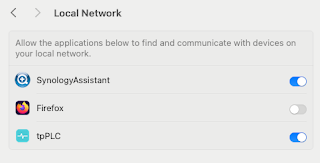
Note to self - Firefox and local connections

 Whilst trying to hit my NAS from Firefox on my Mac, I kept seeing errors such as:- Unable to connect Firefox can’t establish a connection t...