Wednesday, 4 July 2018

Using IBM App Connect enterprise capabilities with IBM MQ on Cloud

A requirement similar to this: -

Your company wants to expose a custom JSON-based REST API to their developers for sending messages to a stock control application through an MQ queue that is hosted in MQ on IBM Cloud. The format of the messages that the application expects is a custom COBOL copy book structure. An integration solution needs to be constructed that receives a simple JSON REST request, converts the JSON to the COBOL structure and then sends that to the correct queue. The integration solution is imported to run in IBM App Connect on IBM Cloud (with a plan that provides enterprise capabilities).

has come up recently, on a project upon which my team are engaged.

Therefore, this is rather useful_ 


Worth a read …...

IBM HTTP Server (IHS) Performance and Tuning and Some Docs

I was having a useful chat with a colleague about threading and concurrency in IBM HTTP Server, which is based upon Apache.

I provided him with a few pertinent URLs: -

For IHS 8.5.X ( based upon Apache 2.2 )


For IHS 9.X ( based upon Apache 2.4 )


and these: -


Tuesday, 3 July 2018

IBM Operational Decision Manager 8.9 - Tuning Guide

This was recently published to the ODMDev space on IBM developerWorks: -


IBM ODM performance architects, Pierre-Andre Paumelle (paumelle@fr.ibm.com) and Nicolas Peulvast (peulvast@fr.ibm.com), have just released a new version of the IBM ODM Tuning Guide. The guide takes you on a tour of the key areas of IBM ODM and shows you how to get under the hood and improve the performance of ODM versions 8.9.0, 8.9.1, and 8.9.2.

The guide covers various "basic" and "advanced" topics, for example, you can learn how best to set up tracing in the Rule Execution Server, and you can find information on how to configure Solr on Decision Center. There is also help for you on migrating a Decision Server database, and how to optimize Decision Warehouse.

So roll up your sleeves, and get tuning. With this guide and a bit of elbow grease, you'll have ODM purring like a kitten in no time!

Monday, 2 July 2018

Cloudant - Backups

Having invested a fair bit of time populating databases into Cloudant: -


I wanted to backup my databases, for safety's sake.

My IBM colleague, Glynn Bird, came to the rescue again: -


with his couchbackup tool.

It was a simple matter of installing the package: -

sudo npm install -g couchbackup

and then running it: -

export COUCH_DB=acctdb
couchbackup --db $COUCH_DB > $COUCH_DB.txt

I then got really clever, and used some script to extract the names of ALL my databases: -

curl -X GET -g $COUCH_URL/_all_dbs

which returned a JSON object comprising the names of my DBs: -

["account","cartoon","foobar","snafu"]

so I "merely" needed to remove the square brackets, the double-quotes and the commas.

Long story short, this is with what I ended up: -

declare -a arr=(`curl -s -X GET -g $COUCH_URL/_all_dbs | sed 's/[][]//g' | sed 's/,/ /g' | sed 's/"//g'`)
for i in "${arr[@]}"; do export COUCH_DB=$i; couchbackup --db $COUCH_DB > $COUCH_DB.txt; done

This pulls back the list of databases from Cloudant, removes the unwanted characters, and then runs the couchbackup command to extract each of them to a text file ….

Nice :-) 


Friday, 15 June 2018

Build REST APIs using Swagger and IBM Integration Bus – IIB v10

I've been teaching myself more about IBM Integration Bus (IIB), in the context of creating RESTful APIs.

This tutorial was immensely useful: -


and I can continue from what it's taught me ….

Munging data - removing duplicates from CSV files

Whilst fiddling with Cloudant yesterday: -


I hit an issue whereby I was trying / failing to upload data that contained duplicates: -

index,name
1,Dave
2,Bob
3,Barney
4,Homer
5,Bart
1,Dave
3,Barney


Note that this is an example file; the real data had 000s of rows :-(

cat duplo.csv | couchimport --transform transform_duplo.js 

  couchimport ****************** +0ms
  couchimport configuration +2ms
  couchimport {
  couchimport  "COUCH_URL": "https://****:****@7fb7794a-fd6f-47a5-a770-a3521ef51df0-bluemix.cloudant.com",
  couchimport  "COUCH_DATABASE": "duplo",
  couchimport  "COUCH_DELIMITER": ",",
  couchimport  "COUCH_FILETYPE": "text",
  couchimport  "COUCH_BUFFER_SIZE": 500,
  couchimport  "COUCH_JSON_PATH": null,
  couchimport  "COUCH_META": null,
  couchimport  "COUCH_PARALLELISM": 1,
  couchimport  "COUCH_PREVIEW": false,
  couchimport  "COUCH_IGNORE_FIELDS": []
  couchimport } +2ms
  couchimport ****************** +0ms
  couchimport { id: '1',
  couchimport   error: 'conflict',
  couchimport   reason: 'Document update conflict.' } +561ms
  couchimport { id: '3',
  couchimport   error: 'conflict',
  couchimport   reason: 'Document update conflict.' } +2ms

  couchimport Written ok:5 - failed: 2 -  (5) +0ms
  couchimport { documents: 5, failed: 2, total: 5, totalfailed: 2 } +0ms
  couchimport writecomplete { total: 5, totalfailed: 2 } +81ms
  couchimport Import complete +0ms


I wanted to strip out the duplicates ( of which there were MANY )

Thankfully the internet showed me how: -


So I did this: -

awk -F, '!seen[$1]++' duplo.csv > duplo_DEDUP.csv

which gave me this: -

index,name
1,Dave
2,Bob
3,Barney
4,Homer
5,Bart


cat duplo_DEDUP.csv | couchimport --transform transform_duplo.js 

  couchimport ****************** +0ms
  couchimport configuration +2ms
  couchimport {
  couchimport  "COUCH_URL": "https://****:****@7fb7794a-fd6f-47a5-a770-a3521ef51df0-bluemix.cloudant.com",
  couchimport  "COUCH_DATABASE": "duplo",
  couchimport  "COUCH_DELIMITER": ",",
  couchimport  "COUCH_FILETYPE": "text",
  couchimport  "COUCH_BUFFER_SIZE": 500,
  couchimport  "COUCH_JSON_PATH": null,
  couchimport  "COUCH_META": null,
  couchimport  "COUCH_PARALLELISM": 1,
  couchimport  "COUCH_PREVIEW": false,
  couchimport  "COUCH_IGNORE_FIELDS": []
  couchimport } +1ms
  couchimport ****************** +1ms
  couchimport Written ok:5 - failed: 0 -  (5) +489ms
  couchimport { documents: 5, failed: 0, total: 5, totalfailed: 0 } +1ms
  couchimport writecomplete { total: 5, totalfailed: 0 } +40ms
  couchimport Import complete +1ms

which is nice :-)

Yay for awk !

macOS - Windows are off the screen ...

I had an issue earlier where my chosen Twitter client, Tweetbot, somehow wandered off the screen, lurking off to the right.

Whilst I could see Tweetbot when I hit the F4 key to open Mission Control, I couldn't actually get to it :-( 

Thankfully the internet ( what, all of it ? ) had the answer: -

…

OS X, particularly recent versions of the operating system, do a good job of corralling application windows by either not allowing a user to resize a window beyond the boundaries of the screen or by automatically snapping a window to a second display for those with multi-monitor setups. But sometimes — due to errors, bugs, or when disconnecting an external monitor — an application window can get "stuck" partially or completely outside of the visible area of the Mac's display, and getting it back can seem impossible. Thankfully, there's a quick and easy step you can take to automatically fix an off screen window in Mac OS X, and it's called Zoom.

…

If you can see the green zoom button, it's the best way to bring the missing portions of your OS X application window back into view. But what if it's the top of the window that's off screen, and you can't see the zoom button at all? In that case, you can achieve the same result via an option in the menu bar.

Simply select your desired application to make it active by click on its icon in the Dock (you should see the application's name in the top-left corner of your OS X Menu Bar, next to the Apple logo). Then, also in the Menu Bar, click the word Window and then Zoom. If you have multiple windows open in the same application, you can also select Zoom All to bring them all to the correct position at once.


…


Bottom line, I hit the Tweetbot icon in the Dock


and then chose Zoom from the Window menu


Now the app is back where it should be


Nice :-)

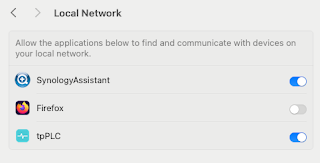
Note to self - Firefox and local connections

 Whilst trying to hit my NAS from Firefox on my Mac, I kept seeing errors such as:- Unable to connect Firefox can’t establish a connection t...