Tuesday, 31 August 2021

Munging Dockerfiles using Bash and Jenkins

Whilst trying to mitigate an issue with a Docker image, in order to remediate a pair of CVE: -

CVE-2021-3711

CVE-2021-3712

I needed to ensure that the latest version of openssl was being used.

Now this image is based, in part, on Alpine Linux, and already included: -

FROM alpine:3.14.1 AS run

...

RUN apk --no-cache add openssl

which *should* mean that I'd be getting the required version of openssl as advised by the two CVEs, namely: -

OpenSSL 1.1.1l

and yet I was still seeing the issues when scanning the resulting image using IBM Container Registry's Vulnerability Advisor tool.

I even added: -

RUN apk info --all openssl

to the Dockerfile, which returned: -

openssl-1.1.1l-r0 description:
WARNING: Ignoring https://dl-cdn.alpinelinux.org/alpine/v3.14/main: No such file or directory
WARNING: Ignoring https://dl-cdn.alpinelinux.org/alpine/v3.14/community: No such file or directory
Toolkit for Transport Layer Security (TLS)
openssl-1.1.1l-r0 webpage:
https://www.openssl.org/
openssl-1.1.1l-r0 installed size:
660 KiB
openssl-1.1.1l-r0 depends on:
so:libc.musl-x86_64.so.1
so:libcrypto.so.1.1
so:libssl.so.1.1
openssl-1.1.1l-r0 provides:
cmd:openssl
openssl-1.1.1l-r0 is required by:
openssl-1.1.1l-r0 contains:
usr/bin/openssl
openssl-1.1.1l-r0 triggers:
openssl-1.1.1l-r0 has auto-install rule:
openssl-1.1.1l-r0 affects auto-installation of:
openssl-1.1.1l-r0 replaces:
libressl
openssl-1.1.1l-r0 license:
OpenSSL

After much tinkering, I came to the realisation that there's more to life than just apk add, namely there's a need to (a) update the Alpine repository sources and (b) upgrade Alpine itself ...

In the Ubuntu world, this would achieved by apt get update && apt-get upgrade -y

In the Alpine world, this is achieved by apk update && apk upgrade

Therefore, I amended my Dockerfile from: -

RUN apk --no-cache add openssl

to: -

RUN apk update && apk upgrade && apk --no-cache add openssl

which did the trick

However, because I'm building the image using Jenkins, via a Bash script wrapped up in a Groovy script ( the Jenkinsfile ), I needed to do some escape magic.

I started with this: -

sed -i'' "s/RUN apk \-\-no-cache add openssl/RUN apk update \&\& apk upgrade \&\& apk \-\-no-cache add openssl/g" Dockerfile

but the Jenkins job failed with: -

org.codehaus.groovy.control.MultipleCompilationErrorsException: startup failed:
WorkflowScript: 22: unexpected char: '\' @ line 22, column 41.
             sed -i'' "s/RUN apk \-\-no-cac


Now I was going a little bit OTT with the escape characters, as I didn't really need to escape out the hyphens ( - ) but the same problem occurred with this: -

sed -i'' "s/RUN apk --no-cache add openssl/RUN apk update \&\& apk upgrade \&\& apk --no-cache add openssl/g" Dockerfile

because I'd forgotten that escaping in Bash in Groovy has its own set of peculiar rules ...

TL;DR; I needed to double escape ...

sed -i'' "s/RUN apk --no-cache add openssl/RUN apk update \\&\\& apk upgrade \\&\\& apk --no-cache add openssl/g" Dockerfile

With this in place, all is good - the build runs smoothly AND the resulting image is clean and green ...

Friday, 20 August 2021

Kata Containers - Building a Pod Sandbox image and QEMU says "No No No"

 As ever, I'm tinkering with Kata 2.0, currently helping a friend build the Pod Sandbox image using the Image Builder tool.

Specifically, the command: -

~/go/src/github.com/kata-containers/kata-containers/tools/osbuilder/image-builder/image_builder.sh ~/fedora_rootfs

fails with: -

...
losetup: /tmp/tmp.bHz11oY851: Warning: file is smaller than 512 bytes; the loop device may be useless or invisible for system tools.
ERROR: File /dev/loop0p1 is not a block device
losetup: /tmp/tmp.bHz11oY851: Warning: file is smaller than 512 bytes; the loop device may be useless or invisible for system tools.
ERROR: File /dev/loop1p1 is not a block device
losetup: /tmp/tmp.bHz11oY851: Warning: file is smaller than 512 bytes; the loop device may be useless or invisible for system tools.
ERROR: File /dev/loop9p1 is not a block device
losetup: /tmp/tmp.bHz11oY851: Warning: file is smaller than 512 bytes; the loop device may be useless or invisible for system tools.
ERROR: File /dev/loop10p1 is not a block device
losetup: /tmp/tmp.bHz11oY851: Warning: file is smaller than 512 bytes; the loop device may be useless or invisible for system tools.
ERROR: File /dev/loop11p1 is not a block device
...
ERROR: File /dev/loop86p1 is not a block device
ERROR: Could not calculate the required disk size
INFO: Creating raw disk with size 126M
/root/go/src/github.com/kata-containers/kata-containers/tools/osbuilder/image-builder/image_builder.sh: line 362: qemu-img: command not found

The solution is kinda in the error - we're missing qemu-img which is easily installed: -

apt-get update && apt-get install -y qemu-utils

Hit:1 https://download.docker.com/linux/ubuntu focal InRelease
Hit:2 http://us.archive.ubuntu.com/ubuntu focal InRelease
Get:3 http://us.archive.ubuntu.com/ubuntu focal-updates InRelease [114 kB]
Get:4 http://us.archive.ubuntu.com/ubuntu focal-backports InRelease [101 kB]
Get:5 http://us.archive.ubuntu.com/ubuntu focal-security InRelease [114 kB]
Fetched 328 kB in 1s (273 kB/s)   
Reading package lists... Done
Building dependency tree       
Reading state information... Done
The following packages were automatically installed and are no longer required:
  linux-headers-5.4.0-72 linux-headers-5.4.0-72-generic linux-image-5.4.0-72-generic linux-modules-5.4.0-72-generic linux-modules-extra-5.4.0-72-generic
Use 'apt autoremove' to remove them.
The following additional packages will be installed:
  libiscsi7 qemu-block-extra sharutils
Suggested packages:
  debootstrap sharutils-doc bsd-mailx | mailx
The following NEW packages will be installed:
  libiscsi7 qemu-block-extra qemu-utils sharutils
0 upgraded, 4 newly installed, 0 to remove and 0 not upgraded.
Need to get 1,246 kB of archives.
After this operation, 7,247 kB of additional disk space will be used.
Get:1 http://us.archive.ubuntu.com/ubuntu focal/main amd64 libiscsi7 amd64 1.18.0-2 [63.9 kB]
Get:2 http://us.archive.ubuntu.com/ubuntu focal-updates/main amd64 qemu-block-extra amd64 1:4.2-3ubuntu6.17 [54.4 kB]
Get:3 http://us.archive.ubuntu.com/ubuntu focal-updates/main amd64 qemu-utils amd64 1:4.2-3ubuntu6.17 [973 kB]
Get:4 http://us.archive.ubuntu.com/ubuntu focal/main amd64 sharutils amd64 1:4.15.2-4build1 [155 kB]
Fetched 1,246 kB in 1s (1,273 kB/s)
Selecting previously unselected package libiscsi7:amd64.
(Reading database ... 157815 files and directories currently installed.)
Preparing to unpack .../libiscsi7_1.18.0-2_amd64.deb ...
Unpacking libiscsi7:amd64 (1.18.0-2) ...
Selecting previously unselected package qemu-block-extra:amd64.
Preparing to unpack .../qemu-block-extra_1%3a4.2-3ubuntu6.17_amd64.deb ...
Unpacking qemu-block-extra:amd64 (1:4.2-3ubuntu6.17) ...
Selecting previously unselected package qemu-utils.
Preparing to unpack .../qemu-utils_1%3a4.2-3ubuntu6.17_amd64.deb ...
Unpacking qemu-utils (1:4.2-3ubuntu6.17) ...
Selecting previously unselected package sharutils.
Preparing to unpack .../sharutils_1%3a4.15.2-4build1_amd64.deb ...
Unpacking sharutils (1:4.15.2-4build1) ...
Setting up sharutils (1:4.15.2-4build1) ...
Setting up libiscsi7:amd64 (1.18.0-2) ...
Setting up qemu-block-extra:amd64 (1:4.2-3ubuntu6.17) ...
Setting up qemu-utils (1:4.2-3ubuntu6.17) ...
Processing triggers for libc-bin (2.31-0ubuntu9.2) ...
Processing triggers for man-db (2.9.1-1) ...
Processing triggers for install-info (6.7.0.dfsg.2-5) ...

and validated: -

which qemu-img

/usr/bin/qemu-img

Actually, the Kata documentation does cover this: -


If you do not wish to build under Docker, remove the USE_DOCKER variable in the previous command and ensure the qemu-img command is available on your system.

Thursday, 19 August 2021

skopeo - policy says "No"

I'm playing with skopeo on Ubuntu 20.04, having simply copied the binary from one box to another ...

Having validated the binary: -

which skopeo

/usr/bin/skopeo

ls -al `which skopeo`

-rwxr-xr-x 1 root root 26859648 Aug 19 09:44 /usr/bin/skopeo

skopeo --version

skopeo version 1.3.0

I tried and, alas, failed to pull an image using skopeo copy ...

skopeo copy docker://registry.fedoraproject.org/fedora:latest dir:/tmp/fedora.image

FATA[0000] Error loading trust policy: open /etc/containers/policy.json: no such file or directory

I checked for the missing file: -

find / -name "policy.json" 2>/dev/null

but to no avail.

Given that I knew that this worked on another Ubuntu 20.04 box, I checked for the file over there: -

find / -name "policy.json" 2>/dev/null

/etc/containers/policy.json

and grabbed a look at it: -

cat /etc/containers/policy.json

{
    "default": [
        {
            "type": "insecureAcceptAnything"
        }
    ],
    "transports":
        {
            "docker-daemon":
                {
                    "": [{"type":"insecureAcceptAnything"}]
                }
        }
}

Knowing what it should look like, I created a duplicate on the "new" Ubuntu box: -

mkdir -p /etc/containers

cat <<EOF | tee /etc/containers/policy.json
{
    "default": [
        {
            "type": "insecureAcceptAnything"
        }
    ],
    "transports":
        {
            "docker-daemon":
                {
                    "": [{"type":"insecureAcceptAnything"}]
                }
        }
}
EOF

and verified it: -

find / -name "policy.json" 2>/dev/null

/etc/containers/policy.json

cat /etc/containers/policy.json

{
    "default": [
        {
            "type": "insecureAcceptAnything"
        }
    ],
    "transports":
        {
            "docker-daemon":
                {
                    "": [{"type":"insecureAcceptAnything"}]
                }
        }
}

so then just re-ran the skopeo copy command: -

skopeo copy docker://registry.fedoraproject.org/fedora:latest dir:/tmp/fedora.image

Getting image source signatures
Copying blob ecfb9899f4ce done
Copying config 37e5619f4a done
Writing manifest to image destination
Storing signatures

Sweet !

I suspect that things didn't originally work due to the way that I "installed" skopeo on this box, via scp rather than a "proper" installation or build.

Nice !

Wednesday, 18 August 2021

More K8s insights using kubectl

From my IBM colleague: -

Get the name of the all the nodes’ name, os image, os architecture, pod cidrs, internal and external ip address

kubectl get nodes -o custom-columns='NODE-NAME:.metadata.name,OS-IMAGE:.status.nodeInfo.osImage,OS-ARCH:.status.nodeInfo.architecture,POD-CIDRs:.spec.podCIDRs[*],INTERNAL-IP:.status.addresses[?(@.type=="InternalIP")].address,EXTERNAL-IP:.status.addresses[?(@.type=="ExternalIP")].address'

which, for me, shows: -

NODE-NAME               OS-IMAGE             OS-ARCH   POD-CIDRs       INTERNAL-IP    EXTERNAL-IP
sideling1.example.com   Ubuntu 20.04.2 LTS   amd64     10.244.0.0/24   10.51.10.109   <none>
sideling2.example.com   Ubuntu 20.04.2 LTS   amd64     10.244.1.0/24   10.51.12.45    <none>

Tuesday, 17 August 2021

And there's more - kubectl and jsonpath FTW

Again, from my ever-generous colleague: -

Get all the pods that are using specific configmap. Change the configmap name according to your requirement in @.spec.volumes[*].configMap.name=="test-config"

which worked for me using the coredns configMap. 

First I queried for configMaps on my cluster: -

kubectl get configmaps -A

NAMESPACE         NAME                                 DATA   AGE
default           kube-root-ca.crt                     1      57d
kube-node-lease   kube-root-ca.crt                     1      57d
kube-public       cluster-info                         1      57d
kube-public       kube-root-ca.crt                     1      57d
kube-system       calico-config                        4      57d
kube-system       coredns                              1      57d
kube-system       extension-apiserver-authentication   6      57d
kube-system       kube-proxy                           2      57d
kube-system       kube-root-ca.crt                     1      57d
kube-system       kubeadm-config                       2      57d
kube-system       kubelet-config-1.21                  1      57d

and then for Pods using that particular configMap: -

kubectl get pods --all-namespaces -o jsonpath='{range $.items[?(@.spec.volumes[*].configMap.name=="coredns")]}{.metadata.name}{"\t"}{.spec.volumes[*].configMap.name}{"\n"}{end}'

coredns-558bd4d5db-dmnnc coredns
coredns-558bd4d5db-t8xnm coredns

Note that I'm including --all-namespaces to catch all Pods, especially as I'm not running much in the default namespace.

Two bits of additional insight from the K8s documentation: -


Monday, 16 August 2021

And another one - the Kubernetes tips keep on coming - and I keep on sharing 'em

 This one is rather useful, and again continues the use of jsonpath

Get the name of the all the nodes and their corresponding InternalIP address.

kubectl get nodes -o jsonpath='{range .items[*]}{.metadata.name}{"\t"}{.status.addresses[?(@.type=="InternalIP")].address}{"\n"}{end}'

sideling1.example.com 10.51.10.109
sideling2.example.com 10.51.12.45

Sunday, 15 August 2021

More Kubernetes goodness ....

My uber-smart colleague has continued to post really rather useful kubectl tips and tricks, including this most recent one: -

Get all the pods that are on specific node. Change the node name accordingly

kubectl get pods -o jsonpath='{range $.items[?(@.spec.nodeName=="kubenode01")]}{.metadata.name}{"\t"}{.spec.nodeName}{"\n"}{end}'

Initially, this didn't appear to work for me - in that it didn't return anything ... that, of course, was a PEBCAK

Initially, I thought that was because my node names included the host AND domain names

Of course, it wasn't that - it was just that I didn't actually have any pods deployed to the default namespace.

Once I amended the command to include ALL namespaces, all was well: -

kubectl get pods --all-namespaces -o jsonpath='{range $.items[?(@.spec.nodeName=="sideling1.example.com")]}{.metadata.name}{"\t"}{.spec.nodeName}{"\n"}{end}'

calico-kube-controllers-cc8959d7f-9qhh4 sideling1.example.com
calico-node-kwj42 sideling1.example.com
coredns-558bd4d5db-dmnnc sideling1.example.com
coredns-558bd4d5db-t8xnm sideling1.example.com
etcd-sideling1.example.com sideling1.example.com
kube-apiserver-sideling1.example.com sideling1.example.com
kube-controller-manager-sideling1.example.com sideling1.example.com
kube-proxy-kz2cm sideling1.example.com
kube-scheduler-sideling1.example.com sideling1.example.com

kubectl get pods --all-namespaces -o jsonpath='{range $.items[?(@.spec.nodeName=="sideling2.example.com")]}{.metadata.name}{"\t"}{.spec.nodeName}{"\n"}{end}'

calico-node-jd867 sideling2.example.com
kube-proxy-bc897 sideling2.example.com

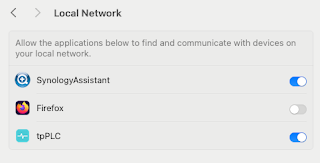
Note to self - Firefox and local connections

 Whilst trying to hit my NAS from Firefox on my Mac, I kept seeing errors such as:- Unable to connect Firefox can’t establish a connection t...