Tuesday, 4 December 2018

WebSphere Application Server (WAS) and Single Sign-On (SSO) - Back to 2011

It's been a while since last I did this, but I'm revisiting the happy days of 2011, when first I setup WAS and SSO with Microsoft Active Directory, Kerberos and SPNEGO.

I even presented upon the topic in 2012: -

IBM Connections and Desktop Single Sign-On using Microsoft Active Directory, Kerberos and SPNEGO

Whilst I've done the SPNEGO piece time and again, the thing that I'd not done in a while was to configure the fallback login page.

Thankfully, the IBM Connections documentation to which I referred back in 2012 is still there, albeit in more recent form: -

Configuring SPNEGO (and Kerberos optionally) on WebSphere Application Server

The significant thing is to create a fallback login page, using the HTML example here: -


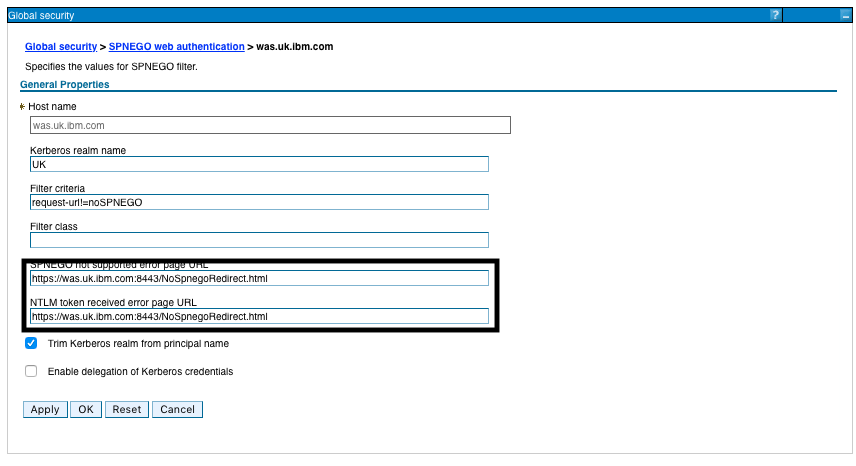
This was then hosted on the IBM HTTP Server (IHS) service that fronts the WAS 9 environment: -

/opt/ibm/HTTPServer/htdocs/NoSpnegoRedirect.html

which I then configured in WAS: -

Now, when I hit my servlet via a clean browser: -

https://was.uk.ibm.com:8443/HelloAgain/HelloAgain

I automatically get a login page: -

Note that the URL automatically gets ?noSPNEGO : -

https://was.uk.ibm.com:8443/HelloAgain/login.html?noSPNEGO

thanks to the filter criteria: -


WebSphere Application Server - Get your security roles right

I'm back in the early noughties, tinkering with Java Enterprise Edition (JEE) servlets and WebSphere Application Server (WAS) Network Deployment (ND).

This, in part, is to enable me to test my SPNEGO / Kerberos configuration.

Having created a JEE application in Eclipse, with servlet, login page etc. and having tested it in Liberty, I'd deployed my code to WAS ND.

However, when I tried to access the servlet: -

https://was.uk.ibm.com:9444/HelloWorld/Hello

I saw this: -

[03/12/18 17:15:19:295 GMT] 00000096 WebCollaborat A   SECJ0129E: Authorization failed for user hayd:defaultWIMFileBasedRealm while invoking GET on default_host://HelloWorld, Authorization failed, Not granted any of the required roles: reader

I'd already ensured that I'd mapped my users ( hayd and Administrator ) to the appropriate role: -


However, I was holding it wrong .... when I'd hand-cranked the web.xml, I'd made a little booboo.

I'd specified the Security Role as: -

Reader

but specified the Auth Constraint -> Role Name as: -

reader

So it made NO difference to which user/group I assigned the Reader role; it'd never work :-(

Get it right .....

SPNEGO - Not working, now working

There's a theme to my blog posts these days: -

Docker for macOS - Broken, now fixed 

Maven and Spring and Liberty - Broken, now fixed 

Kerberos and Red Hat Enterprise Linux - Now friends

so this one is all about SPNEGO and Kerberos.

Having enabled WebSphere Application Server (WAS) 9 and Windows Server 2012 R2 to play nicely together with Kerberos/SPNEGO, I was STILL seeing a logon box in Internet Explorer 11: -


I'd already checked that Integrated Windows Authentication (IWA) was enabled; this now appears to be the default: -


*BUT* guess what I'd forgotten ?

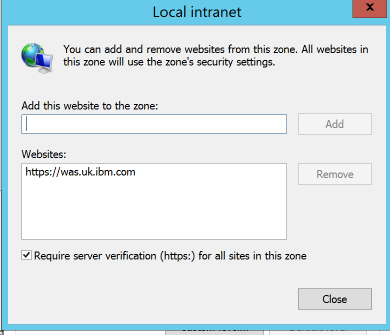
Yep, I had NOT added the site: -

https://was.uk.ibm.com

to the appropriate zoneS in IE.

Now I'd already realised that IE11 no longer shows the internet/intranet/trusted zone in the status bar, BUT you can get a view using the [Alt] [F] [R] key sequence: -


Initially I added the site to the Trusted sites zone: -


but to no avail.

I then followed this: -

Configuring the client browser to use SPNEGO

and added the site to the Local intranet zone: -


which actually moves it from Trusted sites: -


and now it just works.


Nice :-)

Docker for macOS - Broken, now fixed

I had this occur today: -


after updating Docker to the latest version.

I'm using macOS Mojave 10.14.1, and Docker is now 2.0.0.0-mac81 : -


The specific exception in the Docker box was: -

2018-12-04T08:47:42Z docker 
  0     0    0     0    0     0      0      0 --:--:-- --:--:-- --:--:--     0Error starting daemon: error initializing graphdriver: driver not supported
2018-12-04T08:47:42Z docker + failed_to_start

There's an issue on Github here: -


and it's also referenced here: -


including this: -

EDIT: Using the "Factory Reset" button has me up and running again.

Like the posters, I hit the Reset switch: -


and now we're back in the game ......


docker load -i ace.tar 

b8c891f0ffec: Loading layer [==================================================>]    120MB/120MB
33db8ccd260b: Loading layer [==================================================>]  15.87kB/15.87kB
79109c0f8a0b: Loading layer [==================================================>]  14.85kB/14.85kB
f1dfa8049aa6: Loading layer [==================================================>]  3.072kB/3.072kB
926ba84fdf78: Loading layer [==================================================>]   2.56kB/2.56kB
14ddc615b0a9: Loading layer [==================================================>]  2.048kB/2.048kB
7bfdaab18f80: Loading layer [==================================================>]  6.564MB/6.564MB
53a3f139859a: Loading layer [==================================================>]  1.057GB/1.057GB
2c91522175de: Loading layer [==================================================>]  1.487MB/1.487MB
b9e113a69961: Loading layer [==================================================>]  12.79MB/12.79MB
42bf48ad84d5: Loading layer [==================================================>]  6.433MB/6.433MB
ab4fa38d2a99: Loading layer [==================================================>]  16.38kB/16.38kB
4b07a7d9d690: Loading layer [==================================================>]  26.11kB/26.11kB
136e79d5bba2: Loading layer [==================================================>]  19.62MB/19.62MB
4252d65c4c6f: Loading layer [==================================================>]   2.56kB/2.56kB
Loaded image: ibmcom/ace:latest


docker images
REPOSITORY          TAG                 IMAGE ID            CREATED             SIZE
ibmcom/ace          latest              b8cdb54f47bc        2 weeks ago         1.17GB
MacBookPro:~ davidhay$ docker -v
Docker version 18.09.0, build 4d60db4

Monday, 3 December 2018

Kerberos and Red Hat Enterprise Linux - Now friends

Following a number of previous posts, including: -

I was looking for, and failing to find, utilities such as ktutil and ktlist on my RHEL 7.6 box.

Of course, I was holding it wrong.

I was missing the Kerberos (KRB5) tooling: -

yum install -y  krb5-libs
yum install -y  krb5-server
yum install -y  krb5-workstation


specifically the last of the three.

Thanks to this: -


for pointing out the error of my ways.

Now I have this: -

ls -al `which ktutil`

-rwxr-xr-x 1 root root 23784 Aug  1 20:34 /bin/ktutil

so I can do this: -

rkt() { echo -e "read_kt $1\nlist\nquit" | ktutil | grep -v "^ktutil:";}

rkt /mnt/was.uk.ibm.com.keytab 

ktutil:  read_kt /mnt/was.uk.ibm.com.keytab
slot KVNO Principal
---- ---- ---------------------------------------------------------------------
   1    4                   HTTP/was.uk.ibm.com@UK

Friday, 30 November 2018

IBM InfoSphere Information Server - Passwords

Following on from an earlier few posts about IIS, I hit an issue yesterday, where a client was trying, and failing, to connect the IIS tool ( istool.sh ) to their IIS environment, with a strange exception.

I suspected that the issue was their nice n' strong n' proper password, which contained special characters such as pling ( ! ).

Therefore, istool was seeing the password as an extension of the command, and parsing it accordingly.

Thankfully, there's an answer ( kindly provided by a colleague ) - wrap the complex password e.g.

Qp4$$w0rd!! 

in single quotes like this: -

'Qp4$$w0rd!!'

Once we did that, we were golden :-)

Wednesday, 28 November 2018

IBM Notes on macOS - Aiding my memory ....

So one of my colleagues asked about this earlier ….

He was writing a memo, a nice long memo, and then, alas, Notes crashed …..

And he lost the draft memo ….

And he didn't know that Notes has autosave which, of course, is NOT on by default :-(

For reference, it's a Preference on macOS - use the [Cmd] [,] to bring up the pane: -


and/or read this: -


In addition, whilst I'm here, if ever you're looking for the macOS equivalent to notes.ini, it is here: -

/Users/davidhay/Library/Preferences/com.ibm.Notes.plist

Some other useful reading: -


This session will begin with a comparison of Mac OS and Windows and continue with the process of installing & uninstalling Notes on Mac. The team will dive into known issues and must gather information when contacting Support. Notes supportability/limitations on Mac will also be included and we'll of course leave time for your questions!

plus this about where temporary files go to ( my lovely )

The answer can always be found from Terminal using a magic invocation such as this: -

sudo ls -R /private/var/folders | grep TemporaryItems | grep notes

….
/private/var/folders/rv/164kz_s90tl_pfy7bz251lhw0000gn/T/TemporaryItems/notes:
/private/var/folders/rv/164kz_s90tl_pfy7bz251lhw0000gn/T/TemporaryItems/notes/ac789564.TMP:
/private/var/folders/rv/164kz_s90tl_pfy7bz251lhw0000gn/T/TemporaryItems/notes/ac789564.TMP/META-INF:


which is always useful if you choose to edit an attached document within the context of a Memo and then forget to actually save the edited version somewhere other than Notes' temp folder ( which gets cleared when you restart the client ).

Note to self - Firefox and local connections

 Whilst trying to hit my NAS from Firefox on my Mac, I kept seeing errors such as:- Unable to connect Firefox can’t establish a connection t...