Tuesday, 30 November 2021

Every day is a school day - Bash and macOS and aliases etc.

 So I've been using Bash on various Unices for the longest time - I think I started with BSD back in the late 90s, and then switched to various distributions of Linux, via AIX, and now mainly working with macOS ( which is kinda BSD / Darwin ) and Ubuntu.

Anyway, that's the scene setting out of the way ...

I've got a whole load of aliases set up in my Mac's shell, via ~/.bash_profile - examples include: -

alias hist='history | cut -c 8-'

alias ic='/usr/local/bin/ibmcloud'

alias coverage='go test ./... -coverprofile coverage.out && go tool cover -html=coverage.out'

etc.

So I've been writing a Bash script to query my IBM Cloud account and list out the various resources that I've created, including OpenShift Container Platform (OCP) clusters, Virtual Private Clouds (VPC), subnets, security groups etc.

And I wanted this script to use my alias for the ibmcloud command-line interface (CLI) tool, namely ic ...

As an example: -

#!/usr/bin/env bash
ic version

but, when I ran this, I saw: -

./foo.sh: line 3: ic: command not found

I changed my script to dump out my aliases: -

#!/usr/bin/env bash
echo "My aliases are : "
alias
ic version

which returned: -

My aliases are :

./foo.sh: line 6: ic: command not found

Thankfully, Google came to my aid ...

So today I learned ...

1. There's a difference between .bash_profile and .bashrc

.bash_profile is executed for login shells, while .bashrc is executed for interactive non-login shells.

Source: What is the difference between .bash_profile and .bashrc?

So, really, I should be putting my aliases in .bashrc rather than .bash_profile ...

Or duplicating them #yuck

2. I can choose to source .bash_profile from .bashrc meaning that non-interactive shells will pick it up

3. If I add: -

#!/usr/bin/env bash -I

and: -

shopt -s expand_aliases

to my Bash script, I can get the best of all worlds.

Therefore, my test script now looks like this: -

#!/usr/bin/env bash -i

alias

shopt -s expand_aliases

echo "My aliases are : "
alias

ic version

and (a) returns all of my aliases and (b) works 

So I have added: -

if [ -f ~/.bash_profile ]; then
    source ~/.bash_profile
 fi

to ~/.bashrc and also changed my scripts to include: - 

#!/usr/bin/env bash -i

and: -

shopt -s expand_aliases

Thursday, 25 November 2021

And even more sed fun - inserting a file into a file ...

Following on from an earlier post: -

More fun with sed

I can also choose to insert a whole block of text: -

cat insert.txt

  backend "s3" {
    bucket                      = "$bucket"
    endpoint                    = "$endpoint"
    force_path_style            = true
    skip_region_validation      = true
    skip_credentials_validation = true
    skip_metadata_api_check     = true
    key                         = "$object"
    region                      = "$REGION"
  }

into an existing Terraform file: -

cat version.tf

terraform {
  required_providers {
    aws = {
      version = ">= 2.7.0"
      source = "hashicorp/aws"
    }
  }
}

as follows: -

sed -i '/terraform {/ r insert.txt' version.tf

which gives us the following: -

cat version.tf
 
terraform {
  backend "s3" {
    bucket                      = "$bucket"
    endpoint                    = "$endpoint"
    force_path_style            = true
    skip_region_validation      = true
    skip_credentials_validation = true
    skip_metadata_api_check     = true
    key                         = "$object"
    region                      = "$REGION"
  }

  required_providers {
    aws = {
      version = ">= 2.7.0"
      source = "hashicorp/aws"
    }
  }
}

Nice!

More fun with sed

Problem to be solved - I was looking for a way to insert a line into a file ( it's actually related to Terraform but, for the purpose of illustration, it's just a text file ), using sed.

Here's a sample text file: -

cat simpsons.txt 

Bart
Homer
Lisa
Maggie
Marge

and I want to add a new cast member called, imaginatively, "Dave" into the list, between "Bart" and "Homer".

Here's how I can do it in sed : -

sed -i'' '/^Bart/a Dave' simpsons.txt

cat simpsons.txt

Bart
Dave
Homer
Lisa
Maggie
Marge

Of course, with a basic list of text, I could've just as easily appended "Dave" to the list, and sort it: -

echo "Dave" >> simpsons.txt && sort simpsons.txt --output simpsons.txt

cat simpsons.txt

Bart
Dave
Homer
Lisa
Maggie
Marge

but that doesn't work too well with a structured file.

Let's use a Terraform file for illustration: -

cat version.tf
 
terraform {
  required_providers {
    aws = {
      version = ">= 2.7.0"
      source = "hashicorp/aws"
    }
  }
}

where I want to insert backend "s3" immediately after terraform but indented with two spaces: -

sed -i'' '/^terraform/a \ \ backend "s3" {}' version.tf

which results in a nicely updated file: -

cat version.tf 

terraform {
  backend "s3" {}
  required_providers {
    aws = {
      version = ">= 2.7.0"
      source = "hashicorp/aws"
    }
  }
}

I <3 sed

Monday, 22 November 2021

Today I Learned - use nettop on macOS to see what's eating your network stack

One of my IBM colleagues drew my attention to nettop 

NAME

     nettop – Display updated information about the network


SYNOPSIS

     nettop [-ncd] [-m <mode>] [-t <type>] [-s <seconds>] [-p <process-name|pid>] [-n] [-l <samples>] [-L <samples>] [-P]

            [-j|k|J <column-name[,column-name]...>]


DESCRIPTION

     The nettop program displays a list of sockets or routes. The counts for network structures are updated periodically.

I've already started using this to see what Slack, Firefox etc. are doing, in terms of chatting away ....

Awesome!

Monday, 15 November 2021

Continuing to love jq - more on selections

I'm using jq more and more now, and continue to love it the more I get to know it ...

This time around, I'm looking at selecting data based upon text patterns.

Here's an example: -

cat simpsons.json | jq .

[
  {
    "givenName": "Maggie",
    "familyName": "Simpson"
  },
  {
    "givenName": "Lisa",
    "familyName": "Simpson"
  },
  {
    "givenName": "Marge",
    "familyName": "Simpson"
  },
  {
    "givenName": "Homer",
    "familyName": "Simpson"
  },
  {
    "givenName": "Bart",
    "familyName": "Simpson"
  }
]
Say I want to find all the family members whose first name ( aka givenName ) begins with "Ma" and ends with "e" ?

JQ has the tools for that, as part of the select() tool, namely startswith and endswith.

Here's it in action: -

cat simpsons.json | jq -r '.[].givenName | select(startswith("Ma") and endswith("e"))' 

Maggie
Marge

If I want to narrow that down to only include first names that end with "ie", then here goes: -

cat simpsons.json | jq -r '.[].givenName | select(startswith("Ma") and endswith("ie"))' 

Maggie

Now obviously this is a very trivial example, but I've been using this to great effect with the IBM Cloud CLI tool, whilst tinkering with OpenShift Container Platform (OCP) clusters, Cloud Object Storage buckets and secrets.

Of course I could use grep and awk but why.... jq can do it all 🤪

Which is nice....

Friday, 12 November 2021

Keeping my skills from getting rusty - by tinkering with Rust

A friend was looking for a way to define a function in Rust outside of the module upon which he was working, using the tried n' approved method of creating a "library" of re-usable functions.

I'd not done this before, so was happy to jump in and have a play.

This is with what I ended up: -

Create a new project

cargo new greetings

     Created binary (application) `greetings` package

Enter the project root

cd greetings/

See what we have

ls -al

total 16

drwxr-xr-x  6 hayd  staff  192 12 Nov 15:56 .

drwxr-xr-x  4 hayd  staff  128 12 Nov 15:56 ..

drwxr-xr-x  9 hayd  staff  288 12 Nov 15:56 .git

-rw-r--r--  1 hayd  staff    8 12 Nov 15:56 .gitignore

-rw-r--r--  1 hayd  staff  178 12 Nov 15:56 Cargo.toml

drwxr-xr-x  3 hayd  staff   96 12 Nov 15:56 src

Create a library directory etc.

mkdir -p lib/src

Create the library module

vi lib/src/lib.rs

pub fn greeting(name: &str) {
    println!("Hello {}, how you doing ?", name);
}

Create the main module

vi src/main.rs

use greeting_lib::greeting;

fn main() {
    let name = std::env::args().nth(1).expect("no name given");

    greeting(&name);
}

Update the Cargo manifest

vi Cargo.toml

[package]
name = "greetings"
version = "0.1.0"
edition = "2021"

[lib]
name = "greeting_lib"
path = "lib/src/lib.rs"

Build the project

cargo build

   Compiling greetings v0.1.0 (/Users/hayd/functions.rust/greetings)
    Finished dev [unoptimized + debuginfo] target(s) in 0.56s

Test

cargo run Roy

    Finished dev [unoptimized + debuginfo] target(s) in 0.00s
     Running `target/debug/greetings Roy`
Hello Roy, how you doing ?

cargo run Ted

    Finished dev [unoptimized + debuginfo] target(s) in 0.00s
     Running `target/debug/greetings Ted`
Hello Ted, how you doing ?

cargo run Keely

    Finished dev [unoptimized + debuginfo] target(s) in 0.00s
     Running `target/debug/greetings Keely`
Hello Keely, how you doing ?

cargo run Rebecca

    Finished dev [unoptimized + debuginfo] target(s) in 0.00s
     Running `target/debug/greetings Rebecca`
Hello Rebecca, how you doing ?

Build a binary

cargo install --path .

  Installing greetings v0.1.0 (/Users/hayd/functions.rust/greetings)
   Compiling greetings v0.1.0 (/Users/hayd/functions.rust/greetings)
    Finished release [optimized] target(s) in 0.55s
  Installing /Users/hayd/.cargo/bin/greetings
   Installed package `greetings v0.1.0 (/Users/hayd/functions.rust/greetings)` (executable `greetings`)

Validate the built binary

ls -al target/release/greetings

-rwxr-xr-x  2 hayd  staff  464416 12 Nov 16:08 target/release/greetings

Test the binary

./target/release/greetings Beard

Hello Beard, how you doing ?

And that's all she ( I mean, I ) wrote 🤣

Friday, 5 November 2021

There's a hole in my bucket - IBM Cloud Object Storage

Whilst trying to create a Storage Bucket within my IBM Cloud Object Storage (COS) instance: -

ic cos bucket-create --bucket abcd321s

I saw this: -

FAILED

InvalidLocationConstraint: Invalid provisioning code.  Container storage location not deployed

status code: 400, request id: ff7e511d-87d4-4a65-b20c-8a35e268ce73, host id: 

I suspected my configuration, specifically the Service Endpoint for COS: -

ic cos config endpoint-url --list

Key                  Value   
ServiceEndpointURL   s3.us-south.cloud-object-storage.appdomain.cloud   

Looking at Endpoints and storage locations and given that I'm targeting the EU-DE region, I took a guess that having us-south wasn't ever gonna work.

Therefore, I cleared the current setting: -

ic cos config endpoint-url --clear

and validated the clearing: -

ic cos config endpoint-url --list

Key                  Value   
ServiceEndpointURL      

and set it to eu-de: -

ic cos config endpoint-url --url s3.eu-de.cloud-object-storage.appdomain.cloud

OK
Successfully updated service endpoint URL.

and validating the setting: -

ic cos config endpoint-url --list

Key                  Value   
ServiceEndpointURL   s3.eu-de.cloud-object-storage.appdomain.cloud   

and then retried the bucket creation: -

ic cos bucket-create --bucket abcd321s

OK
Details about bucket abcd321s:
Region: eu-de
Class: Standard

Yay!

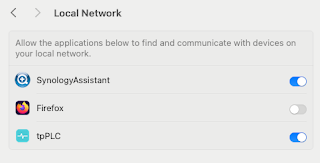
Note to self - Firefox and local connections

 Whilst trying to hit my NAS from Firefox on my Mac, I kept seeing errors such as:- Unable to connect Firefox can’t establish a connection t...