Friday, 30 December 2022

Weirdness with Go

Whilst tinkering ( my fave word ) with a Go project,  I was trying to force a complete rebuild of the module, via go mod tidy.

Now I started by removing go.mod and go.sum : -

rm go.mod
rm go.sum

And, when I ran go mod tidy  I noticed that the command was: -

(a) failing
(b) looking at a whole slew of OTHER Go projects, including those outside of the directory within which I was running the command, namely : -

/root/go/src/github.com/docker/sbom-cli-plugin

Now, of course, note what I did previously i.e. rm go.mod 

THAT WAS MY DOWNFALL :-)

From this: -

Why does 'go mod tidy' record indirect and test dependencies in my 'go.mod'?

<snip>

go mod tidy updates your current go.mod to include the dependencies needed for tests in your module — if a test fails, we must know which dependencies were used in order to reproduce the failure.

</snip>

Guess what I didn't have ?

So, the key was to re-create go.mod via: -

go mod init

and then re-run the make command that had initially populated go.mod - which also ran go mod tidy and then ... everything is OK.

Phew !


Tuesday, 20 December 2022

Giving Twitter the bird ...

After 15 years or so, I decided to jump out of the Twitter-verse, and join Mastodon ...

I'm probably following the herd ( well, a mastodon is kinda like a mammoth, which must've been a herd critter ), but ... here I am

@davehay@infosec.exchange 

https://infosec.exchange/@davehay

Let's see what happens next .....

Friday, 2 December 2022

Reminder - how to split strings in a shell script

There's almost certainly 73 different ways to do this, but this worked for me

The problem to be solved ... I have a string containing three container architectures: -

export architecture="amd64 s390x arm64"

and I want to split it into three, each on a newline

This does the needful: -

echo $architecture | tr ";" "\n"

rather nicely

Tuesday, 29 November 2022

TIL - Searching back through zsh history on macOS

A friend just showed me a rather nifty CLI hack on macOS.

With an iTerm session going, hit [ctrl] [r] and search back through zsh history

So, as per the screenshot, I hit that sequence and typed in kube - at which point zsh showed me all of my recent kubectl commands, allowing me to use [ctrl] [r] to toggle back through only those commands: -


which is nice

Thanks Jordan 😁

YIL - Where does Apple keep its podcasts on macOS ?

I wanted to grab a copy of a bunch of podcasts that I'd downloaded via the Apple Podcasts app ( I usually listen to them on my iPhone, but they're also replicated on my MacBook ).

A quick Google led me here: -

/Users/hayd/Library/Group Containers/243LU875E5.groups.com.apple.podcasts/Library/Cache

which is, I think you'll agree, a memorable file path ... 😁

Also, who doesn't love spaces in paths ? Microsoft Windows and C:\Program Files, I'm looking at you.

Anyway, having added double quotes to the path to protect myself ...

cd "/Users/hayd/Library/Group Containers/243LU875E5.groups.com.apple.podcasts/Library/Cache"

ls -al

total 281064
drwxr-xr-x@  15 hayd  staff       480 28 Nov 15:15 .
drwx------    8 hayd  staff       256 28 Nov 13:58 ..
-rw-------@   1 hayd  staff  14405359 28 Nov 13:57 12039B90-D8F4-4E7C-A72F-B12FD9446AD0.mp3
-rw-------@   1 hayd  staff  14480550 28 Nov 13:57 3A3F9C52-29D5-4078-A8DD-D72709ED8570.mp3
-rw-------@   1 hayd  staff  14177014 28 Nov 13:57 5F2546E2-38B6-4943-91AA-1B1F629F1DEF.mp3
-rw-------@   1 hayd  staff  14692089 28 Nov 14:07 6A29D77B-CAA8-4973-A401-71E766C50FFD.mp3
-rw-------@   1 hayd  staff   1303411 28 Nov 13:57 7F3A1811-C194-4EEA-9952-86BF3C7262CA.mp3
-rw-------@   1 hayd  staff  14174282 28 Nov 14:13 A3C5E109-4E10-4A89-97A1-393C40D7159B.mp3
-rw-------@   1 hayd  staff  14146202 14 Nov 18:13 D031B8D2-D555-4EB5-9256-AA4E7BE625C7.mp3
-rw-------@   1 hayd  staff  14000627 28 Nov 13:57 DDD7F857-DAEE-42DD-9979-C7661E4DDA1E.mp3
-rw-------@   1 hayd  staff  14253164 28 Nov 14:13 EAC34548-0661-449E-8772-26FCBB59AAE2.mp3
-rw-------@   1 hayd  staff  13801565 28 Nov 13:58 EE5E9ECD-B637-46D0-8078-CE191E73304C.mp3
-rw-------@   1 hayd  staff  14449933 28 Nov 14:01 EED252F0-3A26-4490-AA6B-06419DFA4A62.mp3
drwxr-xr-x@ 202 hayd  staff      6464 28 Nov 15:14 IMImageStore-Default
drwxr-xr-x@   3 hayd  staff        96 28 Nov 15:30 JSStoreDataProvider

Sorted

PS YIL == Yesterday I Learned ( 'cos it was yesterday, when I learned this 🤣)

Monday, 28 November 2022

IBM Cloud Kubernetes Service - where's my KUBECONFIG ?

As much as anything, this is a reminder of where the KUBECONFIG ( Kubernetes configuration ) gets persisted, by default, when I retrieve the cluster config using the IBM Cloud CLI tool.

So, I have a cluster called davehay-cluster-24112022 in my account, which I spun up last week, targeting version 1.25.4_1522. This cluster has a unique ID of cdvpi5320u9g36cvpjrg.

I can retrieve this cluster configuration using a command such as: -

ibmcloud cs cluster config --cluster davehay-cluster-24112022

or, even: -

ibmcloud cs cluster config --cluster cdvpi5320u9g36cvpjrg --admin --network

( if I want to (a) admin the cluster and (b) get the Calico network configuration )

When I run this command, I get a helpful output reminding me where things get stored: -

OK
The configuration for cdvpi5320u9g36cvpjrg was downloaded successfully.
Network Config:
/Users/hayd/.bluemix/plugins/container-service/clusters/davehay-cluster-24112022-cdvpi5320u9g36cvpjrg-admin/calicoctl.cfg

Added context for cdvpi5320u9g36cvpjrg to the current kubeconfig file.
You can now execute 'kubectl' commands against your cluster. For example, run 'kubectl get nodes'.
If you are accessing the cluster for the first time, 'kubectl' commands might fail for a few seconds while RBAC synchronizes.

Most notably, this is the important bit: -

/Users/hayd/.bluemix/plugins/container-service/clusters/davehay-cluster-24112022-cdvpi5320u9g36cvpjrg-admin

If I inspect that subdirectory: -

ls -al

I see a bunch of files: -

total 64
drwxr-x---  10 hayd  staff   320 28 Nov 14:41 .
drwxr-x---   3 hayd  staff    96 28 Nov 14:41 ..
-rw-r--r--   1 hayd  staff  1679 28 Nov 14:41 admin-key.pem
-rw-r--r--   1 hayd  staff  1350 28 Nov 14:41 admin.pem
-rw-r--r--   1 hayd  staff  1188 28 Nov 14:41 ca-aaa00-davehay-cluster-24112022.pem
-rw-r--r--   1 hayd  staff  1188 28 Nov 14:41 ca.pem
-rw-r--r--   1 hayd  staff   230 28 Nov 14:41 calicoctl.cfg
-rw-r--r--   1 hayd  staff   135 28 Nov 14:41 calicoctl.cfg.template
-rw-r--r--   1 hayd  staff   628 28 Nov 14:41 kube-config-aaa00-davehay-cluster-24112022.yml
-rw-r--r--   1 hayd  staff   628 28 Nov 14:41 kube-config.yaml

including kube-config.yaml.

I can then setup my kubectl environment: -

export KUBECONFIG=/Users/hayd/.bluemix/plugins/container-service/clusters/davehay-cluster-24112022-cdvpi5320u9g36cvpjrg-admin/kube-config.yaml

and then run kubectl commands such as: -

kubectl get nodes -A

NAME         STATUS   ROLES    AGE     VERSION
10.240.0.5   Ready    <none>   3d22h   v1.25.4+IKS

As an alternate, I could do this: -

ibmcloud cs cluster config --cluster cdvpi5320u9g36cvpjrg --admin --output YAML > ~/k8s.yaml

export KUBECONFIG=~/k8s.yaml

which is a nice alternative.


Container images and Software Bill Of Materials (SBOM)

Today, I'll mainly be reading about, and tinkering with, Software Bill Of Materials (SBOM), in the context of container images.

I'm starting with this: -

Generate the SBOM for Docker images

A Software Bill Of Materials (SBOM) is analogous to a packing list for a shipment. It lists all the components that make up the software, or were used to build it. For container images, this includes the operating system packages that are installed (for example, ca-certificates) along with language-specific packages that the software depends on (for example, Log4j). The SBOM could include a subset of this information or even more details, like the versions of components and their source.

and this: -

How to Use “docker sbom” to Index Your Docker Image’s Packages

Software supply chain security has become topical in the wake of high profile dependency-based attacks. Producing an SBOM for your software artifacts can help you identify weaknesses and trim down the number of packages you rely on.

A new Docker feature integrates support for SBOM generation into the docker CLI. This lets you produce an SBOM alongside your build, then distribute it to consumers of your image.

and am now building the sbom-cli-plugin on my Mac and Ubuntu boxes ....


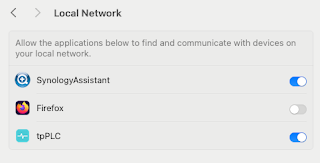
Note to self - Firefox and local connections

 Whilst trying to hit my NAS from Firefox on my Mac, I kept seeing errors such as:- Unable to connect Firefox can’t establish a connection t...