Wednesday, 8 June 2016

Announced - IBM WebSphere Application Server V9.0

Saw this today: -


<snip>
WebSphere® Application Server V9.0, with its traditional and Liberty run times, continues to offer industry-leading, production-ready, standards-based Java™ EE 7 compliant architecture.

Highlights of Version 9.0 include:

• Certification to the Java EE 7 Web Profile and Java EE 7 Full Platform for WebSphere Application Server traditional, which provides assurance that applications leverage standards-compliant programming models. WebSphere Liberty was certified to Java EE 7 Web Profile and Full Platform in June, 2015.
• Ease of connecting existing on-premises applications with Bluemix® services, which include IBM Watson™ cognitive for optimal business outcomes.
• Enhanced support for creating, documenting, and discovering APIs, and also integrating with API platforms, such as IBM API Connect™.
• Significant improvements in software delivery lifecycle times through seamless integration into DevOps workflows. This enables continuous delivery and removes cross-team dependencies for deployment.
• Accelerated pace of development and deployment by taking advantage of container technology that includes IBM® Container Services and Docker container with support for Docker Data Center. This enables seamless deployment of WebSphere applications to best meet business needs.
• Increased flexibility to deploy WebSphere Application Server workloads with speed and agility on Pivotal Cloud Foundry, Amazon Web Services, Microsoft™ Azure, and Openshift, in addition to IBM Bluemix.
• New WebSphere Application Server on Bluemix, single-tenant offering, which provides an option for deploying WebSphere Application Server applications on an isolated, single-tenant hardware.
• New option to enable VMware customers to quickly provision new or scale existing workloads to the IBM Cloud. This enables clients who start locally and scale globally with cloud capabilities to scale more easily and also comply with data residency and other regulatory mandates.
• Updated WebSphere Extreme Scale that provides ease-of-use enhancements for caching to help improve response times for the most demanding applications and dramatically speed configurations.
• Use of Liberty App Accelerator to provide a quick start development of Java microservices. Spring Boot, Watson™ services, and other technologies can be used with Liberty App Accelerator to easily deploy projects to Bluemix.
• Best practices for creating new Java microservices by using Game On!, an exemplar application, which helps explore microservices concepts.
WebSphere Application Server V9.0 continues to offer the leading, open-standards-based application foundation for traditional workloads and also modern applications that tend to be delivered as services. It enables accelerated delivery of innovative applications with unmatched operational efficiency, reliability, administration, security, and control.
</snip>

<snip>
Planned availability date

June 24, 2016
</snip>


Monday, 6 June 2016

Problems installing IBM Integration Designer - I *MUST* read my own blog

I was trying to install IBM Integration Designer 8.5.5 via a response file, and kept finding that the installation failed to complete, and that DB2 Express ( part of the IID WebSphere Test Environment - WTEt ) failed to install.

I broke the installation down into its component parts, and tried to simply install DB2: -

"c:\IBM\Installation Manager\eclipse\tools\imcl.exe" -input z:\tmp\iid856\installDB2_WIN64.rsp -acceptLicense

This explicitly failed: -

ERROR: Error preparing IBM® DB2 Express 64 bit
  CRIMC1029E ERROR: Adding plug-in com.ibm.ws.detect.running.process.v80_8.5.0.20130823_0000 to repository C:\ProgramData\IBM\Installation Manager\bundles failed.
    CRIMC1085E ERROR: Resumable download failed for: z:\tmp\IID856\WTE_Disk\repository\DB2_64\plugins\com.ibm.ws.detect.running.process.v80_8.5.0.20130823_0000.jar.
      ERROR: 'plug-in com.ibm.ws.detect.running.process.v80_8.5.0.20130823_0000' does not exist (at z:\tmp\IID856\WTE_Disk\repository\DB2_64\plugins\com.ibm.ws.detect.running.process.v80_8.5.0.20130823_0000.jar).

      java.io.FileNotFoundException: z:\tmp\IID856\WTE_Disk\repository\DB2_64\plugins\com.ibm.ws.detect.running.process.v80_8.5.0.20130823_0000.jar (The systemcannot find the file specified)

I found this blog post: -


from early 2013.

It looked like there was some problem with the WAS fixes element of the installation.

Reading this IBM Technote: -


appeared to confirm that.

Therefore, I applied the same solution as before - re-extract the ZIP files that comprise the WTE: -

unzip /Volumes/DaveHaySSD/Software/IID856/IID_V856_UTE_1_of_4_Windows.zip 
unzip /Volumes/DaveHaySSD/Software/IID856/IID_V856_UTE_2_of_4_Windows.zip 
unzip /Volumes/DaveHaySSD/Software/IID856/IID_V856_UTE_3_of_4_Windows.zip 
unzip /Volumes/DaveHaySSD/Software/IID856/IID_V856_UTE_4_of_4_Windows.zip 


and also checked for the missing file: -

com.ibm.ws.detect.running.process.v80_8.5.0.20130823_0000.jar

in the old expanded WTE: -

find /tmp/iid856.old/WTE_Disk/ | grep -i com.ibm.ws.detect.running.process.v80_8.5.0.20130823_0000.jar

/tmp/iid856.old/WTE_Disk//repository/WAS/plugins/com.ibm.ws.detect.running.process.v80_8.5.0.20130823_0000.jar

find /tmp/iid856/WTE_Disk/ | grep -i com.ibm.ws.detect.running.process.v80_8.5.0.20130823_0000.jar

/tmp/iid856/WTE_Disk//repository/BPM/plugins/com.ibm.ws.detect.running.process.v80_8.5.0.20130823_0000.jar
/tmp/iid856/WTE_Disk//repository/COGNOS_64/plugins/com.ibm.ws.detect.running.process.v80_8.5.0.20130823_0000.jar
/tmp/iid856/WTE_Disk//repository/DB2_64/plugins/com.ibm.ws.detect.running.process.v80_8.5.0.20130823_0000.jar
/tmp/iid856/WTE_Disk//repository/WAS/plugins/com.ibm.ws.detect.running.process.v80_8.5.0.20130823_0000.jar
/tmp/iid856/WTE_Disk//repository/WBM/plugins/com.ibm.ws.detect.running.process.v80_8.5.0.20130823_0000.jar

See the difference ?

Right, now for the installation ….


Friday, 3 June 2016

Bulletproof SSL and TLS

This time, it's not a book review, it's a book purchase …

I signed up for a free one-week introduction to SSL/TLS, partly to help me cement my understanding


At the end of it, I decided to purchase the author, Ivan's, book: -


which I've just downloaded as an ebook :-)

Something for the weekend ….

In the meantime, Ivan is available here on Twitter

IBM Global Security Toolkit - CTGSK2041W An unsupported modulus size was found.

I'm still tinkering with different ciphers and signature algorithms in IBM HTTP Server, as per this: -


and hit this today when attempting to create a self-signed certificate using the SHA256WithECDSA Signature Algorithm: -

/opt/IBM/HTTPServer/bin/gskcapicmd -cert -create -db /opt/IBM/HTTPServer/ssl/keystore.kdb -stashed -size 2048 -dn "cn=bpm856.uk.ibm.com,dc=uk,dc=ibm,dc=com" -label bpm856.uk.ibm.com_ss -default_cert yes -sigalg SHA256WithECDSA

CTGSK2041W An unsupported modulus size was found.

/opt/IBM/HTTPServer/bin/gskcapicmd -cert -create -db /opt/IBM/HTTPServer/ssl/keystore.kdb -stashed -size 1024 -dn "cn=bpm856.uk.ibm.com,dc=uk,dc=ibm,dc=com" -label bpm856.uk.ibm.com_ss -default_cert yes -sigalg SHA256WithECDSA

CTGSK2041W An unsupported modulus size was found.

/opt/IBM/HTTPServer/bin/gskcapicmd -cert -create -db /opt/IBM/HTTPServer/ssl/keystore.kdb -stashed -size 512 -dn "cn=bpm856.uk.ibm.com,dc=uk,dc=ibm,dc=com" -label bpm856.uk.ibm.com_ss -default_cert yes -sigalg SHA256WithECDSA

[ No Message ]

Yep, it worked, as validated here: -

/opt/IBM/HTTPServer/bin/gskcapicmd -cert -list -db /opt/IBM/HTTPServer/ssl/keystore.kdb -stashed

Certificates found
* default, - personal, ! trusted, # secret key
! ad2008root
- bpm856.uk.ibm.com
*- bpm856.uk.ibm.com_ss


/opt/IBM/HTTPServer/bin/gskcapicmd -cert -validate -db /opt/IBM/HTTPServer/ssl/keystore.kdb -stashed

ad2008root : OK
bpm856.uk.ibm.com : OK
bpm856.uk.ibm.com_ss : OK

/opt/IBM/HTTPServer/bin/gskcapicmd -cert -details -db /opt/IBM/HTTPServer/ssl/keystore.kdb -stashed -label bpm856.uk.ibm.com_ss

Label : bpm856.uk.ibm.com_ss
Key Size : 512
Version : X509 V3
Serial : 71b3dcfd3e00e5d0
Issuer : CN=bpm856.uk.ibm.com,DC=uk,DC=ibm,DC=com
Subject : CN=bpm856.uk.ibm.com,DC=uk,DC=ibm,DC=com
Not Before : 2 June 2016 17:14:00 GMT+01:00
Not After : 3 June 2017 17:14:00 GMT+01:00

Signature Algorithm : EC_ecdsa_with_SHA256 (1.2.840.10045.4.3.2)
...

I then get deeper into the verification using openssl : -

openssl s_client -connect bpm856.uk.ibm.com:8443 < /dev/null

Server Temp Key: ECDH, prime256v1, 256 bits
New, TLSv1/SSLv3, Cipher is ECDHE-ECDSA-AES128-GCM-SHA256
Server public key is 521 bit

SSL-Session:
    Protocol  : TLSv1.2
    Cipher    : ECDHE-ECDSA-AES128-GCM-SHA256

and SSLSleuth plugin Firefox: -


Cipher suite
TLS_ECDHE_ECDSA_WITH_AES_128_GCM_SHA256
Key exchange: Elliptic curve Diffie-Hellman.
Authentication: ECDSA. 
Bulk cipher: AES GCM 128 bits.
HMAC: SHA-256. 
Perfect Forward Secrecy: Yes
SSL/TLS Version: TLSv1.2
Connection status: Secure
Certificate
Extended validation: No
Signature: SHA-256/ECDSA
Key: 521 bits ECC
Common name: bpm856.uk.ibm.com
Issued to:  
Issued by: bpm856.uk.ibm.com 
Validity: 2 June 2016 -- 3 June 2017
Fingerprint: 0F:04:8F:94:F3:0D:72:12:C4:2A: 35:06:C5:6F:BD:17:2A:E1:9F:C9

which is nice.

Fun, Not With Flags, but with Passwords in IBM Installation Manager

I'm installing IBM Integration Designer (IID) 8.5.6 into a Windows VM, as I prepare to write some BPM Advanced SCA/BPEL code ….

However, I hit a pesky password problem with DB2, upon which the IID test environment ( BPM Advanced ) depends.

This is what I did: -

"c:\IBM\Installation Manager\eclipse\tools\imcl.exe" -input z:\tmp\iid856\installIID856.rsp -acceptLicense

and this is what I saw: -

ERROR: Error during "install" phase:
  ERROR: Password is required.

Installed com.ibm.integration.designer.v85_8.5.6000.v20150305_0236 to the C:\IBM\IntegrationDesigner\v8.5 directory.

In other words, IID does get installed, but nothing else does :-(

In my response file - installIID856.rsp - this is what I have in the context of DB2: -

...
    <data key='user.db2.admin.username' value='db2admin'/>
    <data key='user.db2.admin.password' value='P455w0rd!!'/>
    <data key='user.db2.port' value='50000'/>
    <data key='user.db2.use.existing' value='false'/>


So the trick is to encode ( "encrypt" ) the password …

This is documented here: -

In short, one needs to encode the password: -

"c:\IBM\Installation Manager\eclipse\tools\imutilsc.exe" -silent -nosplash encryptString P455w0rd!!!

xQCOAvaPmxemUA3E6gZ+AA==

and update the response file: -

    <data key='user.db2.admin.username' value='db2admin'/>
    <data key='user.db2.admin.password' value='xQCOAvaPmxemUA3E6gZ+AA=='/>
    <data key='user.db2.port' value='50000'/>
    <data key='user.db2.use.existing' value='false'/>


Once done, I uninstalled IID: -

C:\>"c:\IBM\Installation Manager\eclipse\tools\imcl.exe" uninstallAll

Uninstalled com.ibm.integration.designer.v85_8.5.6000.v20150305_0236 from the C:\IBM\IntegrationDesigner\v8.5 directory.

cleared down the contents of the directory structure, and re-ran the installation process: -

"c:\IBM\Installation Manager\eclipse\tools\imcl.exe" -input z:\tmp\iid856\installIID856.rsp -acceptLicense

Which always helps :-)

Microsoft Active Directory - SSL Certificate Request - And what I forgot

I was trying to generate an SSL certificate, signed by Active Directory ( on Windows Server 2008 R2 SP1 ), using the certreq command: -

certreq -submit -attrib "CertificateTemplate:Webserver" bpm856.uk.ibm.com_ihs.req bpm856.uk.ibm.com_ihs.cer

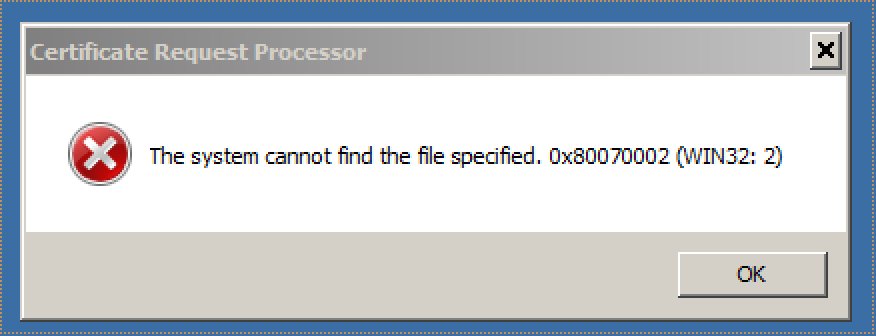
which kept popping up with: -


and: -

Active Directory Enrollment Policy
  {2738EA28-25D5-4E51-841F-73F6AEFBB682}
  ldap:
Certificate Request Processor: The system cannot find the file specified. 0x80070002 (WIN32: 2)


I couldn't work out what I'd missed … until I opened up Server Manager … and realised that I had NOT added the appropriate Role - Active Directory Certificate Services - so my AD box was "only" acting as a DNS server and domain controller.

Once I did this, unsurprisingly it just worked: -

certreq -submit -attrib "CertificateTemplate:Webserver" bpm856.uk.ibm.com_ihs.req bpm856.uk.ibm.com_ihs.cer

with: -


and: -

Active Directory Enrollment Policy
  {2738EA28-25D5-4E51-841F-73F6AEFBB682}
  ldap:
RequestId: 2
RequestId: "2"
Certificate retrieved(Issued) Issued

and a certificate :-)

Wednesday, 1 June 2016

More on IBM Integration Designer 8.5.5 - "Unable to get property isExists of undefined or null reference"

Following this post from last year: -


in which I write about the issue of installing IBM Integration Designer (IID) from a shared drive on a Windows server.

Most recently, I saw this whilst trying to install IID from a VMware Shared Folder, using VMware Fusion on my Mac, to a Windows 2008 Server R2 VM. I had previously unpacked the installation media into a directory on my Mac, and was hoping to install INTO the VM without needing to copy the source files INTO the VM.

Alas, that did not work, as per my previous post.

However, I've since found this: -


which says, in part: -

<snip>
On the Microsoft Windows operating system, the LaunchPad always uses Internet Explorer regardless of the default browser that is set by the operating system user. The Internet Explorer default security constraints do not allow applications to access executable files on a remote disk.
</snip>

which describes how to change IE security policies, albeit briefly, in order to support the installation from a remote "disk".

Which is nice :-)

Note to self - Firefox and local connections

 Whilst trying to hit my NAS from Firefox on my Mac, I kept seeing errors such as:- Unable to connect Firefox can’t establish a connection t...