Wednesday, 2 June 2021

Now that I did not know - using pushd and popd to navigate the Bourne Again Shell (BASH)

Further tinkering with Kata Containers etc. led me here: -

Install cri-tools

You can install the cri-tools from source code:

$ go get github.com/kubernetes-incubator/cri-tools

$ pushd $GOPATH/src/github.com/kubernetes-incubator/cri-tools

$ make

$ sudo -E make install

$ popd

I'd seen references to pushd and popd before but decided to unleash Google fu to know a little more ....

Navigating the Bash shell with pushd and popd

Pushd and popd are the fastest navigational commands you've never heard of.

The pushd and popd commands are built-in features of the Bash shell to help you "bookmark" directories for quick navigation between locations on your hard drive. You might already feel that the terminal is an impossibly fast way to navigate your computer; in just a few key presses, you can go anywhere on your hard drive, attached storage, or network share. But that speed can break down when you find yourself going back and forth between directories, or when you get "lost" within your filesystem. Those are precisely the problems pushd and popd can help you solve.

So now I'm learning .....

Tuesday, 1 June 2021

Inspecting certificates using OpenSSL and a variant of grep

In the context of: -

Building Kubernetes on Linux on IBM Z - it's a matter of trust ...

today I learned (TIL) that one could use egrep to examine x509 certificates: -

echo | openssl s_client -connect storage.googleapis.com:443 | egrep "^subject=|^issuer="

depth=2 OU = GlobalSign Root CA - R2, O = GlobalSign, CN = GlobalSign
verify return:1
depth=1 C = US, O = Google Trust Services, CN = GTS CA 1O1
verify return:1
depth=0 C = US, ST = California, L = Mountain View, O = Google LLC, CN = *.storage.googleapis.com
verify return:1
DONE
subject=/C=US/ST=California/L=Mountain View/O=Google LLC/CN=*.storage.googleapis.com
issuer=/C=US/O=Google Trust Services/CN=GTS CA 1O1

which is good to know 😁

Building Kubernetes on Linux on IBM Z - it's a matter of trust ...

 One of my colleagues saw an interesting issue when trying to build a new Kubernetes cluster on an Ubuntu Linux environment ( on IBM Z ).

For the record, we're running Kubernetes inside Ubuntu containers which are hosted, via runq, on a Secure Service Container (SSC) logical partition (LPAR). In this scenario, we're using docker as the container runtime inside the Ubuntu container which is running inside the SSC LPAR ( nested FTW ).

However, the specific issue seen when running commands such as: -

kubeadm init --pod-network-cidr=192.168.0.0/16 --ignore-preflight-errors=all

wasn't directly related to the use of runq or the SSC LPAR.

Instead, the command returned: -

[preflight] You can also perform this action in beforehand using 'kubeadm config images pull'
[WARNING ImagePull]: failed to pull image k8s.gcr.io/kube-apiserver:v1.20.7: output: Error response from daemon: Get https://k8s.gcr.io/v2/: x509: certificate signed by unknown authority
, error: exit status 1
[WARNING ImagePull]: failed to pull image k8s.gcr.io/kube-controller-manager:v1.20.7: output: Error response from daemon: Get https://k8s.gcr.io/v2/: x509: certificate signed by unknown authority
, error: exit status 1
[WARNING ImagePull]: failed to pull image k8s.gcr.io/kube-scheduler:v1.20.7: output: Error response from daemon: Get https://k8s.gcr.io/v2/: x509: certificate signed by unknown authority
, error: exit status 1
[WARNING ImagePull]: failed to pull image k8s.gcr.io/kube-proxy:v1.20.7: output: Error response from daemon: Get https://k8s.gcr.io/v2/: x509: certificate signed by unknown authority
, error: exit status 1
[WARNING ImagePull]: failed to pull image k8s.gcr.io/pause:3.2: output: Error response from daemon: Get https://k8s.gcr.io/v2/: x509: certificate signed by unknown authority
, error: exit status 1
[WARNING ImagePull]: failed to pull image k8s.gcr.io/etcd:3.4.13-0: output: Error response from daemon: Get https://k8s.gcr.io/v2/: x509: certificate signed by unknown authority
, error: exit status 1
[WARNING ImagePull]: failed to pull image k8s.gcr.io/coredns:1.7.0: output: Error response from daemon: Get https://k8s.gcr.io/v2/: x509: certificate signed by unknown authority
, error: exit status 1

Interestingly, an article on LinkedIn led me to the solution: -


In part, the author had me reload/restart the Docker service: -

service docker reload
service docker restart

Prior to this, I'd also checked some of the missing pre-requisite steps: -

apt-get install -y ca-certificates gnupg2 curl apt-transport-https

curl -s https://packages.cloud.google.com/apt/doc/apt-key.gpg | sudo apt-key add -

plus opening up some firewall ports, using iptables : -

iptables -A INPUT -p tcp -m tcp --dport 6443 -j ACCEPT
iptables -A INPUT -p tcp -m tcp --dport 10250 -j ACCEPT

However, I suspect that the combination of: -

apt-get install -y ca-certificates gnupg2 curl apt-transport-https

and: -

service docker reload
service docker restart

did the trick.

One nice thing that I learned ( TIL ) was: -

kubeadm config images pull

to test whether kubeadm can get it's required image before starting the init process: -

I0601 10:02:47.536650   25480 version.go:251] remote version is much newer: v1.21.1; falling back to: stable-1.20
[config/images] Pulled k8s.gcr.io/kube-apiserver:v1.20.7
[config/images] Pulled k8s.gcr.io/kube-controller-manager:v1.20.7
[config/images] Pulled k8s.gcr.io/kube-scheduler:v1.20.7
[config/images] Pulled k8s.gcr.io/kube-proxy:v1.20.7
[config/images] Pulled k8s.gcr.io/pause:3.2
[config/images] Pulled k8s.gcr.io/etcd:3.4.13-0
[config/images] Pulled k8s.gcr.io/coredns:1.7.0

Having pulled the images normally, without any trust exceptions, kubeadm init ran happily .....

Kata Containers and Ubuntu Linux - lessons learned - 4/many

Building on the series: -

Kata Containers and Ubuntu Linux - lessons learned - 1/many

Kata Containers and Ubuntu Linux - lessons learned - 2/many

Kata Containers and Ubuntu Linux - lessons learned - 3/many - a WIP

I've also had some fun n' games trying to build various components of Kata Containers 2.0 under Ubuntu, including the kernel that's used within the guest Virtual Machine (VM) ...

Problem

Building the kernel: -

sudo ./build-kernel.sh build

fails with: -

/home/hayd/go/src/github.com/kata-containers/kata-containers/tools/packaging/kernel/../scripts/lib.sh: line 25: go: command not found
~/go/src/github.com/kata-containers/tests /home/hayd/go/src/github.com/kata-containers/kata-containers/tools/packaging/kernel
/home/hayd/go/src/github.com/kata-containers/kata-containers/tools/packaging/kernel
INFO: Config version: 85
INFO: Kernel version: 5.10.25
***
*** Configuration file ".config" not found!
***
*** Please run some configurator (e.g. "make oldconfig" or
*** "make menuconfig" or "make xconfig").
***
make: *** [Makefile:697: .config] Error 1

Similarly: -

sudo ./build-kernel.sh setup

fails with: -

/home/hayd/go/src/github.com/kata-containers/kata-containers/tools/packaging/kernel/../scripts/lib.sh: line 25: go: command not found
~/go/src/github.com/kata-containers/tests /home/hayd/go/src/github.com/kata-containers/kata-containers/tools/packaging/kernel
/home/hayd/go/src/github.com/kata-containers/kata-containers/tools/packaging/kernel
INFO: Config version: 85
INFO: Kernel version: 5.10.25
INFO: kernel path does not exist, will download kernel
linux-5.10.25.tar.xz: OK
INFO: kernel tarball already downloaded
linux-5.10.25.tar.xz: OK
INFO: Apply patches from /home/hayd/go/src/github.com/kata-containers/kata-containers/tools/packaging/kernel/patches/5.10.x
INFO: Found 2 patches
INFO: Apply /home/hayd/go/src/github.com/kata-containers/kata-containers/tools/packaging/kernel/patches/5.10.x/0001-arm64-mmu-compared-with-linear-start-physical-addres.patch
INFO: Apply /home/hayd/go/src/github.com/kata-containers/kata-containers/tools/packaging/kernel/patches/5.10.x/0001-NO-UPSTREAM-9P-always-use-cached-inode-to-fill-in-v9.patch
INFO: Constructing config from fragments: /home/hayd/go/src/github.com/kata-containers/kata-containers/tools/packaging/kernel/configs/fragments/x86_64/.config
/bin/sh: 1: flex: not found
make[1]: *** [scripts/Makefile.host:9: scripts/kconfig/lexer.lex.c] Error 127
make: *** [Makefile:602: allnoconfig] Error 2

In both cases, the problems is missing pre-requisites ...

Solution

Install the missing prereqs e.g. flex, bison etc.

apt-get update && apt-get --with-new-pkgs upgrade -y 

apt-get install -y docker.io make flex bison libelf-dev

etc.

Kata Containers and Ubuntu Linux - lessons learned - 3/many - a WIP

Following on from: -

Kata Containers and Ubuntu Linux - lessons learned - 1/many

and: -

Kata Containers and Ubuntu Linux - lessons learned - 2/many

here's one I've yet to solve ....

Having overcome the earlier issues with Kata Containers 2.0 on Ubuntu Linux 20.04 running under VMware Fusion 12 on macOS 11 ( phew ), I'm hitting a similar/different issue ...

Problem

Starting a container using Kata 2: -

sudo ctr run --rm --tty --runtime io.containerd.kata.v2 docker.io/library/ubuntu:latest ubuntu

returns: -

[sudo] password for hayd: 
ctr: failed to create shim: failed to launch qemu: exit status 1, error messages from qemu log: qemu-system-x86_64: error: failed to set MSR 0x48d to 0x5600000016
qemu-system-x86_64: ../target/i386/kvm.c:2701: kvm_buf_set_msrs: Assertion `ret == cpu->kvm_msr_buf->nmsrs' failed.
: unknown

From a fair amount of Google fu, I'm thinking that this is a nested virtualisation issue i.e. I'm using a nice stack of software here ....

Top

macOS 11.4 Big Sur

VMware Fusion 12.1.2

Ubuntu 20.04.2

kernel 5.4.0-73-generic

containerd 1.5.2

kata-runtime 2.1.0

qemu 4.2-3ubuntu6.16

Bottom

I've not yet got to the bottom of this ...... watch this space ....

Kata Containers and Ubuntu Linux - lessons learned - 2/many

Following on from  Kata Containers and Ubuntu Linux - lessons learned - 1/many here's another one ...

Testing the Kata Containers 2.0 runtime environment was failing, again using Ubuntu 20.04 on VMware Fusion on macOS 11 ...

Problem

sudo kata-runtime kata-check

returns: -

WARN[0000] Not running network checks as super user      arch=amd64 name=kata-runtime pid=1283 source=runtime
ERRO[0000] CPU property not found                        arch=amd64 description="Virtualization support" name=vmx pid=1283 source=runtime type=flag
WARN[0000] modprobe insert module failed                 arch=amd64 error="exit status 1" module=kvm_intel name=kata-runtime output="modprobe: ERROR: could not insert 'kvm_intel': Operation not supported\n" pid=1283 source=runtime
ERRO[0000] kernel property not found                     arch=amd64 description="Intel KVM" name=kvm_intel pid=1283 source=runtime type=module
ERRO[0000] ERROR: System is not capable of running Kata Containers  arch=amd64 name=kata-runtime pid=1283 source=runtime
ERROR: System is not capable of running Kata Containers

Solution

Update the VM configuration to support virtualisation via "Enable hypervisor applications in this virtual machine"


Kata Containers and Ubuntu Linux - lessons learned - 1/many

 This is the first of a few consecutive posts about my recent experiences with Kata Containers and Ubuntu, running on various platforms including my Mac ( via VMware Fusion 12 ).

I'm building up a list of "lessons learned" here, so that I can come back and find them when I need them ....


Firstly, having installed Kata 2.0 as the underlying container runtime for containerd  I was testing the container creation process on an Ubuntu 20.04 VM running under Fusion on my Mac ....

Problem 

sudo ctr run --rm --tty --runtime io.containerd.kata.v2 docker.io/library/ubuntu:latest ubuntu

returns: -

ctr: open /dev/vhost-vsock: no such device: unknown

Debugging with: -

sudo modprobe /dev/vhost-vsock

threw up: -

modprobe: FATAL: Module /dev/vhost-vsock not found in directory /lib/modules/5.4.0-73-generic

Solution

So the default VMware Tools equivalent ( open-vm-tools ) was getting in the way: -

Stop the Service

sudo service open-vm-tools stop

Unload the module that's grabbing vsock

sudo modprobe -r vmw_vsock_vmci_transport

Load the vhost_vsock module

sudo modprobe /dev/vhost-vsock

Job done

Alternative

Uninstall open-vm-tools

sudo apt-get remove --auto-remove open-vm-tools

More to follow ....

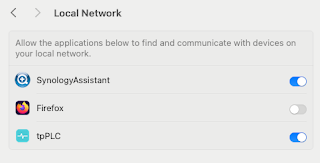
Note to self - Firefox and local connections

 Whilst trying to hit my NAS from Firefox on my Mac, I kept seeing errors such as:- Unable to connect Firefox can’t establish a connection t...