Thursday, 7 October 2021

Fun with keyctl on Ubuntu

One of my friends is tinkering with keyctl and had a few questions about the Linux kernel modules e.g. pkcs8_key_parser.

So I ran through an end-to-end setup to grow my own understanding, with thanks to: -

keyring-ima-signer

for enabling me to grow my understanding 🤣🤣

What OS do I have ?

lsb_release -a

No LSB modules are available.
Distributor ID: Ubuntu
Description: Ubuntu 20.04.3 LTS
Release: 20.04
Codename: focal

What kernel am I running ?

uname -a

Linux ubuntu 5.4.0-84-generic #94-Ubuntu SMP Thu Aug 26 20:27:37 UTC 2021 x86_64 x86_64 x86_64 GNU/Linux

Install the keyutils package

sudo apt install keyutils

Set a subject for the public key

export subject="/C=GB/O=IBM/CN="`hostname`

Set the description for the keyring entry

export description="Test1"

Generate a RSA private key

openssl genrsa | openssl pkcs8 -topk8 -nocrypt -outform DER -out privatekey.der

Generating RSA private key, 2048 bit long modulus (2 primes)
....................+++++
.....................+++++
e is 65537 (0x010001)

Generate a public key/certificate

openssl req -x509 -key privatekey.der -out certificate.pem -days 365 -keyform DER -subj $subject

Add private key to keyring

keyctl padd asymmetric $description @u <privatekey.der

add_key: Bad message

Load required key parser module

sudo modprobe pkcs8_key_parser

Verify module load

lsmod |grep key

pkcs8_key_parser       16384  0

Add private key to keyring - second attempt

keyctl padd asymmetric $description @u <privatekey.der

676878733

Validate keyring

keyctl list @u

1 key in keyring:
676878733: --als--v  1000  1000 asymmetric: Test1

Wednesday, 6 October 2021

Podman broke my IBM Cloud

As per my earlier posts, I'm all over Podman at the moment.

Having removed Docker Desktop, I then realised that this broke the IBM Cloud CLI tool, specifically the Container Registry plugin: -

ic cr login

FAILED

Could not locate 'docker'. Check your 'docker' installation and path.

Of course, Docker isn't installed, and thus is no longer in the path: -

which docker

which returns NADA!

But Podman is there: -

which podman

/usr/local/bin/podman

so I created an alias/shortcut/symbolic link between the two: -

ln -s `which podman` /usr/local/bin/docker

so now Docker is back: -

which docker

/usr/local/bin/docker

and is remarkably similar to Podman: -

docker --version

docker version 3.4.0

podman --version

podman version 3.4.0

and now the cloud is happy: -

ic cr login

Logging in to 'us.icr.io'...

Logged in to 'us.icr.io'.


OK


Word to the wise - check your serial

I'm transitioning from an iPhone 8 Plus to an iPhone 13, and had wiped the older phone ( having remembered to turn off Find My... and also log out from iCloud ).

All was good, and the new iPhone 13 is oh-so-shiny; I'm a very happy camper ...

However, as I'm handing down the older model to a family member, I wanted to go get the battery replaced.

The Apple site asks, perhaps quite wisely, for a serial or an International Mobile Equipment Identity (IMEI) number.

Try getting that from the Settings page on a wiped, yet-to-be-setup iPhone ...

Thankfully, this article had the answer: -

Find the serial number or IMEI on your iPhone, iPad or iPod touch


It's on the SIM tray; just grab a handy paperclip, and you're good to go !

Monday, 4 October 2021

Podman - pruning

So, back in the Docker days, I wrote a basic little script called prune.sh which would ... prune containers that had exited: -

#!/usr/bin/env bash
echo "Removing Docker containers that have Exited"
docker rm `docker ps -a|grep Exited|awk '{print $1}'`
echo "Completed"

so wanted to do much the same now I'm into podman

My starting position is that I've got two containers, one recently exited and one running: -

podman ps -a

CONTAINER ID  IMAGE                                                               COMMAND               CREATED         STATUS                     PORTS                   NAMES
413adb675c62  docker.io/library/hello-world:latest                                /hello                37 seconds ago  Exited (0) 38 seconds ago  0.0.0.0:8080->8080/tcp  hopeful_vaughan
408ce1f9513f  us.icr.io/demo_time/hello_world_nginx_june_2021:latest  nginx -g daemon o...  32 seconds ago  Up 32 seconds ago          0.0.0.0:8443->443/tcp   zealous_brattain

so I want to remove them both.

Now obviously I don't want to be bother typing in the container ID or name, so lets just get a list of the IDs: -

podman ps -a | grep -v CONTAINER | awk '{print $1}'

413adb675c62
408ce1f9513f

and then use that in a loop to remove the unwanted containers: -

for i in $(podman ps -a | grep -v CONTAINER | awk '{print $1}'); do podman rm $i; done

413adb675c62
Error: cannot remove container 408ce1f9513f8056497d9e6353dd9b210c59d38eafe30c698f202ba6f240babe as it is running - running or paused containers cannot be removed without force: container state improper

so that's a 50% success.

Perhaps I need to add in a podman stop before the podman rm like this: -

podman ps -a

CONTAINER ID  IMAGE                                                               COMMAND               CREATED             STATUS                         PORTS                   NAMES
408ce1f9513f  us.icr.io/demo_time/hello_world_nginx_june_2021:latest  nginx -g daemon o...  7 minutes ago       Exited (0) 49 seconds ago      0.0.0.0:8443->443/tcp   zealous_brattain
43a6797e1036  docker.io/library/hello-world:latest                                /hello                About a minute ago  Exited (0) About a minute ago  0.0.0.0:8080->8080/tcp  hopeful_robinson

for i in $(podman ps -a | grep -v CONTAINER | awk '{print $1}'); do podman stop $i && podman rm $i; done

408ce1f9513f
408ce1f9513f
43a6797e1036
43a6797e1036

podman ps -a

CONTAINER ID  IMAGE       COMMAND     CREATED     STATUS      PORTS       NAMES

I can do much the same for the images, if I want my prune to be really really ruthless: -

for i in $(podman images | grep -v REPOSITORY | awk '{print $1}'); do podman rmi $i; done

Untagged: docker.io/library/hello-world:latest
Deleted: feb5d9fea6a5e9606aa995e879d862b825965ba48de054caab5ef356dc6b3412
Untagged: us.icr.io/demo_time/hello_world_nginx_june_2021:latest
Deleted: c5318a40be88ede4e70c8c11f552a765c1c8aa5965ebd428da0b4766c2546968

So here's my final script: -

#!/usr/bin/env bash

echo "Removing containers"

for i in $(podman ps -a | grep -v CONTAINER | awk '{print $1}'); do podman stop $i && podman rm $i; done

echo "Removing images"

for i in $(podman images | grep -v REPOSITORY | awk '{print $1}'); do podman rmi $i; done

echo "Done"

~/prune.sh
 
Removing containers
854a1937c347
854a1937c347
ERRO[12181] accept tcp [::]:8443: use of closed network connection 
95ef5827777e
95ef5827777e
Removing images
Untagged: docker.io/library/hello-world:latest
Deleted: feb5d9fea6a5e9606aa995e879d862b825965ba48de054caab5ef356dc6b3412
Untagged: us.icr.io/demo_time/hello_world_nginx_june_2021:latest
Deleted: c5318a40be88ede4e70c8c11f552a765c1c8aa5965ebd428da0b4766c2546968
Done

podman ps -a

CONTAINER ID  IMAGE       COMMAND     CREATED     STATUS      PORTS       NAMES

podman images

REPOSITORY  TAG         IMAGE ID    CREATED     SIZE

And there's more - podman in action

Following on from my two earlier posts: -

Podman - my first time

Podman and Homebrew and Docker - Permission to launch ...

here we go, using Podman to run a container from a "Here's one I created earlier" container image that hosts Nginx on the internal container port of 443 using SSL/TLS : -

Starting position - no containers nor images

podman ps -a

CONTAINER ID  IMAGE       COMMAND     CREATED     STATUS      PORTS       NAMES

podman images

REPOSITORY  TAG         IMAGE ID    CREATED     SIZE

Logging into IBM Container Registry

export APIKEY="<THIS IS WHERE MY API KEY GOES>"

echo $APIKEY | podman login us.icr.io --username iamapikey --password-stdin

Login Succeeded!

Pulling image

podman pull us.icr.io/demo_time/hello_world_nginx_june_2021:latest

Trying to pull us.icr.io/demo_time/hello_world_nginx_june_2021:latest...

Getting image source signatures
Checking if image destination supports signatures
Copying blob sha256:5843afab387455b37944e709ee8c78d7520df80f8d01cf7f861aae63beeddb6b
Copying blob sha256:0dc18a5274f2c43405a2ecccd3b10c159e3141b963a899c1f8127fd921a919dc
Copying blob sha256:48a0ee941dcdebbf017f21b46c5dd6f6ee81f8086e9347e852a067cf6f18209a
Copying blob sha256:2446243a1a3fbd03fffa8180f51dee385c4c5dbd91a84ebcdb6958f0e42cf764
Copying blob sha256:cbf0756b41fb647e1222f78d79397c27439b0c3a9b27aafbdd34aa5b72bd6a49
Copying blob sha256:c72750a979b985e3c3d6299106d90b0cff7e0b833a53ac02fcb7d76bd5fe4066
Copying blob sha256:48a0ee941dcdebbf017f21b46c5dd6f6ee81f8086e9347e852a067cf6f18209a
Copying blob sha256:45b6990e7dbfc9c43a357f0eb0ff074f159ed75c6ed865d0d9dad33a028cc2a2
Copying blob sha256:cbf0756b41fb647e1222f78d79397c27439b0c3a9b27aafbdd34aa5b72bd6a49
Copying blob sha256:5e158c5bf01f5e088f575e2fbc228bf6412be3c3c203d27d8a54e81eb9dc469e
Copying blob sha256:5843afab387455b37944e709ee8c78d7520df80f8d01cf7f861aae63beeddb6b
Copying blob sha256:2446243a1a3fbd03fffa8180f51dee385c4c5dbd91a84ebcdb6958f0e42cf764
Copying blob sha256:2a7c6912841852e1c853229bd6a6e02035b47a39aec2e98d5a2b0168a843d879
Copying blob sha256:c72750a979b985e3c3d6299106d90b0cff7e0b833a53ac02fcb7d76bd5fe4066
Copying blob sha256:449e432369550bb7d8e8d7424208c98b20e2fa419c885b5786523597afe613f1
Copying blob sha256:5e158c5bf01f5e088f575e2fbc228bf6412be3c3c203d27d8a54e81eb9dc469e
Copying blob sha256:0dc18a5274f2c43405a2ecccd3b10c159e3141b963a899c1f8127fd921a919dc
Copying blob sha256:747e67851ee5fae34759ef37ad7aa7fc1a3f547a47d949ba03fcf6a8aa391146
Copying blob sha256:45b6990e7dbfc9c43a357f0eb0ff074f159ed75c6ed865d0d9dad33a028cc2a2
Copying blob sha256:2a7c6912841852e1c853229bd6a6e02035b47a39aec2e98d5a2b0168a843d879
Copying blob sha256:747e67851ee5fae34759ef37ad7aa7fc1a3f547a47d949ba03fcf6a8aa391146
Copying blob sha256:0217b8cca4864fe2a874053cae58c1d3d195dc5763fb081b1939e241c4f58ed3
Copying blob sha256:449e432369550bb7d8e8d7424208c98b20e2fa419c885b5786523597afe613f1
Copying blob sha256:b6f423348fcd82b9ce715e06704d4ab65f5a7ae41ddc2c4fff8806a66c57ee93
Copying blob sha256:0217b8cca4864fe2a874053cae58c1d3d195dc5763fb081b1939e241c4f58ed3
Copying blob sha256:b6f423348fcd82b9ce715e06704d4ab65f5a7ae41ddc2c4fff8806a66c57ee93
Copying config sha256:c5318a40be88ede4e70c8c11f552a765c1c8aa5965ebd428da0b4766c2546968
Writing manifest to image destination
Storing signatures
c5318a40be88ede4e70c8c11f552a765c1c8aa5965ebd428da0b4766c2546968

Verify pull

podman images

REPOSITORY                                                   TAG         IMAGE ID      CREATED      SIZE
us.icr.io/demo_time/hello_world_nginx_june_2021  latest      c5318a40be88  2 weeks ago  36.8 MB

Create a container

Note that we're using the --detach CLI parameter to run it as a daemon and the 

podman run --detach --publish 8443:443 us.icr.io/demo_time/hello_world_nginx_june_2021

1ac8b1b735d9c1407a143e09f71a86d39ed27b12777a4c2425f1196ae21b9f50

Verify running container

podman ps

CONTAINER ID  IMAGE                                                               COMMAND               CREATED         STATUS             PORTS                  NAMES
1ac8b1b735d9  us.icr.io/demo_time/hello_world_nginx_june_2021:latest  nginx -g daemon o...  26 seconds ago  Up 26 seconds ago  0.0.0.0:8443->443/tcp  heuristic_euclid

Validate HTTPS listener

netstat -an | grep 8443

tcp46      0      0  *.8443                 *.*                    LISTEN     

Validate HTTPS endpoint

openssl s_client -connect localhost:8443 </dev/null

...

SSL handshake has read 2262 bytes and written 289 bytes
---
New, TLSv1/SSLv3, Cipher is ECDHE-RSA-AES256-GCM-SHA384
Server public key is 4096 bit
Secure Renegotiation IS supported
Compression: NONE
Expansion: NONE
No ALPN negotiated
SSL-Session:
    Protocol  : TLSv1.2
    Cipher    : ECDHE-RSA-AES256-GCM-SHA384
...

Test Nginx from the CLI

curl --insecure https://localhost:8443

- Note that we use the --insecure CLI parameter because Nginx is presenting a self-signed SSL certificate that cURL won't automagically trust

<html>
  <head>
    <title>Hello World</title>
  </head>
  <body>
    <div class="info">
      <p>
        <h2>
          <span>Welcome to IBM Hyper Protect ...</span>
        </h2>
      </p>
      <p>
        <h2>
          <span>Message of the Day .... Drink More Herbal Tea!!</span>
        </h2>
      </p>
      <p>
        <h2>
          <span>( and, of course, Hello World! )</span>
        </h2>
      </p>
    </div>
  </body>
</html>

Test Nginx from a browser

- Note that I'm using Firefox as Chrome has decided that it's just too secure to allow self-signed certificates 😁


Stop the container

podman stop 1ac8b1b735d9

ERRO[7790] accept tcp [::]:8443: use of closed network connection 
1ac8b1b735d9

Remove the container

podman rm 1ac8b1b735d9

1ac8b1b735d9

Remove the image

podman rmi us.icr.io/demo_time/hello_world_nginx_june_2021:latest

Untagged: us.icr.io/demo_time/hello_world_nginx_june_2021:latest
Deleted: c5318a40be88ede4e70c8c11f552a765c1c8aa5965ebd428da0b4766c2546968
Podman and Homebrew and Docker - Permission to launch ...

Following my earlier post: -

Podman - my first time

and harking back to an older post: -

Homebrew on macOS - Docker says "No" - well, kinda

I thought I'd update Homebrew: -

brew upgrade

Updating Homebrew...
==> Auto-updated Homebrew!
Updated 2 taps (homebrew/core and homebrew/cask).
==> New Formulae
ca-certificates                            clickhouse-odbc                            cmake-docs                                 texlive
==> Updated Formulae
Updated 187 formulae.
==> New Casks
plistedplus
==> Updated Casks
Updated 116 casks.
==> Upgrading 14 outdated packages:
git-lfs 2.13.3 -> 3.0.1
coreutils 8.32 -> 9.0
podman 3.4.0 -> 3.4.0_1
yq 4.9.6 -> 4.13.3
putty 0.75 -> 0.76
maven 3.8.1 -> 3.8.2
htop 3.0.5 -> 3.1.0
openjdk 16.0.1 -> 17
openssl@1.1 1.1.1l -> 1.1.1l_1
kubernetes-cli 1.21.2 -> 1.22.2
fltk 1.3.6 -> 1.3.7
libzip 1.8.0 -> 1.8.0_1
helm 3.6.1 -> 3.7.0
jpeg-turbo 2.1.0 -> 2.1.1
...
Removing: /Users/hayd/Library/Caches/Homebrew/libidn2_bottle_manifest--2.3.1... (5.2KB)
Removing: /Users/hayd/Library/Caches/Homebrew/guile_bottle_manifest--3.0.7... (6.3KB)
Removing: /Users/hayd/Library/Caches/Homebrew/rust_bottle_manifest--1.51.0... (6.4KB)
Removing: /Users/hayd/Library/Caches/Homebrew/node_bottle_manifest--16.2.0... (9.6KB)
Removing: /Users/hayd/Library/Caches/Homebrew/fltk_bottle_manifest--1.3.6... (4.9KB)
Removing: /Users/hayd/Library/Caches/Homebrew/yq_bottle_manifest--4.9.3... (4.3KB)
Removing: /Users/hayd/Library/Caches/Homebrew/python@3.8_bottle_manifest--3.8.10... (13.7KB)
Removing: /Users/hayd/Library/Caches/Homebrew/node_bottle_manifest--16.1.0... (9KB)
Removing: /Users/hayd/Library/Caches/Homebrew/libtasn1_bottle_manifest--4.17.0... (4.5KB)
Removing: /Users/hayd/Library/Caches/Homebrew/yq_bottle_manifest--4.8.0... (4.3KB)
Removing: /Users/hayd/Library/Caches/Homebrew/gnutls_bottle_manifest--3.6.16... (11KB)
Removing: /Users/hayd/Library/Caches/Homebrew/putty_bottle_manifest--0.75... (4.2KB)
Removing: /Users/hayd/Library/Caches/Homebrew/pyenv_bottle_manifest--1.2.27... (16.0KB)
Removing: /Users/hayd/Library/Caches/Homebrew/kubernetes-cli_bottle_manifest--1.21.1... (4.3KB)
Removing: /Users/hayd/Library/Caches/Homebrew/python@3.9_bottle_manifest--3.9.5... (12.5KB)
Removing: /Users/hayd/Library/Caches/Homebrew/pyenv_bottle_manifest--2.0.0... (16.6KB)
Removing: /Users/hayd/Library/Caches/Homebrew/libssh2_bottle_manifest--1.9.0_1... (5.8KB)
Removing: /Users/hayd/Library/Logs/Homebrew/fdupes... (64B)
Removing: /Users/hayd/Library/Logs/Homebrew/pcre2... (64B)
Error: Permission denied @ apply2files - /usr/local/lib/docker/cli-plugins

The computer said "No".

So we've got some hangover from Docker Desktop, which I'd uninstalled by dragging Docker.app from the Applications folder to the Trashcan.

Thankfully, I remembered the previous incident of this on my 2014 Mac mini.

Knowing that this was permission-related, I checked the offending folder - /usr/local/lib/docker - as follows: -

ls -al /usr/local/lib/docker/

total 0
drwxr-xr-x    3 root  admin    96 15 Sep 17:25 .
drwxrwxr-x  294 hayd  admin  9408  1 Oct 14:52 ..
lrwxr-xr-x    1 root  admin    55 15 Sep 17:25 cli-plugins -> /Applications/Docker.app/Contents/Resources/cli-plugins

and just fixed up the permissions: -

sudo chown -R hayd:admin /usr/local/lib

and then re-ran the Brew upgrade: -

brew upgrade

and now it's happy: -

Bash completion has been installed to:
  /usr/local/etc/bash_completion.d
==> coreutils
Commands also provided by macOS and the commands dir, dircolors, vdir have been installed with the prefix "g".
If you need to use these commands with their normal names, you can add a "gnubin" directory to your PATH with:
  PATH="/usr/local/opt/coreutils/libexec/gnubin:$PATH"

Sadly, despite the supposed upgraded to podman the version still reports as before: -

podman --version

podman version 3.4.0

podman version

Client:
Version:      3.4.0
API Version:  3.4.0
Go Version:   go1.17.1
Built:        Thu Sep 30 19:44:31 2021
OS/Arch:      darwin/amd64

Server:
Version:      3.3.1
API Version:  3.3.1
Go Version:   go1.16.6
Built:        Mon Aug 30 21:46:36 2021
OS/Arch:      linux/amd64

and the initial JSON-related issue persists: -

podman run hello-world

Error: error preparing container c30900631b5e91c564a3c8093dc11ff975bd09b02d156b95f6ef243844548320 for attach: error configuring network namespace for container c30900631b5e91c564a3c8093dc11ff975bd09b02d156b95f6ef243844548320: error adding pod musing_kirch_musing_kirch to CNI network "podman": unexpected end of JSON input

Sigh!!!

Podman - my first time

Now that things are a-changin' with Docker Desktop, I wanted to give podman a try.

I'm running macOS 11.6 Big Sur and have Homebrew installed: -

brew --version

Homebrew 3.2.14
Homebrew/homebrew-core (git revision 161852c41e5; last commit 2021-10-01)
Homebrew/homebrew-cask (git revision 486624192d; last commit 2021-10-01)

so simply installed podman via brew install podman.

Having installed, I checked the version of podman thusly: -

podman version

Client:
Version:      3.4.0
API Version:  3.4.0
Go Version:   go1.17.1
Built:        Thu Sep 30 19:44:31 2021
OS/Arch:      darwin/amd64
Server:
Version:      3.3.1
API Version:  3.3.1
Go Version:   go1.16.6
Built:        Mon Aug 30 21:46:36 2021
OS/Arch:      linux/amd64

Starting at the beginning, I tried ( and sadly failed ) to run the stock Hello World image: -

podman run hello-world

Resolved "hello-world" as an alias (/etc/containers/registries.conf.d/000-shortnames.conf)
Trying to pull docker.io/library/hello-world:latest...
Getting image source signatures
Copying blob sha256:2db29710123e3e53a794f2694094b9b4338aa9ee5c40b930cb8063a1be392c54
Copying config sha256:feb5d9fea6a5e9606aa995e879d862b825965ba48de054caab5ef356dc6b3412
Writing manifest to image destination
Storing signatures
Error: error preparing container f8dee00901c488f0362af2ffe6e8736a41a609890bfc2f3f8863349932cb050d for attach: error configuring network namespace for container f8dee00901c488f0362af2ffe6e8736a41a609890bfc2f3f8863349932cb050d: error adding pod confident_panini_confident_panini to CNI network "podman": unexpected end of JSON input

Thankfully, GitHub had the answer: -


which says in part: -

Should be fixed once podman 3.4 lands in CoreOS, as workaround you have to forward at least one port, e.g. -p 8080.

This is a duplicate of: -


which says, in part: -

TLDR, the bug is that you cannot use the machine plugin without ports.

Given this, I tried the circumvention ( even though Hello World doesn't actually need a port ) : -

podman run -p 8080:8080 hello-world

Hello from Docker!
This message shows that your installation appears to be working correctly.

To generate this message, Docker took the following steps:
 1. The Docker client contacted the Docker daemon.
 2. The Docker daemon pulled the "hello-world" image from the Docker Hub.
    (amd64)
 3. The Docker daemon created a new container from that image which runs the
    executable that produces the output you are currently reading.
 4. The Docker daemon streamed that output to the Docker client, which sent it
    to your terminal.

To try something more ambitious, you can run an Ubuntu container with:
 $ docker run -it ubuntu bash

Share images, automate workflows, and more with a free Docker ID:
 https://hub.docker.com/

For more examples and ideas, visit:
 https://docs.docker.com/get-started/

~ $ ERRO[170262] accept tcp [::]:8080: use of closed network connection 

Given the GitHub issues, and noting that the "server" side of Podman is still 3.3.1 : -

podman version

Client:
Version:      3.4.0
API Version:  3.4.0
Go Version:   go1.17.1
Built:        Thu Sep 30 19:44:31 2021
OS/Arch:      darwin/amd64

Server:
Version:      3.3.1
API Version:  3.3.1
Go Version:   go1.16.6
Built:        Mon Aug 30 21:46:36 2021
OS/Arch:      linux/amd64

I'll keep an eye on the issue etc. and see when we see a fix for the server side ....

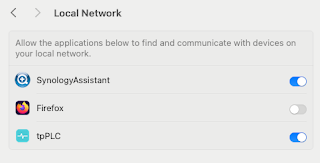
Note to self - Firefox and local connections

 Whilst trying to hit my NAS from Firefox on my Mac, I kept seeing errors such as:- Unable to connect Firefox can’t establish a connection t...