Thursday, 30 June 2016

Ubuntu Linux and the growing file-system

A friend asked me how to resize a disk partition ( virtual disk ) in an Ubuntu VM on VMware.

This is what I did: -

Look at the existing disk layout

df -kmh

Filesystem      Size  Used Avail Use% Mounted on
/dev/sda1        19G  3.6G   15G  20% /
none            4.0K     0  4.0K   0% /sys/fs/cgroup
udev            478M  4.0K  478M   1% /dev
tmpfs            98M  1.5M   97M   2% /run
none            5.0M     0  5.0M   0% /run/lock
none            489M  216K  489M   1% /run/shm
none            100M   32K  100M   1% /run/user
/dev/sdb1       4.8G   10M  4.6G   1% /installs


Look at the underlying disk "drive"

fdisk /dev/sdb

Command (m for help): p

Disk /dev/sdb: 5368 MB, 5368709120 bytes
181 heads, 40 sectors/track, 1448 cylinders, total 10485760 sectors
Units = sectors of 1 * 512 = 512 bytes
Sector size (logical/physical): 512 bytes / 512 bytes
I/O size (minimum/optimal): 512 bytes / 512 bytes
Disk identifier: 0x9844eb8f

   Device Boot      Start         End      Blocks   Id  System
/dev/sdb1            2048    10485759     5241856   83  Linux

In VMware Fusion, I have TWO virtual disks


The second drive - Virtual Disk 2.vmdk - is the one in which I'm interested

Increase it from 5 GB to 10 GB, with the Linux VM shutdown


With this result


Now check the file-system in Linux

df -kmh

Filesystem      Size  Used Avail Use% Mounted on
/dev/sda1        19G  3.6G   15G  21% /
none            4.0K     0  4.0K   0% /sys/fs/cgroup
udev            478M  4.0K  478M   1% /dev
tmpfs            98M  1.5M   97M   2% /run
none            5.0M     0  5.0M   0% /run/lock
none            489M  144K  489M   1% /run/shm
none            100M   28K  100M   1% /run/user
/dev/sdb1       4.8G   10M  4.6G   1% /installs

fdisk /dev/sdb

Command (m for help): p

Disk /dev/sdb: 10.7 GB, 10737418240 bytes
181 heads, 40 sectors/track, 2896 cylinders, total 20971520 sectors
Units = sectors of 1 * 512 = 512 bytes
Sector size (logical/physical): 512 bytes / 512 bytes
I/O size (minimum/optimal): 512 bytes / 512 bytes
Disk identifier: 0x9844eb8f

   Device Boot      Start         End      Blocks   Id  System
/dev/sdb1            2048    10485759     5241856   83  Linux

Nothing has changed, you cry

Now we delete the old partition :-)

Command (m for help): d
Selected partition 1


and then create a new one

Command (m for help): n
Partition type:
   p   primary (0 primary, 0 extended, 4 free)
   e   extended
Select (default p): p
Partition number (1-4, default 1): 
Using default value 1
First sector (2048-20971519, default 2048): 
Using default value 2048
Last sector, +sectors or +size{K,M,G} (2048-20971519, default 20971519): 
Using default value 20971519


Note that we start with the same block - 2048 - but that the end block is ~2x ( increased from 10,485,759 to 20,971,519 )

Write the new partition table

Command (m for help): w
The partition table has been altered!

Calling ioctl() to re-read partition table.

WARNING: Re-reading the partition table failed with error 16: Device or resource busy.
The kernel still uses the old table. The new table will be used at
the next reboot or after you run partprobe(8) or kpartx(8)
Syncing disks.


Error-check the virtual disk

e2fsck -f /dev/sdb1 

e2fsck 1.42.9 (4-Feb-2014)
Pass 1: Checking inodes, blocks, and sizes
Pass 2: Checking directory structure
Pass 3: Checking directory connectivity
Pass 4: Checking reference counts
Pass 5: Checking group summary information
/dev/sdb1: 11/327680 files (0.0% non-contiguous), 55902/1310464 blocks

Resize the virtual disk

resize2fs /dev/sdb1 

resize2fs 1.42.9 (4-Feb-2014)
Resizing the filesystem on /dev/sdb1 to 2621184 (4k) blocks.
The filesystem on /dev/sdb1 is now 2621184 blocks long.

Mount the file-system

mount -a

Look at the new disk layout

df -kmh

Filesystem      Size  Used Avail Use% Mounted on
/dev/sda1        19G  3.7G   15G  21% /
none            4.0K     0  4.0K   0% /sys/fs/cgroup
udev            478M  4.0K  478M   1% /dev
tmpfs            98M  1.5M   97M   2% /run
none            5.0M     0  5.0M   0% /run/lock
none            489M  144K  489M   1% /run/shm
none            100M   28K  100M   1% /run/user
/dev/sdb1       9.8G   12M  9.2G   1% /installs


Job, as they say, is a good 'un

With thanks to this: -

WebSphere Application Server 8.5.5.8, TLS 1.2 and DB2

It's been a day for old blog posts helping to fix new problems.

Today, we saw this: -

CWSIS1593I: The messaging engine, ME_UUID=E997A9EFA09498FC, INC_UUID=6DC2A53AD19710D7, has failed to gain an initial lock on the data store.
CWSIS1538I: The messaging engine, ME_UUID=E997A9EFA09498FC, INC_UUID=6DC2A53AD19710D7, is attempting to obtain an exclusive lock on the data store.

which led me here: -


However the resolution - to sort out the SIB tables - did NOT help.

However we also saw this: -

MESSAGE : DIA3604E The SSL function "gsk_secure_soc_init" failed with the 
          return code "402" in "sqlccSSLSocketSetup".

in the DB2 diagnostic log.

This second post was of immense use: -


as it confirmed that rc402 means: -

0x00000192     402     GSK_ERROR_NO_CIPHERS     Neither SSLV2 nor SSLV3 is enabled.

We're using a Dynamic outbound endpoint SSL configuration set up between WAS and DB2, which ensures that specific connections, on specific ports, go via a specific SSL Configuration, and use TLS 1.2 and strong SSL ciphers.

This is an interim fix, before we enable TLS 1.2 and the strong ciphers across the entire WAS cell.

For some yet-to-be-unexplained reason, even though we had the fully-qualified hostname ( host plus domain ) of the DB2 servers, something was forcing WAS to use the short-name ( hostname ) instead.

Of course, the Dynamic SSL configuration was ONLY configured for the FQDN, and NOT for the short-name.

Once the short-names of the DB2 boxes ( we have an HADR pair ) was applied, WAS worked a treat.

Easy when you know how ….

My Cognos has fallen AGAIN and can't get up

We saw this problem: -

CAM-CRP-1280 An error occurred while trying to decrypt using the system protection key. Reason: javax.crypto.BadPaddingException: Given final block not properly padded 

again today, on another IBM Business Monitor 8.5.5.0 environment.

Again, it was due to our moving an AIX LPAR from one p780 server to another.

So there's something in Cognos that REALLY loves the underlying hardware, assumedly an AES encryption key.

Still, the solution was the same - force the Cognos configuration under Monitor to rebuild.

Thankfully, my previous blog post: -


helped immensely.

Friday, 24 June 2016

F5 BIG-IP - More learning, more tinkering, more blogging

I'm continuing to learn more about the F5, in my quest to really understand how it all works, in the context of solving a tricksy little SSL handshake problem between an LTM and an IBM HTTP Server box.

Here's a few commands that I've used: -

tmsh show /ltm node

----------------------------------------------
Ltm::Node: bpm856.uk.ibm.com (192.168.153.200)
----------------------------------------------
Status               
  Availability   : unknown
  State          : enabled
  Reason         : Node address does not have service checking enabled
  Monitor        : none
  Monitor Status : unchecked
  Session Status : enabled
                     
Traffic                ServerSide  General
  Bits In                       0        -
  Bits Out                      0        -
  Packets In                    0        -
  Packets Out                   0        -
  Current Connections           0        -
  Maximum Connections           0        -
  Total Connections             0        -
  Total Requests                -        0
  Current Sessions              -        0


tmsh show ltm pool all members field-fmt |grep "ltm\ pool\|active-member-cnt\|addr\|monitor-status"

ltm pool bpm856.uk.ibm.com_ihs {
    active-member-cnt 1
            addr 192.168.153.200
            monitor-status up

Plus this: -


Wednesday, 22 June 2016

WebSphere Plugin and the Case of the GSK_ERROR_BAD_KEYFILE_PASSWORD

We've seen a few instances , where the WebSphere Plugin fails to communicate, via SSL, with WAS.

This manifests itself as Error 500 / HTTP500 when accessing WAS via IHS, using hostname OR service name.

Long story short, it looks like the Plugin SSL configuration files are getting "borked" by something.

The plugin log shows this: -

[22/Jun/2016:13:14:40.16292] 00d3008c 00000001 - ERROR: lib_security: logSSLError: str_security (gsk error 408):  GSK_ERROR_BAD_KEYFILE_PASSWORD
[22/Jun/2016:13:14:40.16294] 00d3008c 00000001 - ERROR: lib_security: initializeSecurity: Failed to initialize GSK environment. Secure transports are not possible.


One symptom is that you cannot query the keystore using the gskcapicmd command, as per this: -

/opt/ibm/HTTPServer/bin/gskcapicmd -cert -list -db plugin-key.kdb -stashed

which returns: -

CTGSK3026W The key file "plugin-key.kdb" does not exist or cannot be read.
CTGSK2016W An invalid database password was encountered.


The same error occurs if you use the correct keystore password e.g. WebAS.

We saw this problem even when we deleted the .KDB and .STH files ( see below ), and propagated them from the WAS cell via the Deployment Manager.

The problem appears to be related to the use of the gskcapicmd command to create certificate requests.

I *think* that, as some point, someone has created certificate requests for the Plugin, which has updated one or more of the related configuration files.

There are a number of files in play here: -

plugin-cfg.xml                                  Configuration file, generated by WAS, and propagated from the Deployment Manager to the IHS box
plugin-key.kdb                                  CMS key database, holding BOTH personal AND signer certificates ( keys and trusts )
plugin-key.sth                                   Encrypted stashed password file
plugin-key.crl                                    Certificate Recovation List
plugin-key.rdb                                  Certificate Request Database

As a test, we moved the .CRL and .RDB files into a different subdirectory, leaving just the .xml, .kdb and .sth files in place.

We were then able to query the .KDB without problems: -

/opt/ibm/HTTPServer/bin/gskcapicmd -cert -list -db plugin-key.kdb –stashed

Certificates found
* default, - personal, ! trusted, # secret key
!       "CN=was.uk.ibm.com, OU=RootCertificate, OU=test, OU=dmgr, O=ibm, O=co, C=uk"
-       default


/opt/ibm/HTTPServer/bin/gskcapicmd -cert -list -db plugin-key.kdb -pw WebAS

Certificates found
* default, - personal, ! trusted, # secret key
!       "CN=was.uk.ibm.com, OU=RootCertificate, OU=test, OU=dmgr, O=ibm, O=co, C=uk"
-       default


I did some more testing, moving the .CRL and .RDB files back and forth, and have concluded that it IS the .RDB file that "breaks" things.

Once we ended up with JUST the .XML, .KDB and .STH files in place ( in /opt/ibm/WebSphere/Plugins/config/ ), I was able to successfully navigate to WAS via IHS.

Bottom line, there's no need to use the IHS GSK commands ( gskcapicmd ) to request certificates for the WebSphere Plugin in the context of WAS.

If we need a personal WAS certificate, we can generate the Certificate Request using Jython scripts or the ISC, and WAS will take care of updating the KDB etc.

This is different to Plugin -> IBM Integration Bus, where there's no WAS to manage things for us.

The only time we'd ever need to use gskcapicmd against the Plugin KDB was if we wanted to mark the WAS personal certificate as default, in order to ensure that it was used for Plugin -> WAS connectivity, in the context of Mutual Authentication etc ( via the –setdefault  command ).


F5 Load Balancing - My first few forays

I'm currently working on a situation whereby HTTPS load-balancing is inconsistently not working against IBM HTTP Server 8.5.5.

To help me help the client's network team debug this, I've been tinkering with a F5 Local Traffic Manager (LTM) using VMware Fusion on my Mac.

I found a slew of excellent articles on the F5 site including: -


Load balancing got its start in the form of network-based load balancing hardware. It is the essential foundation on which Application Delivery Controllers (ADCs) operate. The second iteration of purpose-built load balancing (following application-based proprietary systems) materialized in the form of network-based appliances. These are the true founding fathers of today's ADCs. Because these devices were application-neutral and resided outside of the application servers themselves, they could load balance using straightforward network techniques. In essence, these devices would present a "virtual server" address to the outside world, and when users attempted to connect, they would forward the connection to the most appropriate real server doing bi-directional network address translation (NAT).


Monitors determine the availability and performance of devices, links, and services on a network. Health monitors check the availability. Performance monitors check the performance and load. If a monitored device, link, or service does not respond within a specified timeout period, or the status indicates that performance is degraded or that the load is excessive, the BIG-IP system can redirect the traffic to another resource.

More importantly, this link: -


was just what I need to get a developer version of F5 VE installed and working.

I ended up with a working F5 Health Monitor probing my IHS server ( on a different Linux VM ), over SSL.

Two things that made a difference: -

(1) Getting the RIGHT cipher

openssl ciphers -v

DHE-RSA-AES256-SHA      SSLv3 Kx=DH       Au=RSA  Enc=AES(256)  Mac=SHA1
DHE-DSS-AES256-SHA      SSLv3 Kx=DH       Au=DSS  Enc=AES(256)  Mac=SHA1
AES256-SHA              SSLv3 Kx=RSA      Au=RSA  Enc=AES(256)  Mac=SHA1
DHE-RSA-CAMELLIA256-SHA SSLv3 Kx=DH       Au=RSA  Enc=Camellia(256) Mac=SHA1
DHE-DSS-CAMELLIA256-SHA SSLv3 Kx=DH       Au=DSS  Enc=Camellia(256) Mac=SHA1
CAMELLIA256-SHA         SSLv3 Kx=RSA      Au=RSA  Enc=Camellia(256) Mac=SHA1
EDH-RSA-DES-CBC3-SHA    SSLv3 Kx=DH       Au=RSA  Enc=3DES(168) Mac=SHA1
EDH-DSS-DES-CBC3-SHA    SSLv3 Kx=DH       Au=DSS  Enc=3DES(168) Mac=SHA1
DES-CBC3-SHA            SSLv3 Kx=RSA      Au=RSA  Enc=3DES(168) Mac=SHA1
DES-CBC3-MD5            SSLv2 Kx=RSA      Au=RSA  Enc=3DES(168) Mac=MD5 
DHE-RSA-AES128-SHA      SSLv3 Kx=DH       Au=RSA  Enc=AES(128)  Mac=SHA1
DHE-DSS-AES128-SHA      SSLv3 Kx=DH       Au=DSS  Enc=AES(128)  Mac=SHA1
AES128-SHA              SSLv3 Kx=RSA      Au=RSA  Enc=AES(128)  Mac=SHA1
DHE-RSA-CAMELLIA128-SHA SSLv3 Kx=DH       Au=RSA  Enc=Camellia(128) Mac=SHA1
DHE-DSS-CAMELLIA128-SHA SSLv3 Kx=DH       Au=DSS  Enc=Camellia(128) Mac=SHA1
CAMELLIA128-SHA         SSLv3 Kx=RSA      Au=RSA  Enc=Camellia(128) Mac=SHA1
RC2-CBC-MD5             SSLv2 Kx=RSA      Au=RSA  Enc=RC2(128)  Mac=MD5 
RC4-SHA                 SSLv3 Kx=RSA      Au=RSA  Enc=RC4(128)  Mac=SHA1
RC4-MD5                 SSLv3 Kx=RSA      Au=RSA  Enc=RC4(128)  Mac=MD5 
RC4-MD5                 SSLv2 Kx=RSA      Au=RSA  Enc=RC4(128)  Mac=MD5 
EDH-RSA-DES-CBC-SHA     SSLv3 Kx=DH       Au=RSA  Enc=DES(56)   Mac=SHA1
EDH-DSS-DES-CBC-SHA     SSLv3 Kx=DH       Au=DSS  Enc=DES(56)   Mac=SHA1
DES-CBC-SHA             SSLv3 Kx=RSA      Au=RSA  Enc=DES(56)   Mac=SHA1
DES-CBC-MD5             SSLv2 Kx=RSA      Au=RSA  Enc=DES(56)   Mac=MD5 
EXP-EDH-RSA-DES-CBC-SHA SSLv3 Kx=DH(512)  Au=RSA  Enc=DES(40)   Mac=SHA1 export
EXP-EDH-DSS-DES-CBC-SHA SSLv3 Kx=DH(512)  Au=DSS  Enc=DES(40)   Mac=SHA1 export
EXP-DES-CBC-SHA         SSLv3 Kx=RSA(512) Au=RSA  Enc=DES(40)   Mac=SHA1 export
EXP-RC2-CBC-MD5         SSLv3 Kx=RSA(512) Au=RSA  Enc=RC2(40)   Mac=MD5  export
EXP-RC2-CBC-MD5         SSLv2 Kx=RSA(512) Au=RSA  Enc=RC2(40)   Mac=MD5  export
EXP-RC4-MD5             SSLv3 Kx=RSA(512) Au=RSA  Enc=RC4(40)   Mac=MD5  export
EXP-RC4-MD5             SSLv2 Kx=RSA(512) Au=RSA  Enc=RC4(40)   Mac=MD5  export


Note that this particular version of the F5 software does NOT support my preferred ECDHE/RSA/GCM ciphers :-(

On my VM, I am running: -

BIG-IP 11.3.0 Build 39.0 VE Trial 11.3.0-HF1 (based on BIGIP 11.3.0HF6)

(2) Getting the Monitor configuration correct

Specifically the send string and the receive response are mega-important

tmsh list ltm monitor https

ltm monitor https davehttps {
    cipherlist DEFAULT:+SHA:+3DES:+kEDH
    compatibility enabled
    defaults-from https
    destination *:pcsync-https
    interval 5
    recv 200
    send "GET /index.html HTTP/1.1\\r\\nHost: www.example.com\\r\\nConnection: Close\\r\\n\\r\\n"
    time-until-up 0
    timeout 16
}


I inferred the send string using openssl on the device itself: -

openssl s_client -connect 192.168.153.200:8443

and pasted this string: -

GET /index.html HTTP/1.1
Host: www.example.com
Connection: Close


into the terminal, and pressed [Enter].

This returned, in part: -

...
HTTP/1.1 200 OK
Date: Wed, 22 Jun 2016 05:26:41 GMT
Last-Modified: Tue, 06 Jan 2015 17:02:04 GMT
ETag: "da5-50bfec4265b00"
Accept-Ranges: bytes
Content-Length: 3493

…

which confirms the recv string of 200 ( HTTP 200 OK ).

Now my IHS server is showing regular GET requests from the F5 Monitor: -

…
192.168.153.1 - - [22/Jun/2016:06:26:54 +0100] "GET /index.html HTTP/1.1" 200 3493
192.168.153.1 - - [22/Jun/2016:06:26:59 +0100] "GET /index.html HTTP/1.1" 200 3493
192.168.153.1 - - [22/Jun/2016:06:27:04 +0100] "GET /index.html HTTP/1.1" 200 3493
192.168.153.1 - - [22/Jun/2016:06:27:09 +0100] "GET /index.html HTTP/1.1" 200 3493
192.168.153.1 - - [22/Jun/2016:06:27:14 +0100] "GET /index.html HTTP/1.1" 200 3493
192.168.153.1 - - [22/Jun/2016:06:27:19 +0100] "GET /index.html HTTP/1.1" 200 3493
192.168.153.1 - - [22/Jun/2016:06:27:24 +0100] "GET /index.html HTTP/1.1" 200 3493
192.168.153.1 - - [22/Jun/2016:06:27:29 +0100] "GET /index.html HTTP/1.1" 200 3493
192.168.153.1 - - [22/Jun/2016:06:27:34 +0100] "GET /index.html HTTP/1.1" 200 3493
192.168.153.1 - - [22/Jun/2016:06:27:39 +0100] "GET /index.html HTTP/1.1" 200 3493
192.168.153.1 - - [22/Jun/2016:06:27:44 +0100] "GET /index.html HTTP/1.1" 200 3493
192.168.153.1 - - [22/Jun/2016:06:27:49 +0100] "GET /index.html HTTP/1.1" 200 3493
192.168.153.1 - - [22/Jun/2016:06:27:54 +0100] "GET /index.html HTTP/1.1" 200 3493

...

in the access.log.

Now I need to go and configure the F5 "front door" to allow me to actual send traffic to/through the load-balancer to the downstream IHS box.

These links were also of use: -


Monday, 20 June 2016

IBM BPM - Process Center and Unit Test Environment Together

This article from 2014: -


A stand-alone Process Center profile for IBM® Business Process Manager (BPM) is useful for situations where memory and disk space are limited. Rather than install the Process Center as a network deployment environment with at least three profiles running, plus an additional profile to support the unit test environment server, this article describes how a single profile can provide both a Process Center server and a unit test environment server. This content is part of the IBM Business Process Management Journal.

has been updated with a second article: -


A stand-alone Process Center profile for IBM® Business Process Manager (BPM) is useful in situations where memory and disk space are limited. In Part 1, you learned how to create a stand-alone Process Center Profile for Windows environments, and now in Part 2, learn the specific steps for a Linux environment. Rather than install the Process Center as a network deployment environment with at least three profiles running, plus an additional profile to support the unit test environment server, this series describes how a single profile can provide both a Process Center server and a unit test environment server.

Definitely worth a bookmark 

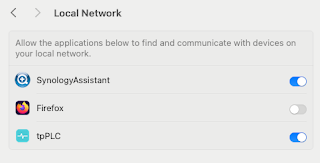
Note to self - Firefox and local connections

 Whilst trying to hit my NAS from Firefox on my Mac, I kept seeing errors such as:- Unable to connect Firefox can’t establish a connection t...