Thursday, 28 October 2021

RedHat OpenShift Container Platform - commanding the line ..

As per previous posts, I'm working with RedHat OpenShift Container Platform (OCP) a lot at present, and was looking for the most recent command-line tool, namely oc, for my Mac.

RedHat have the downloads for macOS, Windows and Linux here: -

Command-line interface (CLI) tools

so I pulled the appropriate tarball 


which resulted in: -

-rw-r--r--@   1 hayd  staff    41481963 28 Oct 15:35 openshift-client-mac.tar.gz

Having unpacked this: -

ls -al ~/Downloads/openshift-client-mac

total 384664
drwx------@ 5 hayd  staff       160 28 Oct 15:51 .
drwx------@ 7 hayd  staff       224 28 Oct 15:51 ..
-rw-r--r--@ 1 hayd  staff       954  1 Oct 01:41 README.md
-rwxr-xr-x@ 2 hayd  staff  98469344  1 Oct 01:41 kubectl
-rwxr-xr-x@ 2 hayd  staff  98469344  1 Oct 01:41 oc


I checked the version of oc - having had 4.7 previously: -

~/Downloads/openshift-client-mac/oc version

Client Version: 4.9.0

However, I also noted that the bundle includes kubectl 

When I checked the version of that: -

~/Downloads/openshift-client-mac/kubectl version

Client Version: version.Info{Major:"1", Minor:"21", GitVersion:"v0.21.0-beta.1", GitCommit:"96e95cef877ba04872b88e4e2597eabb0174d182", GitTreeState:"clean", BuildDate:"2021-10-01T00:41:12Z", GoVersion:"go1.16.6", Compiler:"gc", Platform:"darwin/amd64"}

which is out of sync with the version that I'm already using: -

kubectl version

Client Version: version.Info{Major:"1", Minor:"22", GitVersion:"v1.22.2", GitCommit:"8b5a19147530eaac9476b0ab82980b4088bbc1b2", GitTreeState:"clean", BuildDate:"2021-09-15T21:31:32Z", GoVersion:"go1.16.8", Compiler:"gc", Platform:"darwin/amd64"}

I'm not 100% sure why, and will ask around, but... in the meantime, I'll stick with what I have ...

IBM Cloud - The computer says "No"

Whilst trying to delete an IBM Cloud Object Storage (COS) instance from the command-line: -

ic resource service-instance-delete e8c79678-2ef8-4c7c-8a89-24ff2e85e691 --force

I saw: -

Deleting service instance e8c79678-2ef8-4c7c-8a89-24ff2e85e691 in resource group default under account DAVID HAY's Account as david_hay@uk.ibm.com...
FAILED
Cannot delete instance or alias, resource keys must first be deleted.


and couldn't quite work out to what it was referring.

Thankfully, the help text for that command had the answer: -

ic resource service-instance-delete --help

FAILED
Incorrect Usage.

NAME:
  service-instance-delete - Delete service instance

USAGE:
  /usr/local/bin/ibmcloud resource service-instance-delete ( NAME | ID ) [-g RESOURCE_GROUP] [-f, --force] [--recursive] [-q, --quiet]
  
OPTIONS:
  -g value     Resource group name
  -f, --force  Force deletion without confirmation
  --recursive  Delete all belonging resources
  -q, --quiet  Suppress verbose output


ic resource service-instance-delete e8c79678-2ef8-4c7c-8a89-24ff2e85e691 --force --recursive

Deleting service instance e8c79678-2ef8-4c7c-8a89-24ff2e85e691 in resource group default under account DAVID HAY's Account as david_hay@uk.ibm.com...
OK
Service instance cos_for_roks with ID crn:v1:bluemix:public:cloud-object-storage:global:a/f5e2ac71094077500e0d4b1ef85fdaec:e8c79678-2ef8-4c7c-8a89-24ff2e85e691:: is deleted successfully


Apple Watch - stop talking to me

For some peculiar reason, the Workout app on my Apple Watch started talking to me this morning …

Whilst that's not necessarily a problem, hearing a disembodied voice coming through my AirPods at 0600ish, whilst out on my morning walk was somewhat disconcerting

Thankfully a quick Google came to the rescue: -

which led me to the Apple Watch app on my iPhone : -


Why this started today, given that I updated to watchOS 8 a week or two back …. 🤷‍♀️

Tuesday, 26 October 2021

Podman and IBM Container Registry - there's more ...

Following on from my most recent Podman-related posts I'm creating an image to test my RedHat OpenShift Kubernetes Service (ROKS) deployment.

Given that I'm living in the IBM Cloud CLI, I thought I'd try the ic cr command-line: -

ic cr build --no-cache de.icr.io/roks_oct2021/hello_world:latest --file Dockerfile .

FAILED

The 'build' command is deprecated, you must specify the --accept-deprecation option to use this command. For more information see: https://www.ibm.com/cloud/blog/announcements/ibm-cloud-container-registry-deprecating-container-builds

Aw shucks, of course ...

Thankfully, I have Podman ...

podman build --no-cache -t de.icr.io/roks_oct2021/hello_world:latest -f Dockerfile .

and then, having created myself a namespace in ICR: -

ic cr namespace-add roks_oct2021

I can push the image: -

podman push de.icr.io/roks_oct2021/hello_world:latest

and we're off to the races ...

ic cr images

Listing images...


Repository                           Tag      Digest         Namespace      Created          Size    Security status   

de.icr.io/roks_oct2021/hello_world   latest   029263beb4d4   roks_oct2021   43 minutes ago   16 MB   No Issues   


OK

ic cr va de.icr.io/roks_oct2021/hello_world:latest

Checking security issues for 'de.icr.io/roks_oct2021/hello_world:latest'...

Image 'de.icr.io/roks_oct2021/hello_world:latest' was last scanned on Tue Oct 26 12:36:34 UTC 2021
The scan results show that NO ISSUES were found for the image.

OK

ic cr va --extended de.icr.io/roks_oct2021/hello_world:latest

Checking security issues for 'de.icr.io/roks_oct2021/hello_world:latest'...

Image 'de.icr.io/roks_oct2021/hello_world:latest' was last scanned on Tue Oct 26 12:36:34 UTC 2021
The scan results show that NO ISSUES were found for the image.

OK

which is nice !

Ooops, Podman broke my IBM Container Registry - well, kinda

I was digging into an IBM Container Registry (ICR), specifically to look at an image that I'd just built/pushed.

This is on a Mac upon which I've installed Podman, to replace Docker Desktop, as per previous posts.

Having logged into IBM Cloud ( I have a script for that ), I logged into the ICR instance: -

ic cr login

which responded: -

Logging in to 'us.icr.io'...

FAILED

Failed to 'docker login' to 'us.icr.io' with error: Cannot connect to Podman. Please verify your connection to the Linux system using `podman system connection list`, or try `podman machine init` and `podman machine start` to manage a new Linux VM

Error: unable to connect to Podman. failed to create sshClient: Connection to bastion host (ssh://core@localhost:53095/run/user/1000/podman/podman.sock) failed.: dial tcp [::1]:53095: connect: connection refused

At which point, I realised where I'd gone wrong - I'd rebooted my Mac since last I did this, and, at a guess, the Podman Machine doesn't autostart.

I manually started it: -

podman machine start

INFO[0000] waiting for clients...                       

INFO[0000] listening tcp://0.0.0.0:7777                 

INFO[0000] new connection from  to /var/folders/b5/8vqr9tt54v94jxzs0_k2qq2m0000gn/T/podman/qemu_podman-machine-default.sock 

Waiting for VM ...

Machine "podman-machine-default" started successfully

and then attempted to log into ICR: -

ic cr login

Logging in to 'us.icr.io'...

Logged in to 'us.icr.io'.


OK

Next step is to find out how to autostart the Podman Machine "service" .... 

Monday, 25 October 2021

IBM Cloud - OCP clusters, Ingress and Certificate Manager

So this is definitely a work-in-progress but I may have resolved an issue that I was seeing with a newly created OpenShift Container Platform (OCP) cluster.

TL;DR; the command ic cs cluster ls showed my cluster state as warning and never as ready.

When I inspected the cluster using ic cs cluster get --cluster $cluster_name I saw: -

Ingress Subdomain:              - †   

Ingress Secret:                 - †   

Ingress Status:                 -   

Ingress Message:                -   

and: -

† Your Ingress subdomain and secret might not be ready yet. For more info by cluster type, see 'https://ibm.biz/ingress-sub' for Kubernetes or 'https://ibm.biz/ingress-sub-ocp' for OpenShift.

and, after a while, this: -

Ingress Message:                Could not upload certificates to Certificate Manager instance. Ensure you have the correct IAM permissions. For more info, see http://ibm.biz/ingress-secret   

I followed the suggested link: -

and ended up with: -


which said, in part: -     

What’s happening

You create and delete a cluster multiple times, such as for automation purposes.

Every time that you create the cluster, you use either the same name or a name that is very similar to previous names that you used. When you run ibmcloud ks cluster get --cluster <cluster>, your cluster is in a normal state but no Ingress Subdomain or Ingress Secret are available.
Why it’s happening

When you create and delete a cluster that uses the same name multiple times, the Ingress subdomain for that cluster in the format <cluster_name>.<globally_unique_account_HASH>-0000.<region>.containers.appdomain.cloud is registered and unregistered each time.

The certificate for the subdomain is also generated and deleted each time. If you create and delete a cluster with the same name 5 times or more within 7 days, you might reach the Let's Encrypt Duplicate Certificate rate limit, because the same Ingress subdomain and certificate are registered every time that you create the cluster. Because very long cluster names are truncated to 24 characters in the Ingress subdomain for the cluster, you can also reach the rate limit if you use multiple cluster names that have the same first 24 characters.

Given that I'm writing a document guiding one through the process of deploying OCP on IBM Cloud, I have been re-using the same cluster name e.g. roks-oct2021 over and over the past few days.

Working on the hypothesis that that's the root cause, I've changed the way that I generate the cluster name for my document: -

export cluster_name="roks_`date +%s`"

which uses the date in epoch format e.g. run the command three times in sequence: -

date +%s

1635176609

date +%s

1635176610

date +%s

1635176611

and note the difference.

I've just deleted and recreated my cluster, and it's looking good thus far: -

ic cs cluster ls

OK
Name              ID                     State       Created          Workers   Location    Version                 Resource Group Name   Provider   
roks_1635176017   c5rcsngf0kf7u096q2e0   deploying   10 minutes ago   2         Frankfurt   4.8.11_1526_openshift   default               vpc-gen2   

The state shows as deploying rather than warning and, even more promisingly, the number of Worker ( Computer Nodes ) shows as 2 rather than 0.

We'll see ....

Today I learned - one reason why one may not be able to authenticate to a RedHat OpenShift cluster running on IBM Cloud ...

Today I mainly be tinkering with RedHat OpenShift Container Platform (OCP) on IBM Cloud, and am running through a set of steps that I've written to document the end-to-end setup.

Having created a cluster on Friday, I tried to authenticate to it today: -

export apikey="my_api_key_goes_here"

oc login https://control-plane-endpoint-url:31452 -u apikey -p $apikey

but this threw up: -

Error from server (InternalError): Internal error occurred: unexpected response: 500

After a spot of digging, I realised why this was the case.
This was a newly created cluster BUT I'd not yet retrieved the cluster configuration from IBM Cloud.

The cluster name is roks-oct2021 so I needed to run: -

ic cs cluster config --cluster roks-oct2021

OK
The configuration for roks-oct2021 was downloaded successfully.

Added context for roks-oct2021 to the current kubeconfig file.
You can now execute 'kubectl' commands against your cluster. For example, run 'kubectl get nodes'.
If you are accessing the cluster for the first time, 'kubectl' commands might fail for a few seconds while RBAC synchronizes.

Once I'd done this, all was well - I was able to run: -

oc login https://control-plane-endpoint-url:31452 -u apikey -p $apikey

which responded: -

Login successful.

You have access to 66 projects, the list has been suppressed. You can list all projects with 'oc projects'

Using project "default".


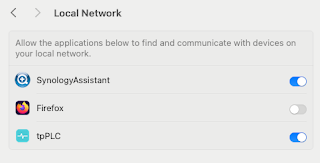
Note to self - Firefox and local connections

 Whilst trying to hit my NAS from Firefox on my Mac, I kept seeing errors such as:- Unable to connect Firefox can’t establish a connection t...