Showing posts sorted by date for query urbancode. Sort by relevance Show all posts

Tuesday, 3 November 2020

UrbanCode Deploy - Using the query symbol to reference properties

 I was looking at an existing UrbanCode Deploy (UCD) element, known as a Component, and noticed that it made reference to an existing Property, but also included a query symbol ( ? ) within the configuration.

So, as an example, rather than referencing an existing Property via the conventional ( for UCD ) syntax of: -

${p:userName}

it instead referenced it using a query: -

${p?:userName}

which confused me initially.

Given that I am using UCD 6.2.7, I checked the documentation: -


Use the ? syntax if you are not sure about a property name:

${p?:propertyName}

This syntax returns a blank if the property is not found, and avoids the undefined property error.

Which is useful to know ....

Monday, 2 November 2020

IBM UrbanCode Deploy - it's been a while ...

 For my day job, I'm using IBM (HCL) UrbanCode Deploy (UCD) to manage the lifecycle of some containers on an IBM Z box.

It's been a while since last I tinkered with UCD, as per my previous posts ....

So I wanted to quickly prototype what I was intending to build, without risking breaking our shared UCD platform.

And, of course, I work with Docker and Kubernetes on a daily basis ...

So ...  we have UCD on Docker ...

IBM UrbanCode Deploy Server trial

UrbanCode Deploy Agent

UrbanCode Deploy Relay Image

Having pulled the UCD Server image to one of my Virtual Servers: -

docker pull ibmcom/ucds

I followed the instructions to run a container: -

docker run -d -p 8443:8443 -p 7918:7918 -p 8080:8080 -t ibmcom/ucds:latest

and then ran docker ps -a to check the running container: -

CONTAINER ID        IMAGE                COMMAND                  CREATED             STATUS              PORTS                                                                    NAMES

e2d9fa725da7        ibmcom/ucds:latest   "/tmp/entrypoint-ibm…"   3 seconds ago       Up 3 seconds        0.0.0.0:7918->7918/tcp, 0.0.0.0:8080->8080/tcp, 0.0.0.0:8443->8443/tcp   crazy_euclid

However, when I checked the container logs: -

docker logs crazy_euclid

Installing IBM UrbanCode Deploy...
Started building ucds container image at Mon Nov  2 16:15:44 UTC 2020.
unzip -q /tmp/ibm-ucd-6.2.7.1.960481.zip -d /tmp
[Database] Configuring Derby
Completed preparing ucds install files at Mon Nov  2 16:15:53 UTC 2020.
Enter the directory of the server to upgrade(leave blank for installing to a clean directory).
root@virtualserver01:~# docker logs crazy_euclid
Installing IBM UrbanCode Deploy...
Started building ucds container image at Mon Nov  2 16:15:44 UTC 2020.
unzip -q /tmp/ibm-ucd-6.2.7.1.960481.zip -d /tmp
[Database] Configuring Derby
Completed preparing ucds install files at Mon Nov  2 16:15:53 UTC 2020.
Enter the directory of the server to upgrade(leave blank for installing to a clean directory).

which is a bit of a pain ....

Given that the container is running as a "daemon", how can one complete the obviously interactive installation ?

Thankfully, there's a GitHub repo: -


with an issue ( albeit one raised 2.5 years ago !! ) : -


which says, in part: -

Same problem.
I created the container with --interactive.
You can run it attached or attach to it later on and just give the required input.

Works for me that way :)

Therefore, I stopped: -

docker stop crazy_euclid

and removed: -

docker rm crazy_euclid

the previous container, and ran it in interactive mode: -

docker run -it -p 8443:8443 -p 7918:7918 -p 8080:8080 -t ibmcom/ucds:latest

Installing IBM UrbanCode Deploy...
Started building ucds container image at Mon Nov  2 16:20:18 UTC 2020.
unzip -q /tmp/ibm-ucd-6.2.7.1.960481.zip -d /tmp
[Database] Configuring Derby
Completed preparing ucds install files at Mon Nov  2 16:20:27 UTC 2020.
Enter the directory of the server to upgrade(leave blank for installing to a clean directory).

Enter the home directory for the JRE/JDK that the new server or already installed server uses. Default [/opt/ibm/java/jre]:

Buildfile: install.with.groovy.xml
    [mkdir] Created dir: /tmp/ibm-ucd-install/compiled

version-check:

compile:
  [groovyc] Compiling 4 source files to /tmp/ibm-ucd-install/compiled
     [copy] Copying 20 files to /tmp/ibm-ucd-install/compiled

install:
    [unzip] Expanding: /tmp/ibm-ucd-install/conf.zip into /tmp/install-1035477236729911138.tmp
     [echo] Found sub-installer UCDeployInstaller.groovy
...

and followed the prompts ...

Once I'd done this, I used [cmd] [c] to terminate the running container, validated the container had stopped: -

docker ps -a

CONTAINER ID        IMAGE                COMMAND                  CREATED             STATUS                       PORTS               NAMES
f11f5d93b304        ibmcom/ucds:latest   "/tmp/entrypoint-ibm…"   56 minutes ago      Exited (130) 2 minutes ago                       stoic_hopper

and then started the container, this time as a daemon: -

docker start stoic_hopper

and monitored the logs: -

docker logs stoic_hopper -f

...
2020-11-02 17:17:48,849 UTC INFO  main com.urbancode.ds.UDeployServer - MultiServer? : false
2020-11-02 17:17:48,857 UTC INFO  main com.urbancode.ds.UDeployServer - External URL: https://ucd-server:8443
2020-11-02 17:17:48,858 UTC INFO  main com.urbancode.ds.UDeployServer - External User URL: https://ucd-server:8443
2020-11-02 17:17:48,865 UTC INFO  main com.urbancode.ds.UDeployServer - Server Broker ID: server-4Gr1NyFx1VO84tSBD8At
2020-11-02 17:17:48,866 UTC INFO  main com.urbancode.ds.UDeployServer - Server Unique ID: 2c1c1469-7291-49c6-9b06-9b06a5c72e44
2020-11-02 17:17:48,867 UTC INFO  main com.urbancode.ds.UDeployServer - JDBC URL: jdbc:derby://localhost:11377/data
2020-11-02 17:17:48,946 UTC INFO  main com.urbancode.ds.UDeployServer - Database User name: ibm_ucd
2020-11-02 17:17:48,948 UTC INFO  main com.urbancode.ds.UDeployServer - DBMS name: Apache Derby
2020-11-02 17:17:48,950 UTC INFO  main com.urbancode.ds.UDeployServer - DBMS version: 10.8.3.1 - (1476465)
2020-11-02 17:17:48,954 UTC INFO  main com.urbancode.ds.UDeployServer - Database Driver name: Apache Derby Network Client JDBC Driver
2020-11-02 17:17:48,956 UTC INFO  main com.urbancode.ds.UDeployServer - Database Driver version: 10.8.3.1 - (1476465)
2020-11-02 17:17:48,958 UTC INFO  main com.urbancode.ds.UDeployServer - === End Diagnostic Info ===
2020-11-02 17:17:48,960 UTC INFO  main com.urbancode.ds.UDeployServer - IBM UrbanCode Deploy server version 6.2.7.1.960481 started.

and now I'm good to go ....

Friday, 5 June 2020

Demo: Z DevOps using Git and Jenkins pipeline - 17 June 2020

The objective of this session is to demonstrate  the power of collaborative development and delivery enabled by the IBM Z for DevOps  solutions. Application teams can learn how they can  modernize their application portfolio using  modern technology and tools. We will focus on code and build, automate unit testing and deploy. Production teams can learn how they can extend and automate their existing build and deployment solutions for enterprise applications.
 
This session will demonstrate how IBM Z DevOps and open source tools like Git and Jenkins, progress the continuous integration, continuous testing and continuous delivery in the z/OS operating environment.
 
Our scenario consists of a "broken" COBOL/CICS/DB2 application. The developer will use IBM DevOps tools to locate and identify the faulty code, make the appropriate fixes and compile/link/bind using a new build automation tool (DBB) that integrates with Git and Jenkins pipeline on z/OS. Once the code is fixed, the developer will push the changes to a Git repository.

In order to demonstrate continuous delivery capabilities, this session will showcase a Jenkins pipeline integrated with IBM tools for the build process, unit testing(using the new zUnit functionality), and deployment of code to a CICS environment (using UrbanCode Deploy).
While our scenario uses a COBOL/CICS/DB2 program as an example, the process is similar to other environments or languages (such as Batch, IMS, or PL/1

Thursday, 7 February 2019

New day, new job - more of the same, but in a VERY good way

Well, technically I started my new job yesterday - 6 February.

Well, to be more accurate, I've been morphing into my new job for the past few weeks.

Well, to be even more accurate, I'm still doing a bit of my old job, whilst also doing my new job.

Is that 100% clear ?

Anyway, after 10 years in IBM Software Services ( under different organisational names ) and nearly 20 years in IBM Software Group ( again under different organisations, most recently IBM Cloud ), I've changed roles.

From an IBM organisational perspective, I've gone back to my roots, as I'm now part of IBM Systems Group, which I joined way back in 1992 when I was working in AS/400 technical support.

Since then, I've worked with all of IBM's server range, including the since departed System X ( Intel-based X86 products moved to Lenovo back in 2014 ) .....

With one exception.

Whilst I've worked on AS/400 ( became iSeries, became System i, now IBM I ) and RS/6000 ( became pSeries, became System p, now IBM Power ) and the aforementioned PS/2 ( became Netfinity, System x and then departed ), I've never properly worked on S/390 ( which became zSeries, System z and now IBM Z ).

Well, I was an end-user of PROFS, EHONE, RETAIN etc. but that's not quite the same thing.

Apart from moving organisations, I've also moved into the IBM Development organisation for the first time ever. Having worked in support, ISV/partner enablement, technical sales and then software services, this is the first time I can honestly say .... I'm an IBM Developer.

Well, now I am.

Bringing the two together is where I'm at.

So after that lengthy introduction, what am I doing ?

Well, I've joined the IBM Hyper Protect Containers team, based in Hursley Park, also known as Z-as-a-Service (ZaaS) bringing Kubernetes to the IBM mainframe ( or vice versa ).

In the main, this means that I'm hands-on and knee-deep in coding, Agile and Design Thinking and test-driven development. It means that I'm going to be learning learning learning ...

Right now, I'm living in macOS Terminal, with SSH sessions, vi/sed/awk/grep, Bash scripting and, of course, Linux, Docker and Kubernetes.

So no change there then.

If you read my posts over the past few years, guess what I've been doing ... much the same, albeit more focused on the Intel x86-64 platforms.

I'm also getting to grips with GitHub, Jenkins, UrbanCode Deploy etc. which again builds upon what I've done before.

So, as ever throughout my long career ( in my 34th year ), it's career by evolution, taking what I know, and growing it .....

Or, to use my most common catch-phrase, #LifeIsGood

Watch this space.... more to follow

Tuesday, 27 March 2018

Rational Key License Server - Some tinkering

In order to license my UrbanCode Deploy (UCD) box, I needed to: -

(a) generate a license key for UCD, using the Rational License Key Centre: -


(b) build/configure a Rational License Key Server (RLKS)

Without this, UCD rightly complains about being unlicensed: -


I built RLKS on a spare RHEL 7 box, as follows: -

Download

CIPQ0ML Rational License Key Server 8.1.4 for Linux x86 Multilingual

Validate

ls -al /tmp/RLKS_8.1.4_FOR_LINUX_X86_ML.zip 

-rw-r--r--. 1 root root 271406147 Mar 27 14:06 /tmp/RLKS_8.1.4_FOR_LINUX_X86_ML.zip

Extract

unzip /tmp/RLKS_8.1.4_FOR_LINUX_X86_ML.zip -d /tmp

Install IIM

/tmp/RLKSSERVER_SETUP_LINUX_X86/disk1/InstallerImage_linux_gtk_x86_64/installc -acceptLicense

Installed com.ibm.cic.agent_1.6.2000.20130301_2248 to the /opt/IBM/InstallationManager/eclipse directory.

See what's available to install

/opt/IBM/InstallationManager/eclipse/tools/imcl listAvailablePackages -repositories /tmp/RLKSSERVER_SETUP_LINUX_X86/disk1/

com.ibm.rational.license.key.server.linux.x86_8.1.4000.20130823_0513

Install RLKS

/opt/IBM/InstallationManager/eclipse/tools/imcl install com.ibm.rational.license.key.server.linux.x86_8.1.4000.20130823_0513 -repositories /tmp/RLKSSERVER_SETUP_LINUX_X86/disk1/ -acceptLicense

Installed com.ibm.rational.license.key.server.linux.x86_8.1.4000.20130823_0513 to the /opt/IBM/RationalRLKS directory.

Attempt to Start

/opt/IBM/RationalRLKS/config/start_lmgrd 

Starting IBM Rational License Key Server.

Check Logs

cat /opt/IBM/RationalRLKS/logs/lmgrd.log 

/opt/IBM/RationalRLKS/config/start_lmgrd: /opt/IBM/RationalRLKS/bin/lmgrd: /lib/ld-lsb.so.3: bad ELF interpreter: No such file or directory

Check Missing Dependency

yum provides /lib/ld-lsb.so.3

Loaded plugins: langpacks, product-id, search-disabled-repos, subscription-manager
...
redhat-lsb-core-4.1-27.el7.i686 : LSB Core module support
Repo        : server
Matched from:
Filename    : /lib/ld-lsb.so.3

…

Install Missing Dependency

yum  install -y redhat-lsb-core-4.1-27.el7.i686

…
Installed:
  redhat-lsb-core.i686 0:4.1-27.el7                                                                                                                                                                                                                                           

Dependency Installed:
  cups-client.x86_64 1:1.6.3-29.el7     cups-libs.x86_64 1:1.6.3-29.el7     m4.x86_64 0:1.4.16-10.el7      ncurses-libs.i686 0:5.9-14.20130511.el7_4     nspr.i686 0:4.13.1-1.0.el7_3     nss.i686 0:3.28.4-15.el7_4                       nss-pem.i686 0:1.0.3-4.el7    
  nss-softokn.i686 0:3.28.3-8.el7_4     nss-util.i686 0:3.28.4-3.el7        patch.x86_64 0:2.7.1-8.el7     psmisc.x86_64 0:22.20-15.el7                  readline.i686 0:6.2-10.el7       redhat-lsb-submod-security.i686 0:4.1-27.el7     spax.x86_64 0:1.5.2-13.el7    
  sqlite.i686 0:3.7.17-8.el7           

Complete!

Removed temporary configuration

…

Attempt to Start

/opt/IBM/RationalRLKS/config/start_lmgrd 

Starting IBM Rational License Key Server.

Check Logs

cat /opt/IBM/RationalRLKS/logs/lmgrd.log 

14:49:58 (lmgrd) -----------------------------------------------
14:49:58 (lmgrd)   Please Note:
14:49:58 (lmgrd) 
14:49:58 (lmgrd)   This log is intended for debug purposes only.
14:49:58 (lmgrd)   In order to capture accurate license
14:49:58 (lmgrd)   usage data into an organized repository,
14:49:58 (lmgrd)   please enable report logging. Use Flexera Software, Inc.'s
14:49:58 (lmgrd)   software license administration  solution,
14:49:58 (lmgrd)   FLEXnet Manager, to  readily gain visibility
14:49:58 (lmgrd)   into license usage data and to create
14:49:58 (lmgrd)   insightful reports on critical information like
14:49:58 (lmgrd)   license availability and usage. FLEXnet Manager
14:49:58 (lmgrd)   can be fully automated to run these reports on
14:49:58 (lmgrd)   schedule and can be used to track license
14:49:58 (lmgrd)   servers and usage across a heterogeneous
14:49:58 (lmgrd)   network of servers including Windows NT, Linux
14:49:58 (lmgrd)   and UNIX. Contact Flexera Software, Inc. at
14:49:58 (lmgrd)   www.flexerasoftware.com for more details on how to
14:49:58 (lmgrd)   obtain an evaluation copy of FLEXnet Manager
14:49:58 (lmgrd)   for your enterprise.
14:49:58 (lmgrd) 
14:49:58 (lmgrd) -----------------------------------------------
14:49:58 (lmgrd) 
14:49:58 (lmgrd) 
14:49:58 (lmgrd) The license server manager (lmgrd) running as root:
14:49:58 (lmgrd)  This is a potential security problem
14:49:58 (lmgrd)  and is not recommended.
14:49:58 (lmgrd) license manager: can't initialize:No SERVER lines in license file.
14:49:58 (lmgrd) License Path: "/opt/IBM/RationalRLKS/config/server_license.lic"
14:49:58 (lmgrd) FLEXnet Licensing error:-13,66
14:49:58 (lmgrd) For further information, refer to the FLEXnet Licensing documentation,available at "www.flexerasoftware.com".

Update License

vi /opt/IBM/RationalRLKS/config/server_license.lic

SERVER rlks.uk.ibm.com INTERNET=192.168.153.132 27000
VENDOR ibmratl
VENDOR telelogic
VENDOR rational
INCREMENT IBMUCD_PVU ibmratl 6.01 30-jan-2019 1 ISSUED=27-Mar-2018 \
NOTICE="Sales Order Number:ARGLE BARGLE GLOOP" \
SIGN="1056 0BA6 C70C A6E3 19BA 3876 575B EC21 D41E 0895 1F53 \
CAF4 8D72 4B75 24E7"

( note that this is NOT my license ! )

Attempt to Start

/opt/IBM/RationalRLKS/config/start_lmgrd 

Starting IBM Rational License Key Server.

Check Logs

cat /opt/IBM/RationalRLKS/logs/lmgrd.log 

14:57:52 (lmgrd) -----------------------------------------------
14:57:52 (lmgrd)   Please Note:
14:57:52 (lmgrd) 
14:57:52 (lmgrd)   This log is intended for debug purposes only.
14:57:52 (lmgrd)   In order to capture accurate license
14:57:52 (lmgrd)   usage data into an organized repository,
14:57:52 (lmgrd)   please enable report logging. Use Flexera Software, Inc.'s
14:57:52 (lmgrd)   software license administration  solution,
14:57:52 (lmgrd)   FLEXnet Manager, to  readily gain visibility
14:57:52 (lmgrd)   into license usage data and to create
14:57:52 (lmgrd)   insightful reports on critical information like
14:57:52 (lmgrd)   license availability and usage. FLEXnet Manager
14:57:52 (lmgrd)   can be fully automated to run these reports on
14:57:52 (lmgrd)   schedule and can be used to track license
14:57:52 (lmgrd)   servers and usage across a heterogeneous
14:57:52 (lmgrd)   network of servers including Windows NT, Linux
14:57:52 (lmgrd)   and UNIX. Contact Flexera Software, Inc. at
14:57:52 (lmgrd)   www.flexerasoftware.com for more details on how to
14:57:52 (lmgrd)   obtain an evaluation copy of FLEXnet Manager
14:57:52 (lmgrd)   for your enterprise.
14:57:52 (lmgrd) 
14:57:52 (lmgrd) -----------------------------------------------
14:57:52 (lmgrd) 
14:57:52 (lmgrd) 
14:57:52 (lmgrd) The license server manager (lmgrd) running as root:
14:57:52 (lmgrd)  This is a potential security problem
14:57:52 (lmgrd)  and is not recommended.
14:57:52 (lmgrd) FLEXnet Licensing (v11.10.0.3 build 96543 i86_lsb) started on rlks.uk.ibm.com (linux) (3/27/2018)
14:57:52 (lmgrd) Copyright (c) 1988-2011 Flexera Software, Inc. All Rights Reserved.
14:57:52 (lmgrd) US Patents 5,390,297 and 5,671,412.
14:57:52 (lmgrd) World Wide Web:  http://www.flexerasoftware.com
14:57:52 (lmgrd) License file(s): /opt/IBM/RationalRLKS/config/server_license.lic /opt/IBM/RationalRLKS/config/rational_server_temp.dat /opt/IBM/RationalRLKS/config/rational_server_perm.dat
14:57:52 (lmgrd) lmgrd tcp-port 27000
14:57:52 (lmgrd) Starting vendor daemons ... 
14:57:52 (lmgrd) Started ibmratl (internet tcp_port 41793 pid 29310)
14:57:52 (lmgrd) Started telelogic (internet tcp_port 43290 pid 29311)
14:57:52 (lmgrd) Started rational (internet tcp_port 40974 pid 29312)
14:57:52 (lmgrd) license daemon: execute process failed: (/opt/IBM/RationalRLKS/bin/telelogic) -T rlks.uk.ibm.com 11.10 3 -c /opt/IBM/RationalRLKS/config/server_license.lic:/opt/IBM/RationalRLKS/config/rational_server_temp.dat:/opt/IBM/RationalRLKS/config/rational_server_perm.dat
14:57:52 (lmgrd) license daemon: system error code: No such file or directory
14:57:52 (lmgrd) telelogic exited with status 45 (Child cannot exec requested server)
14:57:52 (lmgrd) Please correct problem and restart daemons
14:57:52 (lmgrd) license daemon: execute process failed: (/opt/IBM/RationalRLKS/bin/rational) -T rlks.uk.ibm.com 11.10 3 -c /opt/IBM/RationalRLKS/config/server_license.lic:/opt/IBM/RationalRLKS/config/rational_server_temp.dat:/opt/IBM/RationalRLKS/config/rational_server_perm.dat
14:57:52 (lmgrd) license daemon: system error code: No such file or directory
14:57:52 (lmgrd) rational exited with status 45 (Child cannot exec requested server)
14:57:52 (lmgrd) Please correct problem and restart daemons
14:57:52 (ibmratl) FLEXnet Licensing version v11.10.0.3 build 96543 i86_lsb
14:57:52 (ibmratl) Server started on rlks.uk.ibm.com for: IBMUCD_PVU
14:57:52 (ibmratl) EXTERNAL FILTERS are OFF
14:57:52 (lmgrd) ibmratl using TCP-port 41793
14:57:52 (ibmratl) Serving features for the following vendor names:
 ibmratl  rational  tlog_state  telelogic  tlog_rhaps  

Validate Listener

netstat -aon|grep 27000

tcp        0      0 192.168.153.132:56492   192.168.153.132:27000   TIME_WAIT   timewait (17.99/0/0)
tcp6       0      0 :::27000                :::*                    LISTEN      off (0.00/0/0)
tcp6       0      0 ::1:27000               ::1:43888               ESTABLISHED keepalive (7166.21/0/0)
tcp6       0      0 ::1:43888               ::1:27000               ESTABLISHED off (0.00/0/0)


Test connectivity from UCD to RLKS

telnet 192.168.153.132 27000

Trying 192.168.153.132...
telnet: connect to address 192.168.153.132: No route to host

Disable firewall on RLKS box

service firewalld stop

Redirecting to /bin/systemctl stop firewalld.service

Test connectivity from UCD to RLKS

telnet 192.168.153.132 27000

Trying 192.168.153.132...
Connected to 192.168.153.132.
Escape character is '^]'.

Connection closed by foreign host.


Add RLKS information to UCD


And that's the deal :-)


IBM UrbanCode Deploy and WebSphere Liberty Profile - Now playing nicely

A few months back, I'd experienced an issue using UrbanCode Deploy (UCD) to download/deploy WebSphere Liberty Profile (WLP).

The TL;DR; of the issue was that the UCD Plugin that's provided by the WLP team to handle the installation failed to preserve the executable permissions of the WLP binaries.

In other words, the Plugin would download the requisite WLP JAR/ZIP file to the target server ( upon which he UCD Agent is running ), expand it into a directory such as /opt/ibm/WebSphere/Liberty/wlp BUT not preserve the executable permissions.

This meant that one wasn't then able to actually use WLP, without changing the permissions ( via chmod +x ).

Thankfully, this has now been fixed with the latest version ( 18 ) of the WLP Plugin: -


I wrote about this more fully here: -


Again, YAY!

For the record, this is the version that I had been using: -

17.943072

WebSphereLiberty-17.943072.zip

and this is what I have now: -

18.974811

Tuesday, 20 February 2018

Enhance your Kubernetes Experience with UrbanCode Deploy

Saw this on Slack today: -

Kubernetes is a powerful platform for working with application containers. However, as application complexity increases and containers change and evolve, managing your application becomes challenging. UrbanCode Deploy works with Kubernetes to simplify your application deployment. With UrbanCode Deploy, you may easily change the versions of the containers used in your application without the need of editing a YAML file or using the command line. You gain a visual representation of which container versions are deployed where. You may easily roll back container versions in your application without editing a YAML file or using the command line. You may even alter properties of your application by using UrbanCode Deploy with Kubernetes.

In this article, we will go through a simple tutorial showing how UrbanCode Deploy enhances your Kubernetes experience.

Friday, 29 December 2017

IBM UrbanCode Deploy - Commanding the Line

As ever, a Work-in-Progress, as I seek to understand the What, the Why and the How of IBM UrbanCode Deploy (UCD).

This time, it's getting to grips with the command-line, which leverages the out-of-the-box UCD REST interface.

This is the source from which I am working; -


and here I'm creating a new Version ( to be used by a Component Process ) : -

/opt/ibm/UCD/agent/opt/udclient/udclient -username admin -password passw0rd -weburl https://ucd.uk.ibm.com:8443 createVersion -component WebSphereLibertyProfile -name 1.0

and then uploading a file to that newly created version: -

/opt/ibm/UCD/agent/opt/udclient/udclient -username admin -password passw0rd -weburl https://ucd.uk.ibm.com:8443 addVersionFiles -component WebSphereLibertyProfile -version 1.0 -base /wlpsource/5/

The latter command looks within the directory /wlpsource/5 and uploads EVERYTHING it finds, in this instance a single JAR file: -

wlp-nd-all-17.0.0.4.jar

I'm now tinkering with using the same REST API to actually invoke an Application Process, using this JSON: -

~/runProcess.json

{
  "application": "Install WLP",
  "description": "Requesting deployment",
  "applicationProcess": "Install WLP",
  "environment": "Development",
  "onlyChanged": "false"
  },
  "versions": [
    {
      "version": "1.0",
      "component": "WebSphereLibertyProfile"
    }
  ]
}


and this command: -

/opt/ibm/UCD/agent/opt/udclient/udclient -username admin -password passw0rd -weburl https://ucd.uk.ibm.com:8443 requestApplicationProcess ~/runProcess.json

It's not working thus far …. even though it returns a JSON response e.g. 

{"requestId": "160a34da-b3e6-fd1d-de6e-1069f89f0461"}

etc.

the GUI reports "No Version Selected" : -


but that's tomorrow's problem :-)

IBM UrbanCode Deploy - Syntax FTW

As per previous posts, I'm tinkering with IBM UrbanCode Deploy : -


This time around, I'm using UCD to install WebSphere Liberty Profile (WLP), using the appropriately named WebSphere Liberty Plugin: -

IBM WebSphere Liberty

One of the steps provided by this Plugin is Install Server Archive which expands a JAR or ZIP file containing the WLP codebase.

This step takes a few mandatory ( indicated below with a red asterisk ) including Source File: -


I specify the Source File property at the Application level: -


but saw this: -

…
  license=true
  source=wlp-webProfile7-17.0.0.3.zip

… 
  wlpHome=/opt/ibm/WebSphere/Liberty/
  wlpUserDir=

…
Unzipping server archive in : /opt/ibm/WebSphere/Liberty
Caught: : src '/opt/ibm/UCD/agent/var/work/WLP/wlp-webProfile7-17.0.0.3.zip
' doesn't exist.
: src '/opt/ibm/UCD/agent/var/work/WLP/wlp-webProfile7-17.0.0.3.zip
' doesn't exist.
at org.apache.tools.ant.taskdefs.Expand.execute(Expand.java:128)
at org.apache.tools.ant.UnknownElement.execute(UnknownElement.java:291)
at org.apache.tools.ant.dispatch.DispatchUtils.execute(DispatchUtils.java:106)
at com.urbancode.air.plugin.websphereliberty.WebSphereLibertyHelper.installServerArchive(WebSphereLibertyHelper.groovy:194)
at com.urbancode.air.plugin.websphereliberty.WebSphereLibertyHelper$installServerArchive.call(Unknown Source)
at installServerArchive.run(installServerArchive.groovy:25)

 
when I executed the Component Process.

One of my colleagues immediately spotted the flaw: -

…
Caught: : src '/opt/ibm/UCD/agent/var/work/WLP/wlp-webProfile7-17.0.0.3.zip
' doesn't exist.

…

The clue is that there's a space between .zip and the trailing apostrophe.

As he rightly suggested, I'd inserted a Carriage Return / Line Feed ( CR/LF ) in the Application Property.

Once I edited this from: -


to: -


all was well: -


Wednesday, 27 December 2017

IBM UrbanCode Deploy - Error Creating New Version: The provided base is not a directory

I saw this today, whilst creating some new Application Components, needed to install IBM Installation Manager and IBM BPM: -

Error Creating New Version: The provided base is not a directory: /source
java.io.IOException: The provided base is not a directory: /source
at com.urbancode.air.plugin.command.ImportVersion.execute(ImportVersion.java:119)
at sun.reflect.NativeMethodAccessorImpl.invoke0(Native Method)
at sun.reflect.NativeMethodAccessorImpl.invoke(NativeMethodAccessorImpl.java:95)
at sun.reflect.DelegatingMethodAccessorImpl.invoke(DelegatingMethodAccessorImpl.java:55)
at java.lang.reflect.Method.invoke(Method.java:508)
at com.urbancode.air.plugin.Main.execute(Main.java:113)
at com.urbancode.air.plugin.Main.main(Main.java:47)

It took me a while before I smacked myself on the forehead ….

Yes, you've guessed it, I'd created the /source directory on …. the box upon which the Agent is installed rather than the box upon which the Server is running.

Obviously this is a mistake - the Agent "phones home" to the Server to get its configuration etc. including required versioned files such as response files etc.

Can you say "Doh" ? I bet you can ….

IBM UrbanCode Deploy - Upgrading - Don't forget the database

So I'm upgrading my UCD installation, from 6.2.6.1.940532 to 6.2.7.0.951830, using the provided script install-server.sh as per this: -

….
     [echo] Installing IBM UrbanCode Deploy version 6.2.7.0.951830
     [echo] A previous version (6.2.6.1.940532) exists in the specified directory. Do you want to upgrade the currently installed version? Y,n [Default Y]
y
     [echo] 
     [echo] Installing IBM UrbanCode Deploy to: /opt/ibm/UCD/server
     [echo] JVM Version detected: 1.8.0
     [echo] JAVA_HOME: /opt/ibm/Java/jre
     [echo] NOTICE: Upgrading the server while there are processes currently running is not supported. Before proceeding with an upgrade, verify that there are no running processes on the Current Activity page.
     [echo] 
     [echo] Server upgrades cannot be rolled back. Please ensure that you have backed up the server's database and filesystem before proceeding. (press enter to continue)

   [delete] Deleting directory /opt/ibm/UCD/server/opt/tomcat/webapps/ROOT/static
     [copy] Copying 2 files to /mnt/ibm-ucd-install/bin/server
     [copy] Copying 168 files to /mnt/ibm-ucd-install/.tmp-old-lib
  [upgrade] Adding upgrade file for processing: /mnt/ibm-ucd-install/database/deploy/always/all/always_sql.xml
java.lang.Exception: Error trying to cancel currently running processes
at sun.reflect.NativeConstructorAccessorImpl.newInstance0(Native Method)
at sun.reflect.NativeConstructorAccessorImpl.newInstance(NativeConstructorAccessorImpl.java:88)
at sun.reflect.DelegatingConstructorAccessorImpl.newInstance(DelegatingConstructorAccessorImpl.java:57)
…
Caused by: : : com.ibm.db2.jcc.am.DisconnectNonTransientConnectionException: [jcc][t4][2043][11550][3.72.30] Exception java.net.ConnectException: Error opening socket to server ucd.uk.ibm.com/127.0.0.1 on port 60,006 with message: Connection refused. ERRORCODE=-4499, SQLSTATE=08001
…
Caused by: : com.ibm.db2.jcc.am.DisconnectNonTransientConnectionException: [jcc][t4][2043][11550][3.72.30] Exception java.net.ConnectException: Error opening socket to server ucd.uk.ibm.com/127.0.0.1 on port 60,006 with message: Connection refused. ERRORCODE=-4499, SQLSTATE=08001
…

Guess what I forgot to do ?

Yep, having rebooted this VM, I forgot to start DB2: -

su - db2inst1
db2start

Having done that, quelle surprise, the upgrade just worked …

...
[propertyfile] Updating property file: /opt/ibm/UCD/server/conf/installed.version
     [echo] After starting the server, you may access the web UI by pointing your web-browser at
     [echo] https://ucd.uk.ibm.com:8443 
     [echo] Installer Complete. (press return to exit installer)

   [delete] Deleting directory /tmp/install-6103865522074515176.tmp
     [copy] Copying 1 file to /opt/ibm/UCD/server/var/install-log

BUILD SUCCESSFUL
Total time: 3 minutes 1 second


Wednesday, 29 November 2017

IBM UrbanCode Deploy - Where do your agents come from ?

I had a bit of a brain fade today, trying to work out from where to download the Agent code for IBM UrbanCode Deploy (UCD).

I'm using the latest UCD 6.2.6, and have the server up-and-running.

Now I want to pop an agent onto a target box ….

I looked at the downloads on the IBM website ( as an IBMer, we have an internal equivalent of Passport Advantage ), so I was looking at this: -

IBM UrbanCode Deploy 6.2.6 Multiplatform Multilingual eAssembly (CJ2BYML)

which includes: -

IBM UrbanCode Deploy 6.2.6 Multiplatform Multilingual (CNM8JML )

which I'd used to install the UCD Server: -

and this: -

IBM UrbanCode Cloud Agent Packages 6.2.6 Multiplatform Multilingual (CNM8PML )

about which I wasn't so sure ( apart from that it's a 2 GB download ! )

Thankfully, the IBM Knowledge Centre came to my rescue: -


which said, in part: -


so I hit up my UCD Server: -


to get this: -

I grabbed the URL of the Agent: -


and pulled this onto the box: -


and installed the agent: -

/tmp/ibm-ucd-agent-install/install-agent.sh 

into: -

/opt/ibm/UCD/agent/

so that's all good then :-)

Wednesday, 28 June 2017

java.lang.OutOfMemoryError exception with IBM UrbanCode Deploy 6.2.4

I saw this: -

2017-06-28 14:26:54,909 ERROR https-jsse-nio-0.0.0.0-8443-exec-1 com.urbancode.commons.web.filter.ExceptionHandlingFilter - java.lang.OutOfMemoryError: Java heap space
java.lang.OutOfMemoryError: Java heap space

whilst importing a rather large component into IBM UrbanCode Deploy (UCD) 6.2.4: -

-rw-r--r--  1 hayd hayd  9098139652 Jun 28 11:13 bpmexport_artifacts5020774184330379773.zip

Thankfully, this IBM developerWorks Answers post: -

urbancode deploy server javaheapsize out of memory

has the answer; to increase the max heap: -

@kberg you can increase the java heap memory size by changing the default value of JAVA_OPTS -Xmx value within the $SERVER_HOME/bin/set_env file. The default size is set to 1024m.

I made the change: -

vi /opt/IBM/UCD624/bin/set_env

changing from: -

JAVA_OPTS="-Xmx4096m

to: -

JAVA_OPTS="-Xmx2048m

and restarted UCD: -

~/stopUCD.sh

~/startUCD.sh

We'll see how it goes ...

Monday, 31 October 2016

IBM Java 1.8 on Linux - Nice and Silent

I'm tinkering with IBM UrbanCode Deploy (UCD) 6.2.2 on a Linux box, and needed to get IBM Java installed before starting out.

Following this: -

this is what I did: -

vi ~/installer.properties 

INSTALLER_UI=silent 
USER_INSTALL_DIR=/opt/IBM/Java
LICENSE_ACCEPTED=TRUE


export _JAVA_OPTIONS="-Dlax.debug.level=3 -Dlax.debug.all=true"
export LAX_DEBUG=1
./ibm-java-sdk-8.0-3.12-x86_64-archive.bin -i silent -f installer.properties 1>console.txt 2>&1


which resulted in IBM Java being installed in /opt/IBM/Java 

I'm doing this as a non-root user, ucdadmin, so needed to ensure that that user had read/write access to /opt/IBM.

For the record, this is what I have in console.txt post-installation: -

...
Checking for POSIX df.
Found POSIX df.
Checking tail options...
Using tail -n 1.
True location of the self extractor: /home/ucdadmin/ibm-java-sdk-8.0-3.12-x86_64-archive.bin
Creating installer data directory: /tmp/install.dir.20561
Creating installer data directory: /tmp/install.dir.20561/InstallerData
…
Command.run(): /bin/sh:stdout [...Uninstaller Native Support is complete.]
Command.complete(): process completed with exit code: 0
Command.complete(): process '/bin/sh' complete

…

Finally, just to prove that Java is indeed installed: -

/opt/IBM/Java/bin/java -version

java version "1.8.0"
Java(TM) SE Runtime Environment (build pxa6480sr3fp12-20160919_01(SR3 FP12))
IBM J9 VM (build 2.8, JRE 1.8.0 Linux amd64-64 Compressed References 20160915_318796 (JIT enabled, AOT enabled)
J9VM - R28_Java8_SR3_20160915_0912_B318796
JIT  - tr.r14.java.green_20160818_122998
GC   - R28_Java8_SR3_20160915_0912_B318796_CMPRSS
J9CL - 20160915_318796)
JCL - 20160914_01 based on Oracle jdk8u101-b13

Friday, 2 September 2016

Book Review - Mastering Puppet Second Edition by Thomas Uphill

This is another in my infrequent series of book reviews, working in collaboration with the British Computer Society: -

Mastering Puppet Second Edition by Thomas Uphill

I'm currently investing some personal time in getting up-to-speed with some of the fundamental tools of Developer-Operations, aka DevOps, including Docker, UrbanCode Deploy, Git, OpenStack, Jenkins, Chef and, in this context, Puppet.

There are, of course, overlaps between some of these tools, so I was interested to get a better understanding of Puppet, in order to be able to position it in relation to other, similar tools.

This leads me onto the first part of my review; this book is definitely not for beginners - the title should make it clear, but this is aimed at a mastery of, rather than an introduction to, Puppet, which is a configuration management tool.

The book starts as it means to go on, diving straight into the detail of Puppet scalability, and continues to go deep and wide. Another clue is the length of the book, weighing in at nearly 650 pages, covering data hierarchies, storage, security, integration with Git, extensibility and troubleshooting.

Like a lot of Packt's publications, this is definitely something for the reference library - it's full of content, example code, complex integrations etc. and is something to which I will return as I continue to delve into Puppet and other related DevOps tooling.

So, in summary, as long as one appreciates that this book is aimed to achieving mastery, rather than an initial exploration, of Puppet, then this book is definitely worth adding to the virtual bookshelf.

In terms of a rating, I'd give this 8 out of 10.


For the record, BCS provided me with a free copy of this book, in order that I was able to read and review it.

Friday, 19 August 2016

IBM on Docker - My Next Thing

I'm looking at a new piece of discovery and self-development, so I'll be digging into Chef, Puppet, UrbanCode Deploy *AND* Docker 

So this will be required reading: -


TL;DR You can now take your Docker images for WebSphere Application Server Full and Liberty Profile into production and get support. We've provided some resources to build production Liberty images and made them available on WASdev GitHub.


IBM® Operational Decision Manager (ODM) application developers who are new to Docker might consider adding Docker to their development process. This tutorial shows how to build a Docker image for an IBM ODM Rule Execution Server and Decision Center that run on a WebSphere Liberty server. You also learn how to run the Rule Execution Server and Decision Center in a container from the Docker image. This content is part of the IBM Business Process Management Journal.

Watch this space

Wednesday, 8 June 2016

Webcast - Using IBM UrbanCode with IBM WebSphere to Accelerate Business Transformations

As found on Twitter today: -

Great news for WebSphere Application Server Administrators, IT Managers, Directors and anyone with challenges associated with deploying applications and configurations to WebSphere Application Server in its traditional version, Liberty or as a Service. IBM UrbanCode Deploy has WAS covered! IBM UrbanCode Deploy can reduce overall cycle times and accelerate time-to-test and time-to-market for clients. In this call, attendees will learn how to accelerate WAS deployments to cloud, optimize deployments everywhere, "keep the configuration in Synch", and how to take a manually configured environment (i.e. cell), capture all the configuration and easily reuse it. UrbanCode Deploy can even help you migrate from older to newer versions of WAS in a fraction of the time with UCD automation. Come learn from our experts how this combination is helping customers every day.

Thursday, 12 May 2016

IBM BPM Advanced 8.5.7 - CWLLG1356E: At attempt failed to get the current user context

We saw this exception today: -

CWLLG1356E: At attempt failed to get the current user context. com.lombardisoftware.client.delegate.BusinessDelegateException: ObjectId password for authorization validation is null

after an automated ( via UrbanCode Deploy ) build of IBM BPM Advanced 8.5.7 ( specifically a Process Center ).

This happened when we hit the Process Center login page ( https://bpmpc.uk.ibm.com/ProcessCenter ), whilst already logged in ( to the Deployment Manager ) as wasadmin.

I jumped to a conclusion …. which was the RIGHT conclusion … and wondered whether the automation process had "forgotten" to bootstrap the Process Server database ( BPMDB ).

Once I did this … manually: -

<snip>
Bootstrap AppCluster DB - as wasadmin

/opt/IBM/WebSphere/AppServer/profiles/PCDmgr01/bin/bootstrapProcessServerData.sh -clusterName AppCluster

Bootstraping data into cluster AppCluster and logging into /opt/IBM/WebSphere/AppServer/profiles/PCDmgr01/logs/bootstrapProcesServerData.AppCluster.log

WASX7357I: By request, this scripting client is not connected to any server process. Certain configuration and application operations will be available in local mode.
'BootstrapProcessServerData admin command completed successfully.....'

</snip>

Job's a good 'un.

Thursday, 22 October 2015

IBM UrbanCode Deploy - Increase security when impersonating other users

I found this via IBM developerWorks on Twitter: -


Save time with the User Impersonation feature in IBM UrbanCode Deploy

Use IBM UrbanCode Deploy's User Impersonation feature to facilitate deployment of more complex applications where specific features are managed under dedicated users and specific deployment steps need to be executed as these users.


Monday, 23 February 2015

IBM UrbanCode Deploy 6.1.1 - An Update

Thanks to various Tweets including this one: -

rationalsupport
http://t.co/HJ6kqREBC3 IBM UrbanCode Deploy 6.1.1.2 #rational
23/02/2015 12:25

I note that UrbanCode Deploy 6.1.1 now has a fix pack: -


Features

• Using the REST API, you can now create a Release in a single POST request — specifying team and lifecycle by name.

Performance Improvements

• Security page, application-team association tab is now much faster.
• Improved performance of environment reservation dialog on the release detail page.
• scheduled deployments all tab now loads much more quickly.
• Changes page loads faster

The link to the fix is here: -


available from IBM Fix Central.

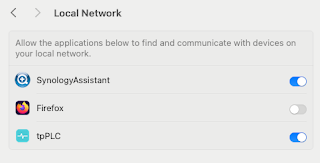
Note to self - Firefox and local connections

 Whilst trying to hit my NAS from Firefox on my Mac, I kept seeing errors such as:- Unable to connect Firefox can’t establish a connection t...